Using the gh Command in Claude Code on the Web
The Claude Code on the Web specifications are as of January 8, 2026. Some settings may become unnecessary once the gh command is installed by default.
2026/1/10
I’ve published a repository where you can configure the gh command. By adding the custom settings described in the repository and the following Hooks, you can execute it:
{
  "hooks": {
    "SessionStart": [
      {
        "hooks": [
          {
            "type": "command",
            "command": "bun x gh-setup-hooks",
            "timeout": 120
          }
        ]
      }
    ]
  }
}I’m Oikon. I usually play around with AI tools, especially Claude Code.
Previously, I wrote an article called Deep Dive into Claude Code on the Web Specifications. In it, I mentioned that the gh command was prohibited, but due to recent specification changes, gh was removed from disallowed_tools and can now be used.
This time, I’ll introduce the settings to enable gh in Claude Code on the Web.
What is Claude Code on the Web?
Claude Code on the Web is an environment where you can run Claude Code in your browser.
The appeal is that you can develop as long as you have a browser, even without a PC at hand. It works by cloning a GitHub repository and running Claude Code in a Sandbox environment. For detailed specifications, see my previous article:

By the way, as an aside, if you prefix a Claude Code prompt with &, you can send tasks from local Claude Code to on the Web.
Lifting the gh Command Ban
In the previous Claude Code on the Web, the gh command was explicitly prohibited. The startup option --disallowed-tools Bash(gh:*) was set, and the system prompt also included:
The GitHub CLI (
gh) is not available in this environment.
In other words, operations using GitHub CLI such as creating PRs and manipulating issues were completely impossible.
However, when I checked later (December 17, 2025), gh had been removed from disallowed_tools.
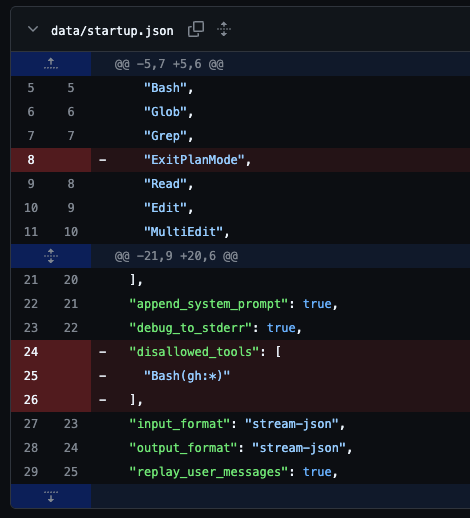
The image above shows the diff of data/startup.json. You can see that "disallowed_tools": ["Bash(gh:*)"] has been removed. This means the gh command itself is no longer prohibited. However, since gh is not installed by default, you can’t use it as-is.
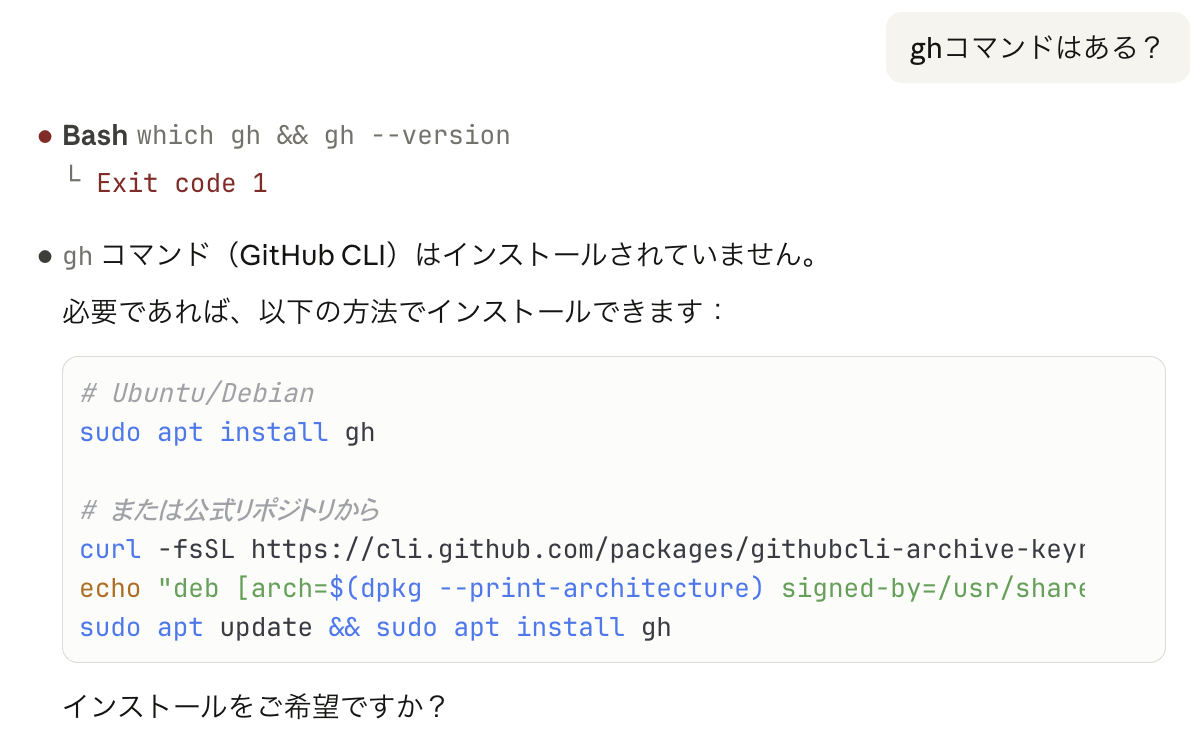
Requirements for Using gh
To use gh, you need the following two things:
- Set GITHUB_TOKEN in a custom environment
- Install
gh
Custom Environment Settings
In Claude Code on the Web, you can set environment variables using custom environments.
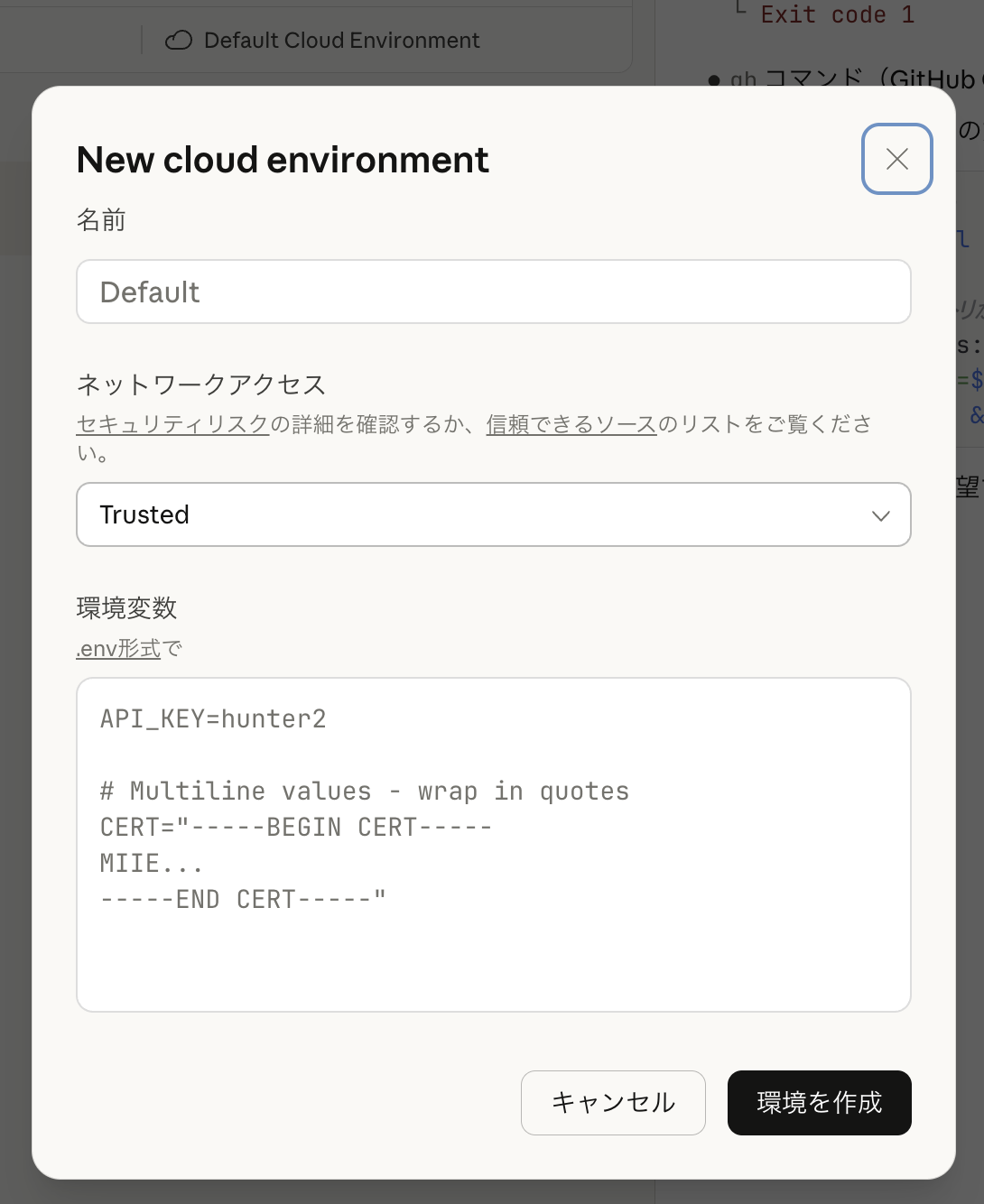
By setting GITHUB_TOKEN in .env format in the custom environment, you can pass the token needed for gh command authentication. Network access doesn’t need special configuration if “Full”, but if “Custom”, add the installation source (in this Script’s case, release-assets.githubusercontent.com).
Installing gh with sessionStartHooks
Once GITHUB_TOKEN is set in the environment, installing the gh command makes gh available. You can explicitly ask Claude Code to do it, but using sessionStartHooks allows automatic installation.
Create .claude/hooks/gh-setup.sh in the repository like this:
gh-setup.sh
#!/bin/bash
# This is sample script, and you should verify your own.
# SessionStart hook: GitHub CLI auto-installation for remote environments
# This script installs gh CLI when running in Claude Code on the Web
# following best practices: idempotent, fail-safe, proper logging

set -e

LOG_PREFIX="[gh-setup]"

log() {
    echo "$LOG_PREFIX $1" >&2
}

# Only run in remote Claude Code environment
if [ "$CLAUDE_CODE_REMOTE" != "true" ]; then
    log "Not a remote session, skipping gh setup"
    exit 0
fi

log "Remote session detected, checking gh CLI..."

# Check if gh is already available
if command -v gh &>/dev/null; then
    log "gh CLI already available: $(gh --version | head -1)"
    exit 0
fi

# Setup local bin directory
LOCAL_BIN="$HOME/.local/bin"
mkdir -p "$LOCAL_BIN"

# Check if gh exists in local bin
if [ -x "$LOCAL_BIN/gh" ]; then
    log "gh found in $LOCAL_BIN"
    # Ensure PATH includes local bin
    if [[ ":$PATH:" != *":$LOCAL_BIN:"* ]]; then
        export PATH="$LOCAL_BIN:$PATH"
        # Persist to CLAUDE_ENV_FILE if available
        if [ -n "$CLAUDE_ENV_FILE" ]; then
            echo "export PATH=\"$LOCAL_BIN:\$PATH\"" >> "$CLAUDE_ENV_FILE"
            log "PATH updated in CLAUDE_ENV_FILE"
        fi
    fi
    exit 0
fi

log "Installing gh CLI to $LOCAL_BIN..."

# Create temp directory for installation
TEMP_DIR=$(mktemp -d)
trap "rm -rf $TEMP_DIR" EXIT

# Detect architecture
ARCH=$(uname -m)
case "$ARCH" in
    x86_64)
        GH_ARCH="amd64"
        ;;
    aarch64|arm64)
        GH_ARCH="arm64"
        ;;
    *)
        log "Unsupported architecture: $ARCH"
        exit 0  # Fail-safe: exit 0 even on failure
        ;;
esac

# Download and install gh CLI
GH_VERSION="2.62.0"
GH_TARBALL="gh_${GH_VERSION}_linux_${GH_ARCH}.tar.gz"
GH_URL="https://github.com/cli/cli/releases/download/v${GH_VERSION}/${GH_TARBALL}"

log "Downloading gh v${GH_VERSION} for ${GH_ARCH}..."

if ! curl -sL "$GH_URL" -o "$TEMP_DIR/$GH_TARBALL"; then
    log "Failed to download gh CLI"
    exit 0  # Fail-safe
fi

log "Extracting..."
if ! tar -xzf "$TEMP_DIR/$GH_TARBALL" -C "$TEMP_DIR"; then
    log "Failed to extract gh CLI"
    exit 0  # Fail-safe
fi

# Move binary to local bin
if ! mv "$TEMP_DIR/gh_${GH_VERSION}_linux_${GH_ARCH}/bin/gh" "$LOCAL_BIN/gh"; then
    log "Failed to install gh CLI"
    exit 0  # Fail-safe
fi

chmod +x "$LOCAL_BIN/gh"

# Update PATH
export PATH="$LOCAL_BIN:$PATH"

# Persist PATH to CLAUDE_ENV_FILE if available
if [ -n "$CLAUDE_ENV_FILE" ]; then
    echo "export PATH=\"$LOCAL_BIN:\$PATH\"" >> "$CLAUDE_ENV_FILE"
    log "PATH persisted to CLAUDE_ENV_FILE"
fi

log "gh CLI installed successfully: $($LOCAL_BIN/gh --version | head -1)"
exit 0
Add the Hooks configuration above to .claude/settings.json:
{
  "hooks": {
    "SessionStart": [
      {
        "matcher": "",
        "hooks": [
          {
            "type": "command",
            "command": "./.claude/hooks/gh-setup.sh"
          }
        ]
      }
    ]
  }
}
CLAUDE_CODE_REMOTE is an environment variable that is only set to true in Claude Code on the Web environments. This allows skipping execution in local environments and only installing gh in on the Web environments. While I used it for installing the gh command this time, it can also be used for other remote-only execution cases.
if [ "$CLAUDE_CODE_REMOTE" != "true" ]; then
    log "Not a remote session, skipping gh setup"
    exit 0
fi
Also, CLAUDE_ENV_FILE is the path to the environment variable file provided by Claude Code. Writing here persists PATH settings during the session.
if [ -n "$CLAUDE_ENV_FILE" ]; then
    echo "export PATH=\"$LOCAL_BIN:\$PATH\"" >> "$CLAUDE_ENV_FILE"
    log "PATH persisted to CLAUDE_ENV_FILE"
fi
Push the repository with the above settings, and when you open that repository in Claude Code on the Web, gh will be automatically installed at session start. If gh is already installed, it will be skipped.
One note is that due to sandbox proxy settings, using the gh command requires the -R owner/repo flag. Claude Code often handles this automatically, but adding a note in CLAUDE.md helps things go smoothly.
This enables creating PRs and manipulating issues on Claude Code on the Web.
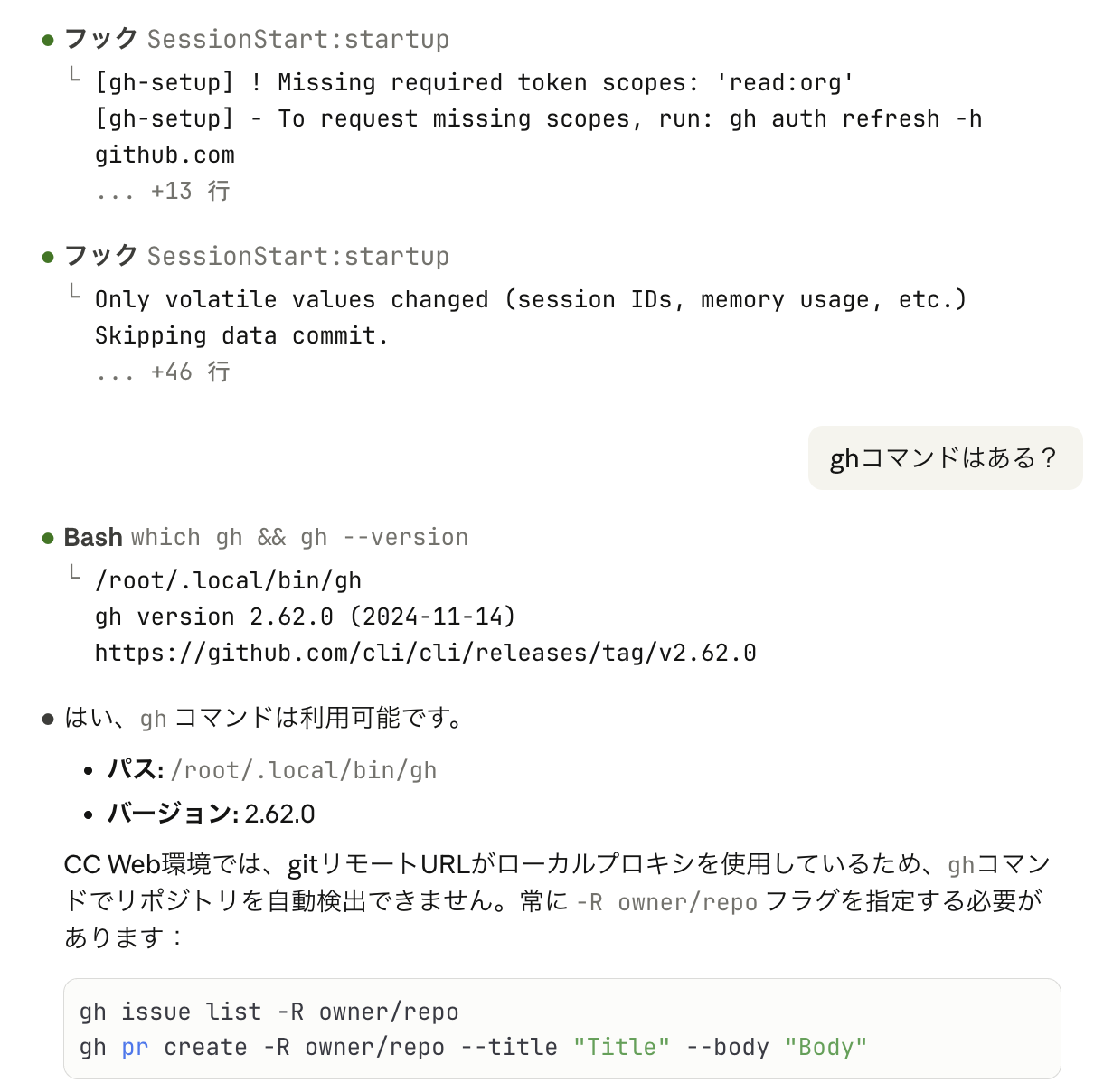
By the way, I’ve published the settings using the script introduced here on GitHub.
By adding the custom settings described in the repository and the following Hooks, you can execute it:
{
  "hooks": {
    "SessionStart": [
      {
        "hooks": [
          {
            "type": "command",
            "command": "bun x gh-setup-hooks",
            "timeout": 120
          }
        ]
      }
    ]
  }
}Summary
This time, I introduced how to enable GitHub CLI (gh) in Claude Code on the Web.
- Around December 17, 2025,
ghwas removed fromdisallowed_tools - Set
GITHUB_TOKENin custom environment - Configure a script to auto-install gh with
sessionStartHooks CLAUDE_CODE_REMOTEcan determine if you’re in an on the Web environment
With gh now available, you can read issues and execute tasks on Claude Code on the Web. Also, using CLAUDE_CODE_REMOTE should be useful for other remote-only workflows. I hope this article was helpful.
Follow Me on X
I also share information on X, so I’d appreciate it if you followed me!

References


