Claude Code Weekly Updates (2.1.105 - 2.1.114)
Here are the Claude Code changes from April 13 to April 19, 2026 that caught my attention.
With the release of Claude Opus 4.7 and Claude Design, it was a week of major leaps for the product.
TL;DR
- version: 2.1.105 -> 2.1.114
- changes: 170
- Important topics
- Claude Opus 4.7 and the
xhigheffort level - Launch of Claude Design (Anthropic Labs)
- Recap feature /
/recapcommand /tui fullscreenand the split of/focus- Auto mode unlocked for Max subscribers
/ultrareview(cloud multi-agent review)/less-permission-promptsskill- Switch to native binary startup
- Domain blocking via
sandbox.network.deniedDomains
- Claude Opus 4.7 and the
- unwritten in release-note
CLAUDE_CODE_DISABLE_1M_CONTEXTenvironment variable- Remote-session commands such as
/autopilot,/bugfix,/dashboard,/docs,/investigate - Weekly Updates official documentation page
Claude Code Topics
Claude Opus 4.7 release

Claude Opus 4.7 きた!! Opus 4.6をしっかり上回っているようなので早速使ってみる! anthropic.com/news/claude-op…


Introducing Claude Opus 4.7, our most capable Opus model yet. It handles long-running tasks with more rigor, follows instructions more precisely, and verifies its own outputs before reporting back. You can hand off your hardest work with less supervision.

The biggest event of the week is the release of Claude Opus 4.7. Benchmark results showing it surpassing Opus 4.6 across multiple dimensions were published, and together with Claude Code 2.1.111, the xhigh effort level and Auto mode for Max subscribers were unlocked at the same time.
Anthropic’s ClaudeDevs account also shared official best practices. The four key points are: specify the task clearly in the first turn, reduce the number of back-and-forth exchanges with the user, use Auto mode when appropriate, and set up notifications when tasks complete. Opus 4.7 is designed around the premise of “thinking deeply in one shot” more than Opus 4.6, so carefully writing the initial prompt produces better results than many short exchanges.
Claude Code で Claude Opus 4.7 を使う際のベストプラクティス: 1. 最初のターンでタスクを明確に指定する。 2. ユーザーとのやり取り回数を減らす 3. 必要に応じてオートモードを使う 4. タスク完了時の通知を設定する Opus 4.6 と Opus 4.7 の挙動の変化: ・ Opus 4.7 は Opus 4.6
Tips for getting the most out of Opus 4.7
Six points are highlighted as practices for using Opus 4.7 effectively.
- Auto mode: no more permission prompts
/less-permission-promptsskill/recap: a summary of what was done and what’s next- Fullscreen TUI focus mode
- New effort level configuration
- Provide Claude with a way to verify its work

Dogfooding Opus 4.7 the last few weeks, I've been feeling incredibly productive. Sharing a few tips to get more out of 4.7 🧵
Official ClaudeDevs Anthropic account
Anthropic launched ClaudeDevs, a dedicated account for Claude-related Changelogs, API releases, community updates, and deep dives. Having an official channel for catching up on information is a significant development, and this week’s official Opus 4.7 best practices were also distributed from here.

For the developers building with Claude, a direct line from the team. Follow for changelogs, API releases, community updates, and deep dives.
Claude Code Routines
Claude Code Routines がリリース! ルーティンワークをエージェントが実行可能に。 従来のスケジュール機能から拡張され複数種類のトリガーをサポート: ・スケジュール ・GitHub webhook イベント ・POSTリクエストによるAPIトリガー claude.ai/code/routines または /scheduleで管理可能。


Claude Code Routines are here! In addition to a schedule, you can now trigger templated agents via GitHub event or API – with our infra & your MCP+repos They've changed how we do docs, backlog maintenance and more internally at Anthropic Get started at claude.ai/code/routines
Claude Code Routines has launched. It extends the existing scheduled-execution feature so agents can run routine work. Three trigger types are supported.
- Schedule
- GitHub webhook events
- API trigger via POST request
The reach of what can run in the Claude Code on the Web environment widens significantly, and routines are managed through the /schedule command.
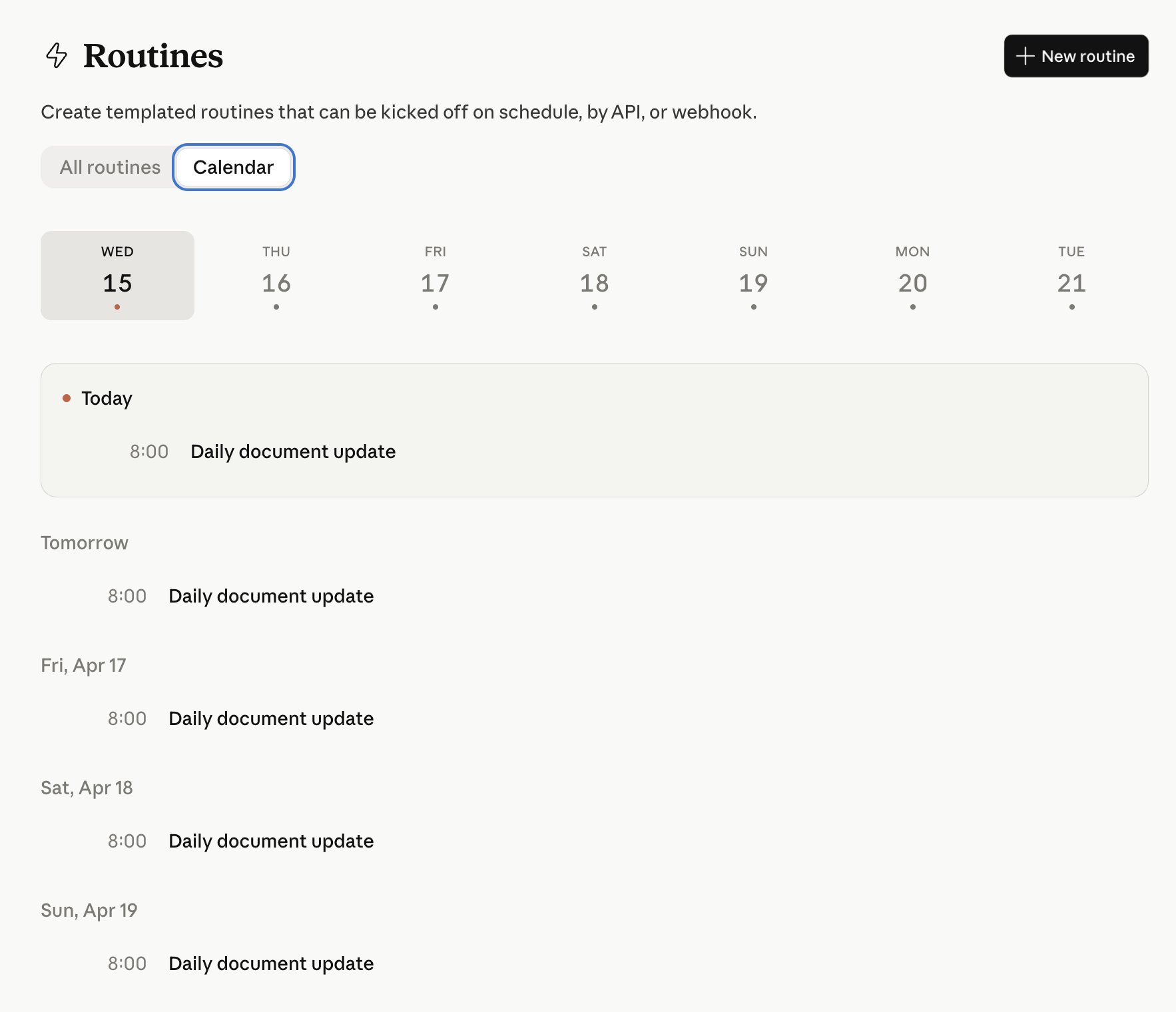
Routines configured via /schedule can be inspected in the calendar view. Triggers spread out via cron expressions can be seen at a glance in one screen, which is a quiet but useful improvement when running multiple routines.
Claude Code Desktop app revamp
The Claude Code desktop app has been significantly revamped. Multiple Claude sessions can now run in parallel within a single window, and the following features were added.
- Terminal
- File editor
- HTML / PDF preview
- Diff viewer
All of these support drag-and-drop layout adjustments. It’s a revamp that gives a strong sense of the agent interface shifting from the CLI to a desktop app (GUI), and it’s an update worth using for a while to see how it fits your workflow.
We've redesigned Claude Code on desktop. You can now run multiple Claude sessions side by side from one window, with a new sidebar to manage them all.
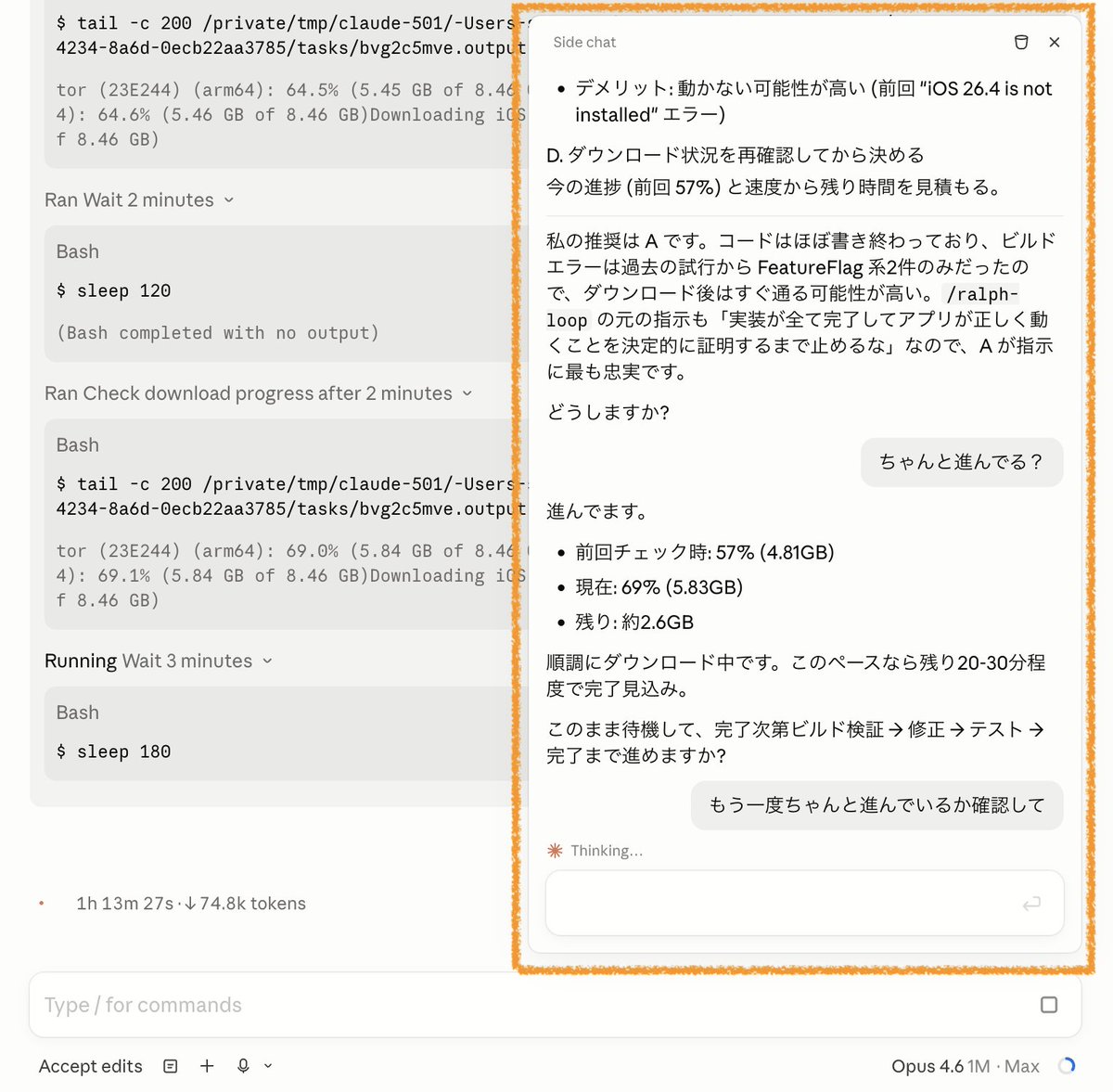
The desktop app also has a /btw command that opens a Side chat, which supports multi-turn exchanges inside that side pane. Since the CLI only allows one-shot questions, being able to run a separate consultation without interrupting the main session is a convenient desktop-only use case.
Anthropic’s article on long-running autonomous tasks and context management
Anthropicのエンジニアによる、Claude Codeのコンテキスト管理についての記事 - 新しいセッションをいつ開始するか - 修正指示より/rewind - /compact と /clearの使い分け - /compact でバカになるのはなぜか - Subagentの使い所 など、コンテキストの基礎的だが重要な内容が多いです


x.com/i/article/2044…
An Anthropic engineer published an article summarizing key points about context management in Claude Code. It covers when to start a new session, why /rewind is preferred over corrective instructions, how to use /compact versus /clear, why model quality drops after /compact, and when to use sub-agents. Many of the points are foundational but important for handling context, and they reveal the design philosophy behind this week’s Recap and /rewind enhancements.
Launch of Claude Design
On April 17, Anthropic Labs launched Claude Design as a research preview. Built on top of Claude Opus 4.7 (the latest vision model released just this week), it is a product that generates and edits visuals such as interactive prototypes, wireframes, pitch decks, and marketing assets from natural-language instructions.
Source: oikon48’s X post
Key features
Input is not limited to text prompts; it also supports images, DOCX / PPTX / XLSX documents, and imports from existing websites. Generated designs can be iterated on through conversation, inline comments, direct text editing, and custom adjustment sliders.
For organizational use, it supports organization-scoped sharing (with fine-grained view / edit permissions) and group collaboration on the same canvas while talking to Claude.
Output formats are broad, and the following are officially listed.
- Internal URL / folder sharing
- Canva (exported as fully editable content)
- PPTX
- Standalone HTML
- A “handoff bundle” targeted at Claude Code
Personally, the most significant point is that Claude Design can read a target organization’s codebase and design files to produce outputs that reflect the existing design system. In other words, it is designed so that the output aligns with the company’s existing UI components and tokens.
Furthermore, because it can output a handoff bundle for Claude Code, Anthropic has officially presented an end-to-end flow of “refining a design in Claude Design, then implementing it in Claude Code.” The fact that Claude Opus 4.7 powers both products is also a good fit, in that the same reasoning experience is shared across different layers.
Explainers from designer perspectives and tips from Anthropic’s own designers have also been published, so reading them together is helpful if you want to understand prompt design and iteration in more depth.
Claude Code Changelog
v2.1.105 (37 changes)
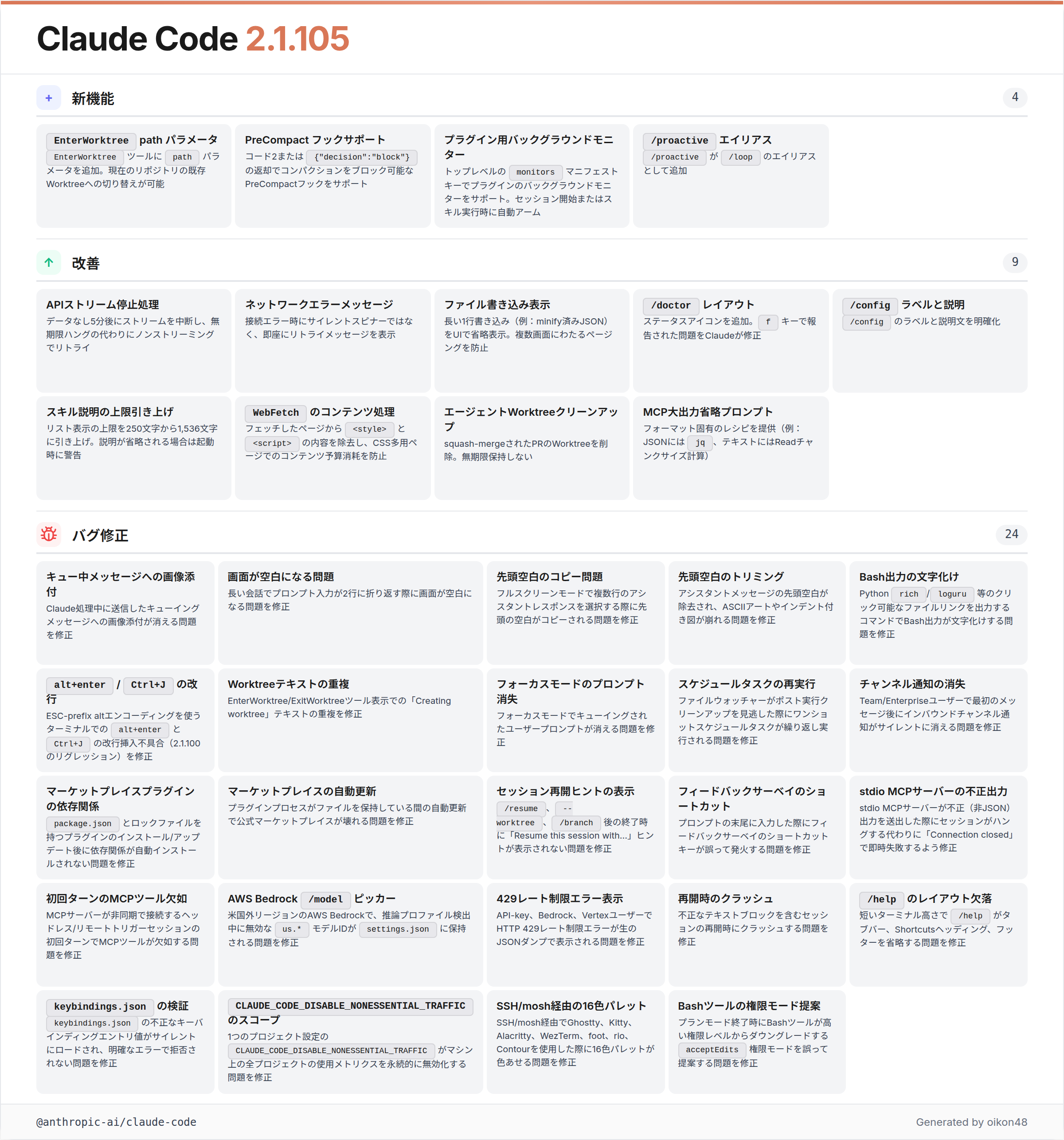
PreCompact hook
Added PreCompact hook support: hooks can now block compaction by exiting with code 2 or returning
{"decision":"block"}
A PreCompact hook that fires right before context compaction runs has been added. The hook can block the compaction itself by exiting with code 2 or returning {"decision":"block"}. This enables workflows like saving state before important information is dropped by compaction, or avoiding compaction altogether in specific situations.
/proactive is now an alias for /loop
/proactiveis now an alias for/loop
/loop’s behavior can now also be invoked as /proactive. Loop execution is often used for “running something proactively on a schedule,” so this name fits some scenarios more naturally.
v2.1.107 & v2.1.108 & v2.1.109 (26 changes)
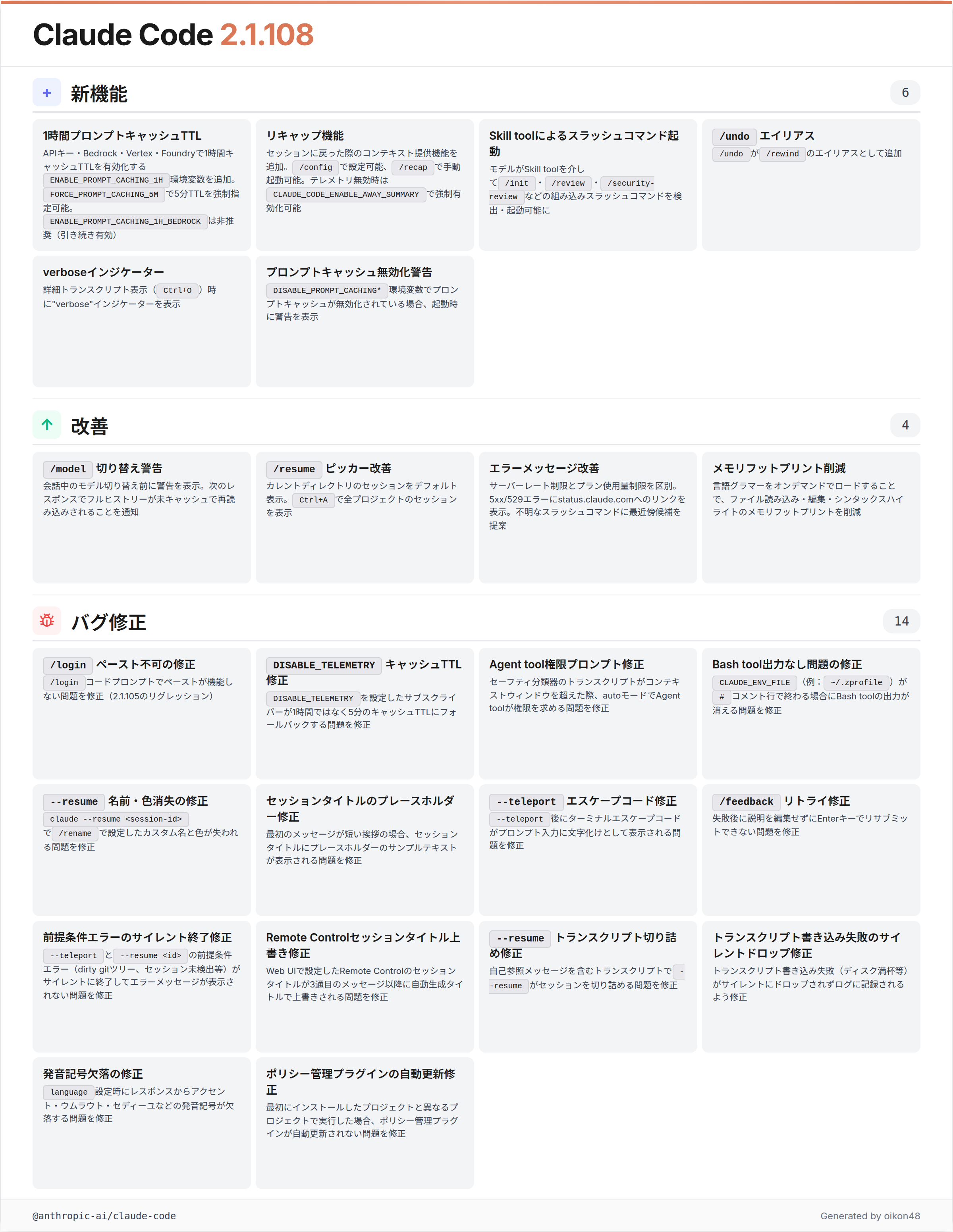
The center of this range is v2.1.108, which adds the Recap feature and /recap command. v2.1.107 and v2.1.109 are mostly small display-side improvements.
Recap feature / /recap command
Added recap feature to provide context when returning to a session, configurable in
/configand manually invocable with/recap
A Recap feature has been added that provides a summary of “what you were last doing” when you return to a session after a break. The auto-display behavior can be configured in /config, and /recap can also be invoked manually. It reduces the cost of reacquiring context when coming back from long-running work or scheduled executions.
For users who have disabled telemetry (Bedrock / Vertex / Foundry / DISABLE_TELEMETRY), CLAUDE_CODE_ENABLE_AWAY_SUMMARY=1 can force-enable the feature.
Model can invoke built-in slash commands
The model can now discover and invoke built-in slash commands like
/init,/review, and/security-reviewvia the Skill tool
The model itself can now discover and execute built-in slash commands like /init, /review, and /security-review via the Skill tool. This enables workflows where Claude autonomously runs commands at appropriate moments, without the user having to invoke them explicitly.
/undo is now an alias for /rewind
/undois now an alias for/rewind
A more intuitive /undo alias has been added for the checkpoint feature /rewind. Even if you don’t remember the command name, /undo takes you back one state.
/model picker warns before switching
Improved
/modelto warn before switching models mid-conversation, since the next response re-reads the full history uncached
Mid-conversation model switches now warn you in advance that the next response re-reads the full history uncached. This helps avoid accidental token spikes from absent-minded model swaps.
v2.1.110 (33 changes)
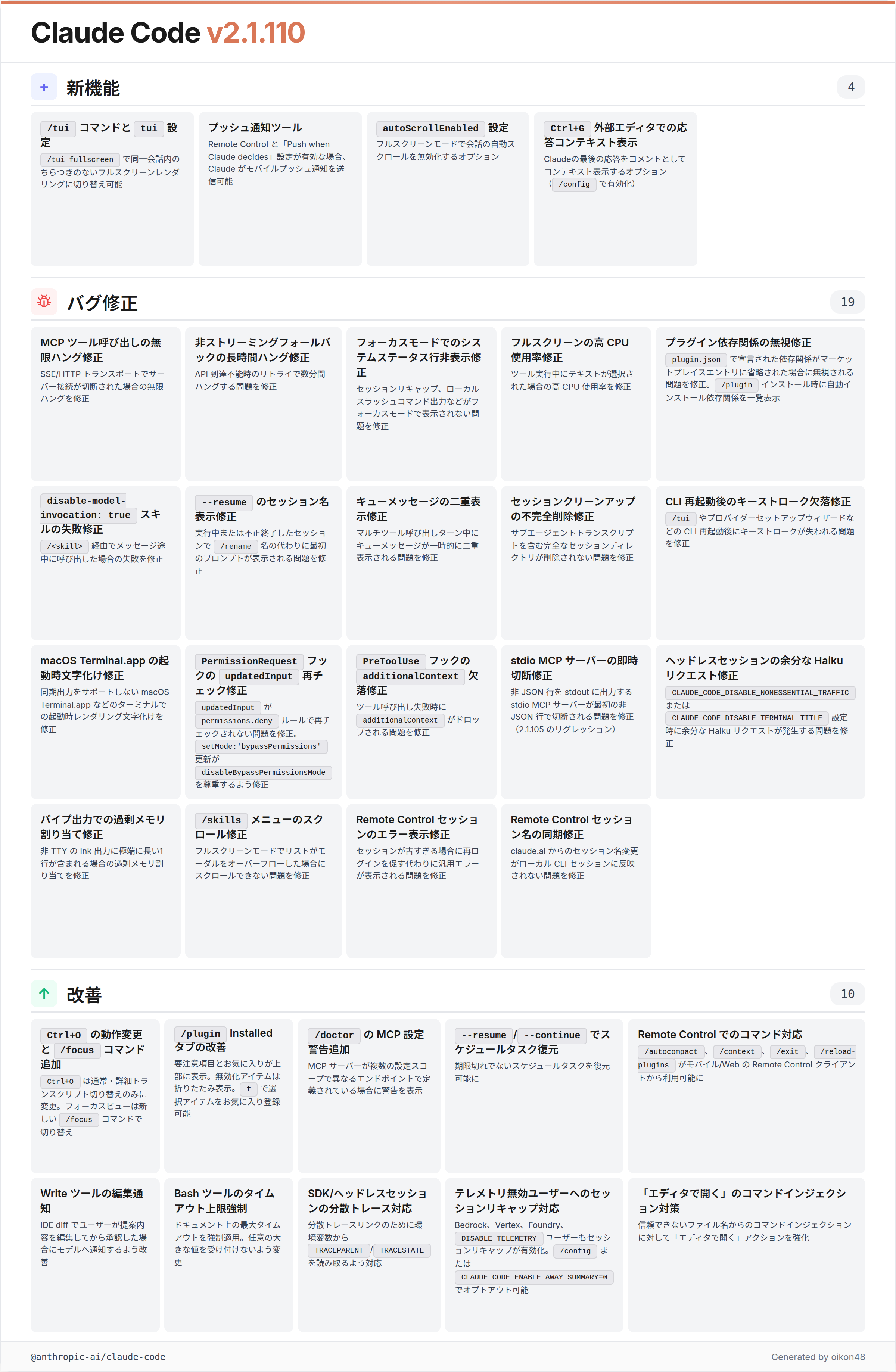
/tui command (flicker-free rendering toggle)
Added
/tuicommand andtuisetting: run/tui fullscreento switch to flicker-free rendering in the same conversation
The flicker-free rendering that was previously enabled via the CLAUDE_CODE_NO_FLICKER=1 environment variable now has a proper interface as the /tui command and tui setting. Typing /tui fullscreen switches it within the same conversation, and /tui default returns to the original inline renderer.
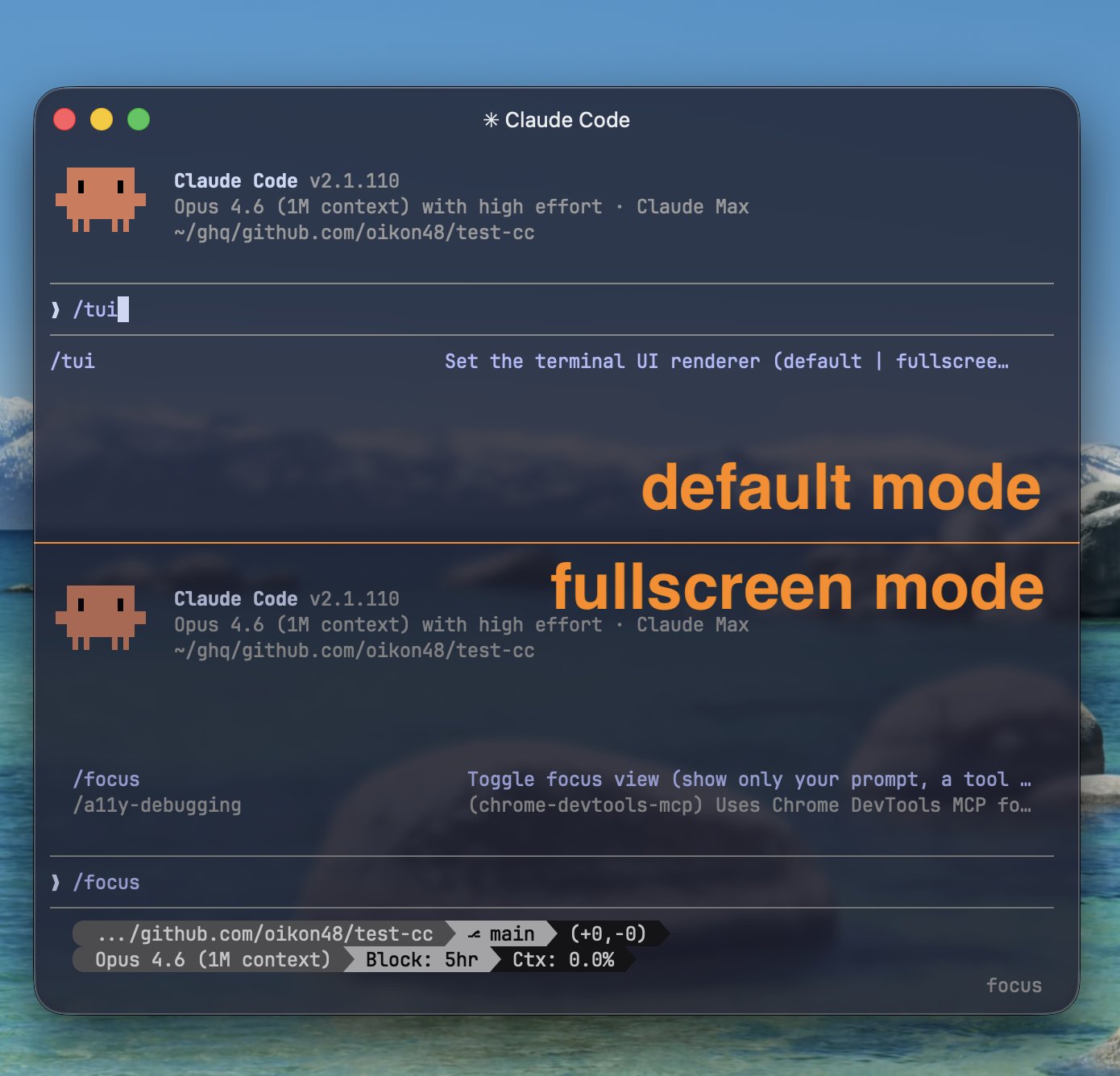
Source: oikon48’s X post
One thing to note: the /focus command for enabling the focus view only works in the fullscreen renderer. /focus is unavailable on the default renderer.
/focus split out
Changed
Ctrl+Oto toggle between normal and verbose transcript only; focus view is now toggled separately with the new/focuscommand
The focus view toggle Ctrl+O added last week has had its role reorganized. Ctrl+O now only toggles transcript detail (normal vs. verbose), and the focus view itself is controlled via the newly introduced /focus command.
v2.1.111 (34 changes)
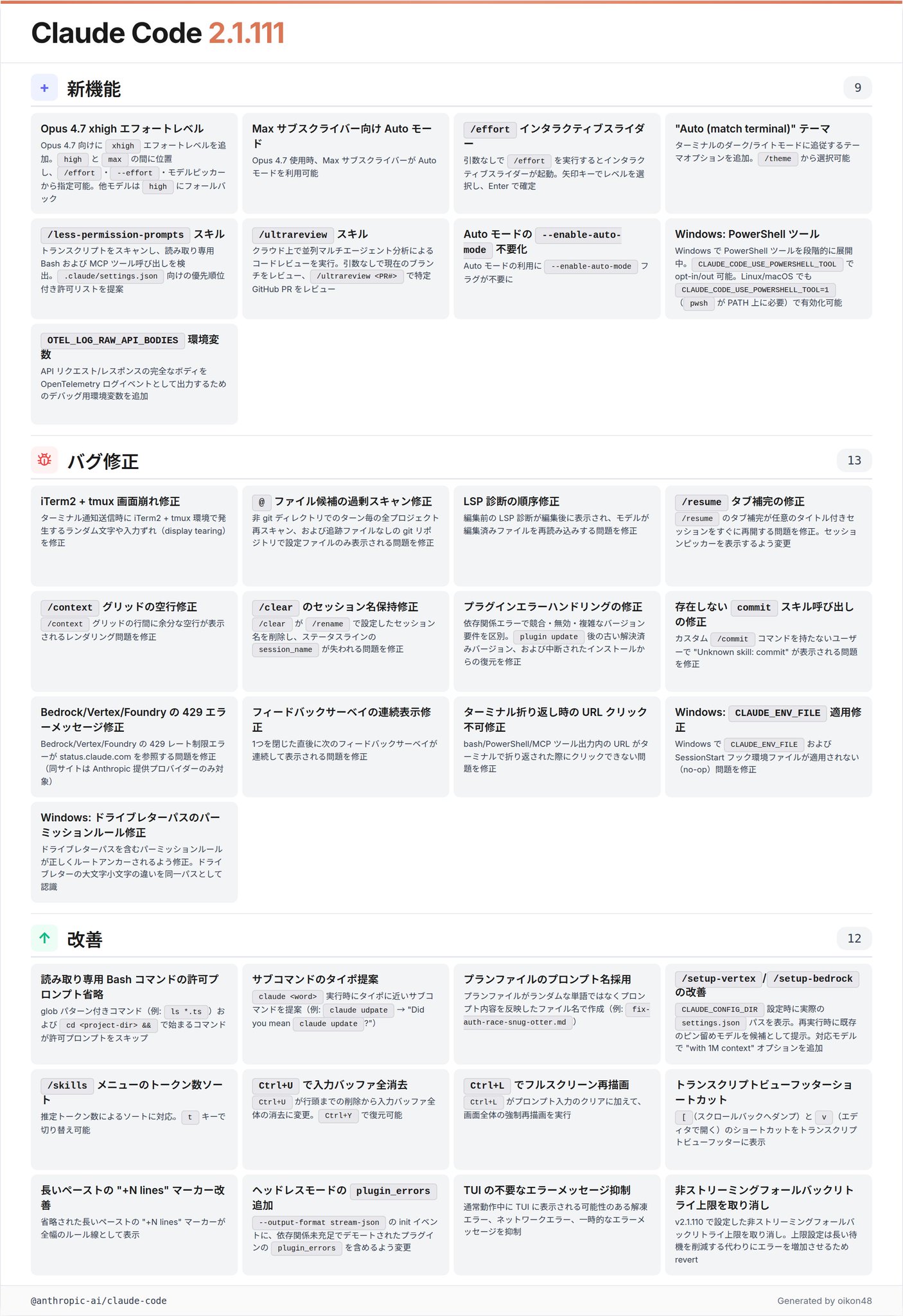
This is the headline version of the week, landing “usability” commands like /ultrareview and /less-permission-prompts alongside the Claude Opus 4.7 release.
Claude Opus 4.7 and the xhigh effort level
Claude Opus 4.7 xhigh is now available! Use /effort to tune speed vs. intelligence
The xhigh effort level for Opus 4.7 has been formally introduced. It sits between high and max and can be selected via /effort, --effort, or the model picker. Other models fall back to high.
Opus 4.7 is designed with xhigh as the default assumption, positioning it as a model that expects “deep thinking” as the norm. max is a mode for “the deepest reasoning with no constraints,” but the official docs also note that there are cases where it thinks too much and efficiency drops.
Auto mode for Max subscribers
Auto mode is now available for Max subscribers when using Opus 4.7
Auto mode, which was previously only available on API metered billing / Team / Enterprise, is now unlocked for Max subscribers as well, limited to using Opus 4.7. The --enable-auto-mode flag is no longer required either.
For Max users, this is a major shift: Auto mode, which had long been “a feature my plan couldn’t really use,” is now truly usable for the first time when combined with Opus 4.7.
/ultrareview
Added
/ultrareviewfor running comprehensive code review in the cloud using parallel multi-agent analysis and critique
/ultrareview has been added, which runs parallel multi-agent code review in the cloud. Running it with no arguments reviews the current branch; /ultrareview <PR#> fetches and reviews a specific GitHub PR.
The split is that existing /review runs locally and /ultrareview runs in the cloud. It’s another addition to the “offload to cloud” command family alongside /ultraplan. Pro / Max plans include a certain number of free runs.
/less-permission-prompts skill
Added
/less-permission-promptsskill: scans transcripts for common read-only Bash and MCP tool calls and proposes a prioritized allowlist for.claude/settings.json
A skill that scans transcripts, detects commonly-used read-only Bash / MCP tool calls, and proposes a prioritized allowlist to add to .claude/settings.json.
For users who get frequent permission prompts in their day-to-day work, this is a quietly effective command that automatically curates “this is one I always want to approve.”
/effort interactive slider
/effortnow opens an interactive slider when called without arguments
Running /effort with no arguments opens an interactive slider where you pick the effort level with arrow keys and confirm with Enter. Effort can also be adjusted from inside the /model picker with left and right arrows.
v2.1.112 & v2.1.113 & v2.1.114 (40 changes)
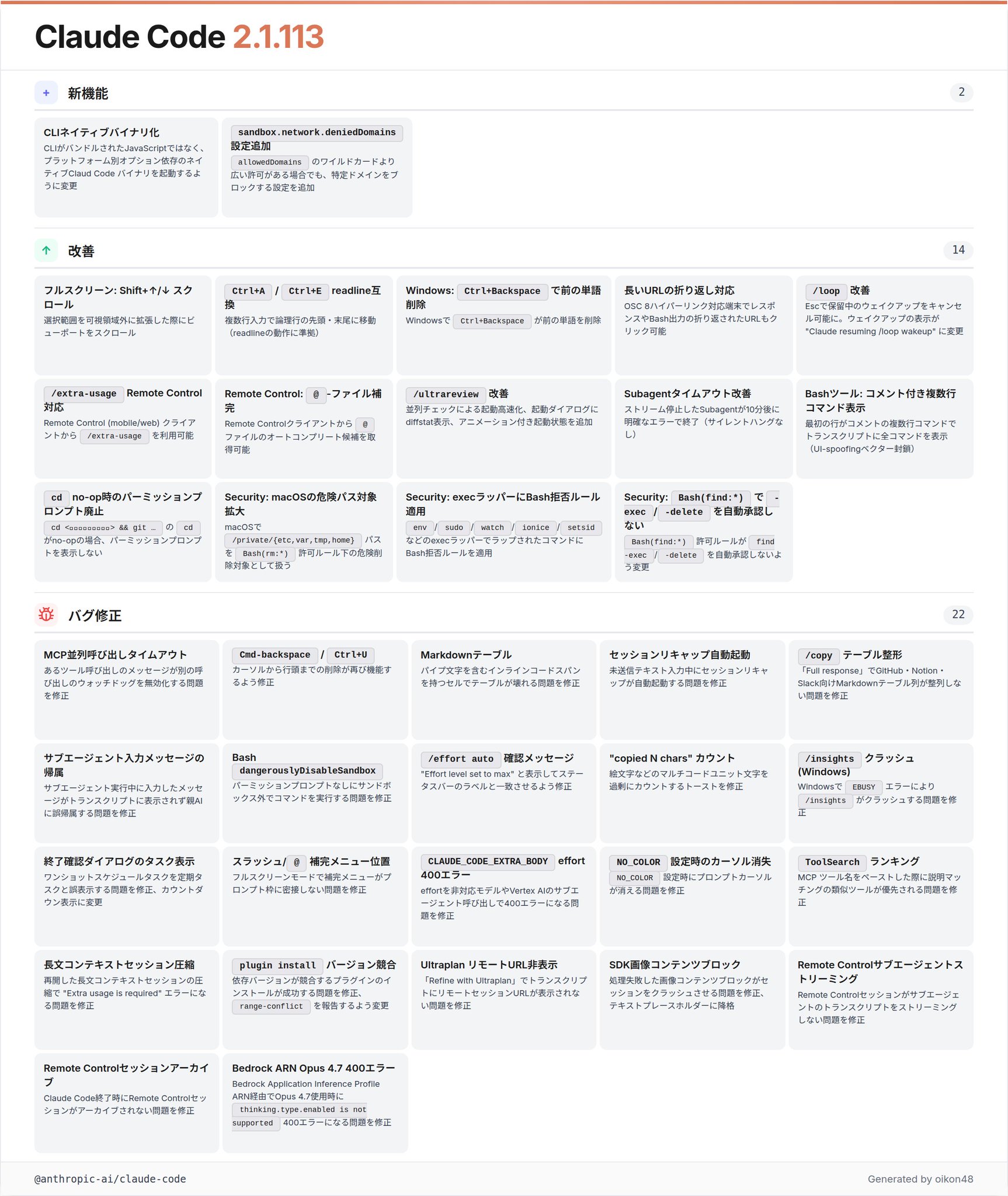
Source: oikon48’s X post
This block centers on the native-binary conversion and security hardening that landed in v2.1.113. v2.1.112 is a single fix for an Opus 4.7 Auto mode bug, and v2.1.114 is a single fix for an agent teams permission-dialog crash.
CLI starts as a native binary
Changed the CLI to spawn a native Claude Code binary (via a per-platform optional dependency) instead of bundled JavaScript
The Claude Code CLI now starts as a native binary via a per-platform optional dependency, rather than as bundled JavaScript. The mechanism distributes OS / architecture-specific binaries using npm optional dependencies.
Beyond startup speed and runtime efficiency, this is an architecture-level change that affects distribution paths and security boundaries. Since existing CI and self-hosted environments may see differences in install steps and cache policy, it’s safer to verify behavior when upgrading.
sandbox.network.deniedDomains
Added
sandbox.network.deniedDomainssetting to block specific domains even when a broaderallowedDomainswildcard would otherwise permit them
network.deniedDomains has been added to explicitly block outbound sandbox destinations. Even if a domain is covered by a wildcard in allowedDomains, matches against deniedDomains take precedence and block it.
{
  "sandbox": {
    "network": {
      "allowedDomains": ["github.com", "*.npmjs.org"],
      "deniedDomains": ["uploads.github.com"]
    }
  }
}
Since it merges across all managed / user / project / local config sources, organizations can keep allowedDomains broadly permissive while pinpointing specific subdomains to block on a per-project basis.
Security hardening
Security: on macOS,
/private/{etc,var,tmp,home}paths are now treated as dangerous removal targets underBash(rm:*)allow rules Security: Bash deny rules now match commands wrapped inenv/sudo/watch/ionice/setsidand similar exec wrappers Security:Bash(find:*)allow rules no longer auto-approvefind -exec/-delete
Three security hardening items landed together.
First, /private/{etc,var,tmp,home} on macOS are now treated as dangerous removal targets under Bash(rm:*) allow rules. The intent is to prevent system-area deletions via symlinks.
Next, Bash deny rules now match commands wrapped in exec wrappers like env, sudo, watch, ionice, and setsid. This closes the gap where wrapped dangerous commands like sudo rm -rf ... previously slipped past deny rules.
Finally, Bash(find:*) allow rules no longer auto-approve find -exec / find -delete. find looks harmless on its surface, but with side-effect-heavy arguments it is effectively equivalent to arbitrary command execution, so these now prompt individually for permission.
Other features
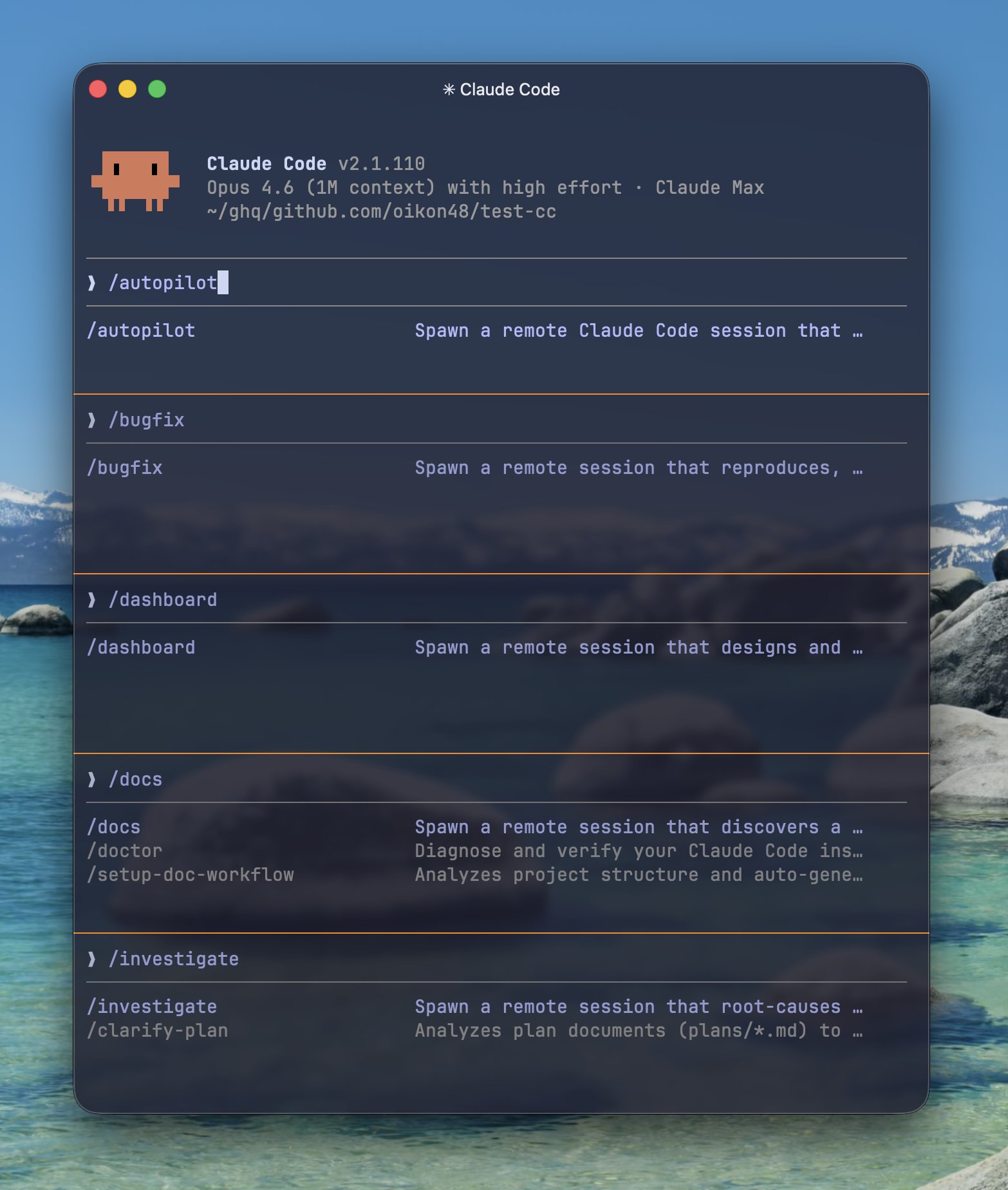
Remote-session commands
Five remote-session commands for Claude Code on the Web have been added. None of these appear in the CHANGELOG; they’re discovered via /help or the official docs.
/autopilot: spawns a remote Claude Code session that runs the autopilot workflow on your task/bugfix: a remote session that reproduces, root-causes, fixes, and regression-tests a bug/dashboard: a remote session that designs and builds a dashboard from your data sources/docs: a remote session that discovers a feature surface and writes or updates its docs/investigate: a remote session that root-causes an incident and produces a report with a suggested fix
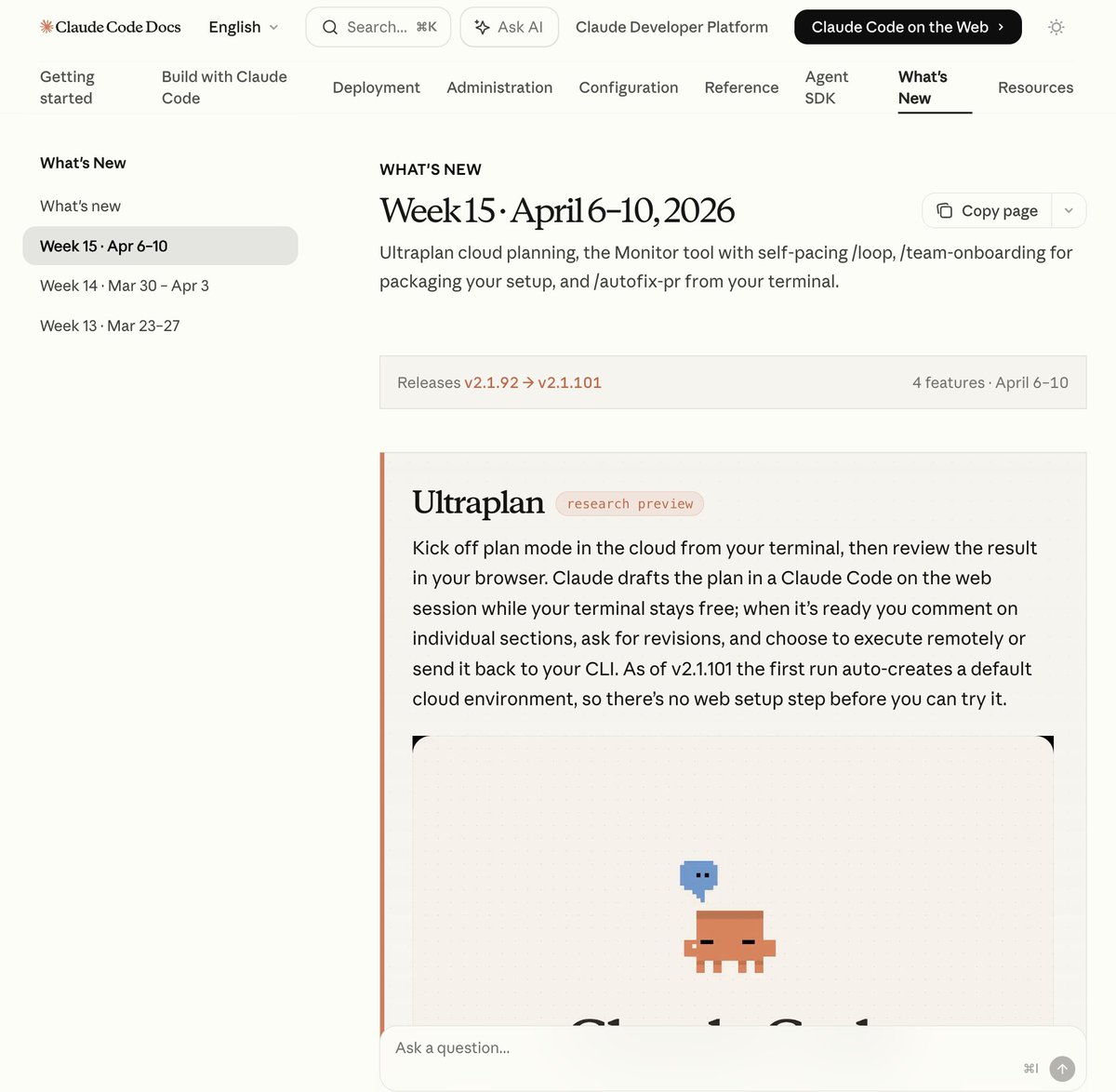
Weekly Updates official docs page
Source: oikon48’s X post
A Weekly Updates page has been added to Claude Code’s official docs. It covers features added through last week such as Ultraplan, the Monitor tool, /autofix-pr, and /team-onboarding. Having the official team publish a weekly roundup helps reduce individual catch-up overhead.
Closing
Thank you for reading!