Boosting Claude Code's Problem-Solving Ability: MCP Servers + Subagents
This article was primarily created manually. AI was only used for:
- Typo and error detection
- Information gathering (I verified referenced links myself)
(Updated 2025/7/25)
As of Claude Code v1.0.60, the Sub agents feature has been implemented.
The implementation described in this article should now be easier.
You can create Subagents to fetch the latest information by running the /agents slash command.
I’m Oikon. I work as an engineer at a foreign IT company.
I use Claude Code daily for my hobby personal development, but there have been several cases where Claude couldn’t solve complex problems that depend on library versions when developing web applications.
After some trial and error, I found that enabling Claude Code to use Model Context Protocol (MCP) servers improved its problem-solving ability, so I’m sharing this.
MCP servers used:
- Context7
- Brave-Search
Both are well-known MCP servers and nothing particularly new. This time, I had Claude Code explicitly use them to solve web application problems.
Additionally, I also tried having subagents use MCP servers through custom slash commands.
Many of you may already be using these MCP servers and subagents, but I’d like to reintroduce them in this article.
Model Context Protocol (MCP) Servers
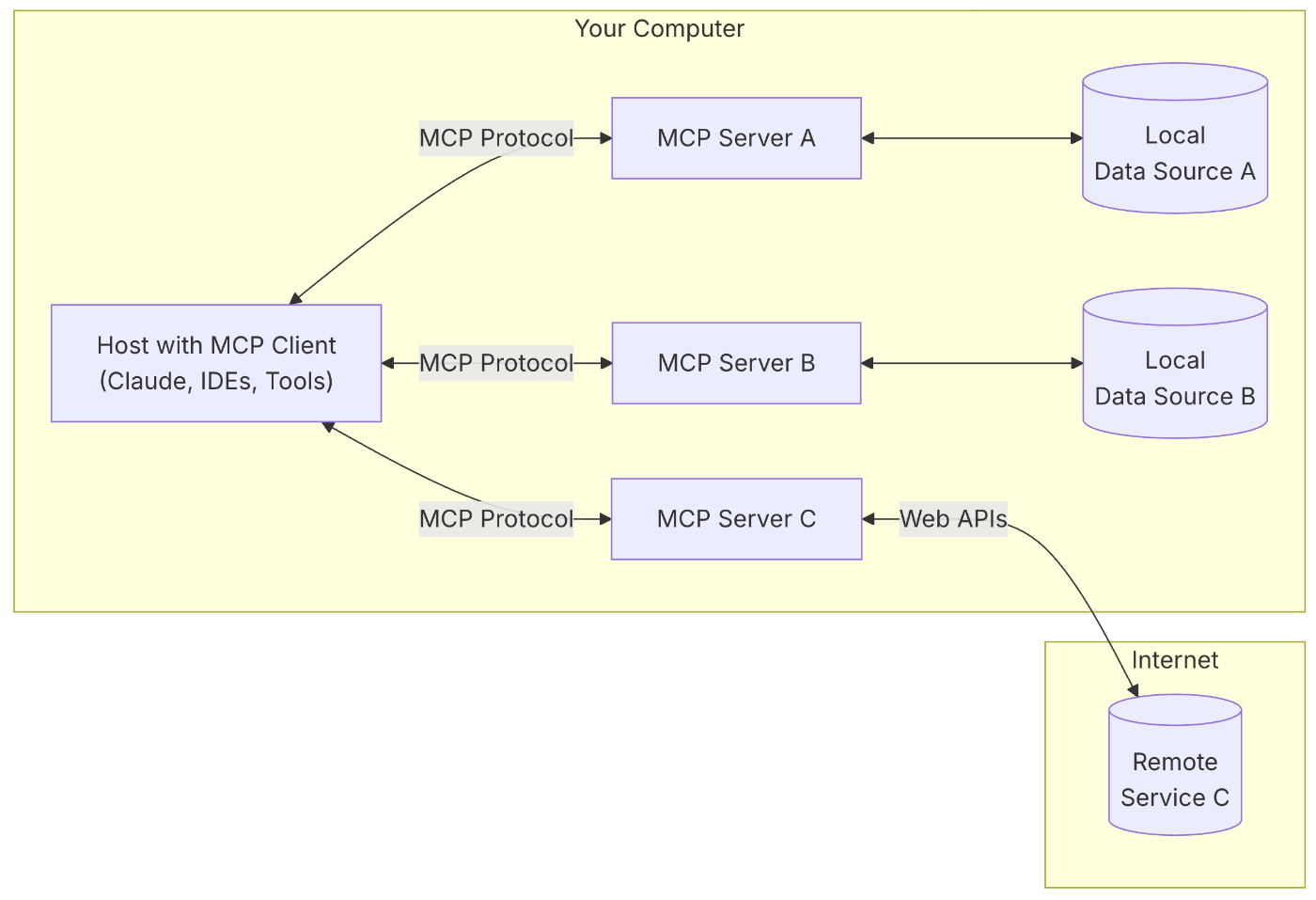
MCP is a protocol proposed by Anthropic that connects AI and tools.
Simply put, it’s a standard for enabling AI agents to use external tools. As of June 2025, it seems quite widespread and has become an indispensable technology for AI agents going forward.
I won’t go deep into MCP here, but comparing with the diagram above:
- Host with MCP client = Claude Code
- MCP server A/C = Context7 MCP server
- MCP server C = Brave-Search MCP server
Let’s briefly look at each MCP server.
① Context7 MCP
Context7 is an MCP server developed by Upstash that fetches versioned API documentation.
In web development, OSS library versions are constantly updated, and the information AI models have becomes outdated. Context7 solves this problem by providing official documentation information.
Specific library examples are shown in the image below:

You can also check these on the Context7 website. As you can see, it includes information for common web development libraries.
Setting up the MCP server is easy. Here’s an example for Claude Code:
Remote MCP Server for Claude Code:
claude mcp add --transport sse context7 https://mcp.context7.com/sseLocal MCP Server for Claude Code:
claude mcp add context7 -- npx -y @upstash/context7-mcp② Brave-Search MCP
Brave-Search is an MCP server for web search tools.
Claude Code has a built-in Web Search feature, but I personally didn’t feel it was very effective, and it was easier to ask subagents to use MCP tools (as I’ll explain later), so I’ve been trying Brave-Search recently.
As an aside, there’s also mention in a Tech Crunch article that Claude Code may be using Brave-Search internally.
The Free plan allows up to 2,000 queries per month. Get your API key from the official website.
I migrated MCP server settings from Claude Desktop using claude mcp add-from-claude-desktop. You can apparently add the Brave-Search MCP server with the following CLI command:
claude mcp add brave-search -s user -- env BRAVE_API_KEY=`YOUR_API_KEY_HERE` npx -y @modelcontextprotocol/server-brave-searchMCP servers are abundant in the world, but there are risks like tool poisoning, so you should avoid using untrusted MCP servers. Context7 and Brave-Search used here are not included in Anthropic’s official reference (Brave-Search was archived), but I’m using them at my own discretion.
For things to be careful about with MCP servers, this Zenn article is helpful:

Claude Code Subagent
Subagent is a feature that exists by default in Claude Code.
Many people may not know this, but what’s displayed as Task is being executed by subagents. Web Fetch and Read actively use subagents in my observation.
Claude Code’s subagent is explicitly mentioned in Anthropic’s official documentation. Quote:
This is the part of the workflow where you should consider strong use of subagents, especially for complex problems. Telling Claude to use subagents to verify details or investigate particular questions it might have, especially early on in a conversation or task, tends to preserve context availability without much downside in terms of lost efficiency.
Here, it recommends using subagents for split tasks like file reading. The good thing is that if you explicitly write “use subagent”, it will delegate tasks to subagents.
Subagents launched in Claude Code have the following characteristics:
- Lightweight
- Can be launched in parallel
- Can use tools available to the parent agent
- Subagents have their own Context Window
- Operate on single tasks and are released upon completion
In other words, the parent agent can assign tasks to subagents for execution.
Being able to execute tasks in parallel using multiple subagents is also a strength. In Anthropic’s How we built our multi-agent research system, it’s mentioned that Claude’s Deep Research uses multiple-subagents.

This time, I tried creating a simple subagent search system within Claude Code by having subagents use two types of MCP servers.
Having Claude Code’s Subagents Use Two MCP Servers
Case Without Using Subagents


First, this is a case where subagent usage is not explicitly specified.
As you can see from the image, both Context7 and Brave-Search MCP servers are being called.
At this time, I had the following text in CLAUDE.md:
CLAUDE.md:
- You can use web search including `use brave-search` MCP to search the latest solution.
- You should check the latest Next.js, Node.js, and other libraries with `use context7` MCP.
In this example, I had it fix a Hydration error in Next.js 15. This was a problem Claude Code alone couldn’t fix well, but in this example, it searched and found information about the Next.js 15 and MaterialUI issue and fixed it.
The benefit of not using subagents is investigating solutions with Claude Code’s Context fully inherited.
On the other hand, using MCP servers for investigation felt like it was compressing the Context window more than usual. It seemed like rate limits were reached faster in my experience.
Case Using Subagents

When using subagents, include phrases like “use subagent” in your prompt. Specifying “multiple subagent” will launch multiple subagent instances (Tasks).
In the image above, multiple subagents are each using Context7 and Brave-Search. (For some reason, another subagent was also launched.)
I see the benefits of using subagents as:
- Information compression through parallel processing
- Separation of concerns for AI agents
- Doesn’t compress the parent Claude Code’s Context Window
On the other hand, sharing the parent Claude Code’s Context with subagents seemed minimal, so there were cases where it didn’t return expected search results.
Pros and Cons of Using MCP Servers with Claude Code
Here are the pros and cons I personally felt about solving Claude Code’s problem-solving ability through supplementation with latest information via MCP servers:
Pros:
- Implementation is very easy
- No RAG system needed
- Can give AI the latest information
Cons:
- Compresses Context
- Consumes a fair amount of tokens
- Claude Code isn’t great at using MCP servers
In my case, getting the latest information through MCP servers was effective, but due to the nature of generative AI, there’s still some element of output lottery. I think it’s fine to think of it as using MCP servers to increase the odds of getting good code results.
Also, I think delegating tasks to subagents can mitigate some of the disadvantages of using MCP servers.
Application: Requesting Bug Resolution Immediately with Custom Slash Commands
Actually, it’s annoying to specify use subagent or use Context7 in prompts every time.
Personally, I recommend setting up a bug resolution command with custom slash commands.
Setup is very easy - just place a Command Markdown file in the following folders:
For MacOS:
- global settings:
~/.claude/commands/(command prefix=/user:) - per-project settings:
<project root>/.claude/commands/(command prefix=/project:
(Added 2025/06/18)
From Claude Code version 1.0.25, instead of prefixes, (user) or (project) is written in the description. In this case, you can execute with /bugfix $ARGUMENTS.
For example, suppose you use the following bugfix.md as a global setting:
~/.claude/commands/bugfix.md
Fix bug from user provided bug description: $ARGUMENTS

1. Understand the bug description and think the root cause. Try to recreate the issue.
2. Fix the issue. Use `context7` and `brave-search` MCP tools to understand the error.
These MCP tool searching should be done by multiple subagents. Also use native Web search subagent for issue investigation.
3. If there is another error, always repeat this debugging process from 1 to 2.
Once you place the Command Markdown file, it appeared as a slash command in Claude Code.

This time I’m also using $ARGUMENTS, so it can take arguments. Usage looks like this (the prompt is an example, I actually write more detail in English):
/user:bugfix There's a Next.js Hydration error, please fix it.This allowed Claude Code to understand the following initially:

As you can see from the image, it understood the execution steps 1-3 I set up and prepared a TODO list.
Creating a custom slash command to instruct multiple-subagents to each use MCP servers like this is effective.
Summary
In this article, I tried to solve the problem of Claude Code not having the latest library information using MCP servers + subagents.
This time I mainly used search-related MCP servers, but using filesystem or the popular Obsidian MCP servers to have it read your documents would also be effective. For search-related MCP servers, there’s also tavily, so you might want to try that. Claude Code doesn’t seem to use MCP servers well yet, but I think MCP servers are one of the technologies you should know going forward, so it’s good to try various things.
Parallelization of Claude’s subagents is a field where research is active recently, so it’s good to keep an eye on it. This time I did a simple search with multiple-subagents within Claude Code, but I feel this feature will eventually be provided more easily by the official team.
I hope this article was helpful.
Follow Me on 𝕏!
I also share information on 𝕏, so I’d really appreciate it if you followed me!

References