Following Every Claude Code CHANGELOG Throughout 2025
I’m Oikon, and I regularly share about Claude Code on X(Twitter).
As the eventful year of 2025 comes to a close, I wanted to reflect on Claude Code. Personally, 2025 was the year when AI agents made tremendous strides, and for me, it was the year of Claude Code.
The Claude Code CHANGELOG has been updated a total of 176 times, and I’ve verified every update from at least v1.0.x onwards.
| Version Series | Number of Releases (as of 2025/12/30) |
|---|---|
| v0.2.x | 37 |
| v1.0.x | 82 |
| v2.0.x | 57 |
| Total | 176 |
Having worked with Claude Code throughout the year, I want to organize my thoughts and reflections. Please note that these are purely my personal opinions.
The First Shock of Using Claude Code
Before Discovering Claude Code
I first tried Claude Code not during the beta release in February 2025, but in March.
At the time, I was dabbling with GitHub Copilot and Cursor, asking ChatGPT and Claude’s web versions about code, copying the good generated code, and manually fixing it locally. Looking back, my development workflow has changed dramatically over this past year.
Even back then, Claude’s web version had GitHub integration and could read the codebase while chatting. I personally felt that Claude 3.7’s coding quality was better compared to other AI models at the time.
The Encounter with Claude Code
Then in March 2025, I discovered a product called Claude Code (unfortunately, I wasn’t active on X at the time, so I don’t have any posts from back then). I remember seeing someone demonstrate it on social media. While IDE-based tools like Cursor and Windsurf were getting attention, Claude Code caught my eye as a CLI tool.
I was truly amazed when I first tried Claude Code. Previous AI tools would code alongside you, but even the early Claude Code could autonomously code and create multiple components on its own.
I remember feeling that the way we code would fundamentally change when I watched the AI agent explore the codebase on its own, gather the necessary information, and implement solutions.
From April onwards, I continued using Claude Code with pay-as-you-go API billing, gradually getting accustomed to CLI-based coding. Around April when I started being active on X, I was posting praise for Claude Code and expressing interest in trying Codex CLI. As a side note, Codex CLI honestly wasn’t very usable at the time, and many people don’t even know it existed. The dramatic improvement of Codex CLI when GPT-5 launched mirrors many aspects of Claude Code’s official release story, which I’ll discuss later.
Claude Max plan was announced on April 9th, and on May 1st, Claude Code became available for unlimited use with the Max plan. It didn’t get much attention at the time, but this laid the groundwork for Claude Code’s widespread adoption.
I subscribed to the Max 5x ($100) plan a few days after this announcement. At the time, I had only ever paid $20 for AI tools, so this was a significant change for me. Now I use the 20x ($200) plan—funny how things evolve.
Claude Code’s Official Release
On May 22, 2025, Anthropic announced Claude 4. I wrote a Zenn article about the situation at the time, so please check it out if you’re interested.

The major changes for Claude Code at this time included:
- Claude 4 (Opus/Sonnet) performed excellently
- The Max unlimited plan became widely known
Claude Code had already shown its excellence in autonomous operation, but with Claude 3.7, the model’s capabilities weren’t quite sufficient to fully leverage the harness’s power. The arrival of Claude 4 was significant because Claude became much better at using tools, reaching a level where it could truly excel.
The recognition of the Max plan was also crucial. Previously, AI coding mostly involved pay-as-you-go API billing, which made people psychologically cautious about usage. Being able to use Claude Code, an excellent AI tool, at a fixed rate through the Max plan changed the AI coding mindset, enabling experimentation with multiple implementation approaches. This unlimited usage model has been adopted industry-wide, including by Codex, Gemini, and Cursor in some of their plans.
Reflecting on Claude Code’s CHANGELOG
With the official release of Claude Code and Claude 4, Claude Code itself underwent its first major update (v1.0.x series). As of December 2025, we’re on v2.0.x (the latest at the time of writing is 2.0.74).
I can’t cover all 176 updates, so I’ll highlight some that I personally found impactful from v1.0.x onwards.
To summarize first, many features are strongly tied to context engineering, suggesting that we currently need to think carefully about context engineering.
Claude Code v1.0.x Series
CLAUDE.md (Memory File)
CLAUDE.md existed since v0.2.x, but with the v1.0.x release, debates frequently arose about “what should be written in CLAUDE.md”. While Cursor Rules already existed, CLAUDE.md became even more important when Claude Code started implementing autonomously.
The term context engineering spread, and attention shifted to the importance of controlling the contents of an AI agent’s context window, which further increased the importance of CLAUDE.md.
In August, when Codex CLI proposed AGENTS.md as an attempt to unify project memory across all AI tools, CLAUDE.md’s existence had already left a significant impact on AI coding.
Incidentally, Claude Code doesn’t support AGENTS.md. This has been discussed among users in GitHub Issues.
Personally, I don’t think Anthropic will support AGENTS.md. Here’s why:
- There’s a high barrier to adopting OpenAI’s standard
- Claude Code has workarounds available
- Universal project memory that works across all harnesses and models is difficult
Anthropic has been creating industry standards for AI tools, such as MCP and more recently Agent Skills, but they seem cautious about adopting other companies’ standards.
Also, as you can see from the GitHub Issue mentioned above, workarounds like @ imports and symbolic links currently exist. I covered these workarounds in [Day 5] of my recently posted Advent Calendar article.
Lastly, this is my personal opinion, but I find it somewhat difficult to believe that having a single AGENTS.md would work for all AI tools. AI tools are combinations of models and harnesses, and to fully leverage their capabilities, you need project memory tailored to that specific tool. Unlike MCP, AGENTS.md is natural language Markdown and isn’t really a protocol.
I personally think this is why Anthropic isn’t enthusiastic about integrating with AGENTS.md.
Plan Mode
Plan mode was silently added around v1.0.18 (June 12th). You can switch to Plan mode with Shift + Tab, and you can set it as the default on startup in /config. If I remember correctly, Cline adopted Plan mode around April, before Claude Code.
Back then, I was caught up in Vibe Coding and was recklessly running --dangerously-skip-permission, so I foolishly didn’t immediately understand its value. But as I used Claude Code longer, I came to appreciate Plan mode’s usefulness.
The important aspect of Plan mode is, obviously, you can clearly see the AI agent’s execution steps in advance. Many failures in AI coding occur because the breakdown of steps the AI agent will execute is unclear, and it doesn’t follow the intended implementation approach.
Furthermore, I believe Plan mode’s value lies in contributing to improvements in post-implementation bottlenecks. By clarifying specifications (Specs) in advance with Plan mode, the AI agent can somewhat follow those specifications when executing tasks, reducing the gap between the specs and the deliverable. This indirectly contributes to reducing bottlenecks like reviews that have become apparent in AI coding. It’s similar to Shift Left Testing—eliminating causes of rework and regression as early as possible has positive effects on later stages.
When I asked Boris Cherny, one of Claude Code’s developers, about the importance of Plan mode, he mentioned this as well. He said he almost always starts from Plan mode.
In the latest Claude Code, Plan documents are created in ~/.claude/plans/, which feels like it’s moving toward Spec Driven Development (SDD) approaches (I also covered this in [Advent Calendar Day 17]).
Subagents
Subagents have existed since the early days of Claude Code, functioning as the Task tool. I discussed early Subagents in the following article.

From v1.0.60, the /agents command was implemented, enabling custom subagents.
Subagents have the following characteristics:
- Can be launched in parallel
- Specialized for specific roles
- Independent context windows
The independent context window aspect is particularly important from a context engineering perspective. The current Claude Code context window is limited, and retrieving large amounts of information with WebSearch or Read quickly fills it up.
By using Subagents, you can keep unnecessary information out of the parent context window and offload it to the Subagent’s context window. Given the current need to think about context engineering, having such workarounds is important.
Also, while AI agent orchestration will likely advance in the future, Subagents that can be launched in parallel are currently an important means of easy orchestration.
/context
The /context command was added in v1.0.86 (August 20th). The value of this command lies literally in context visualization.
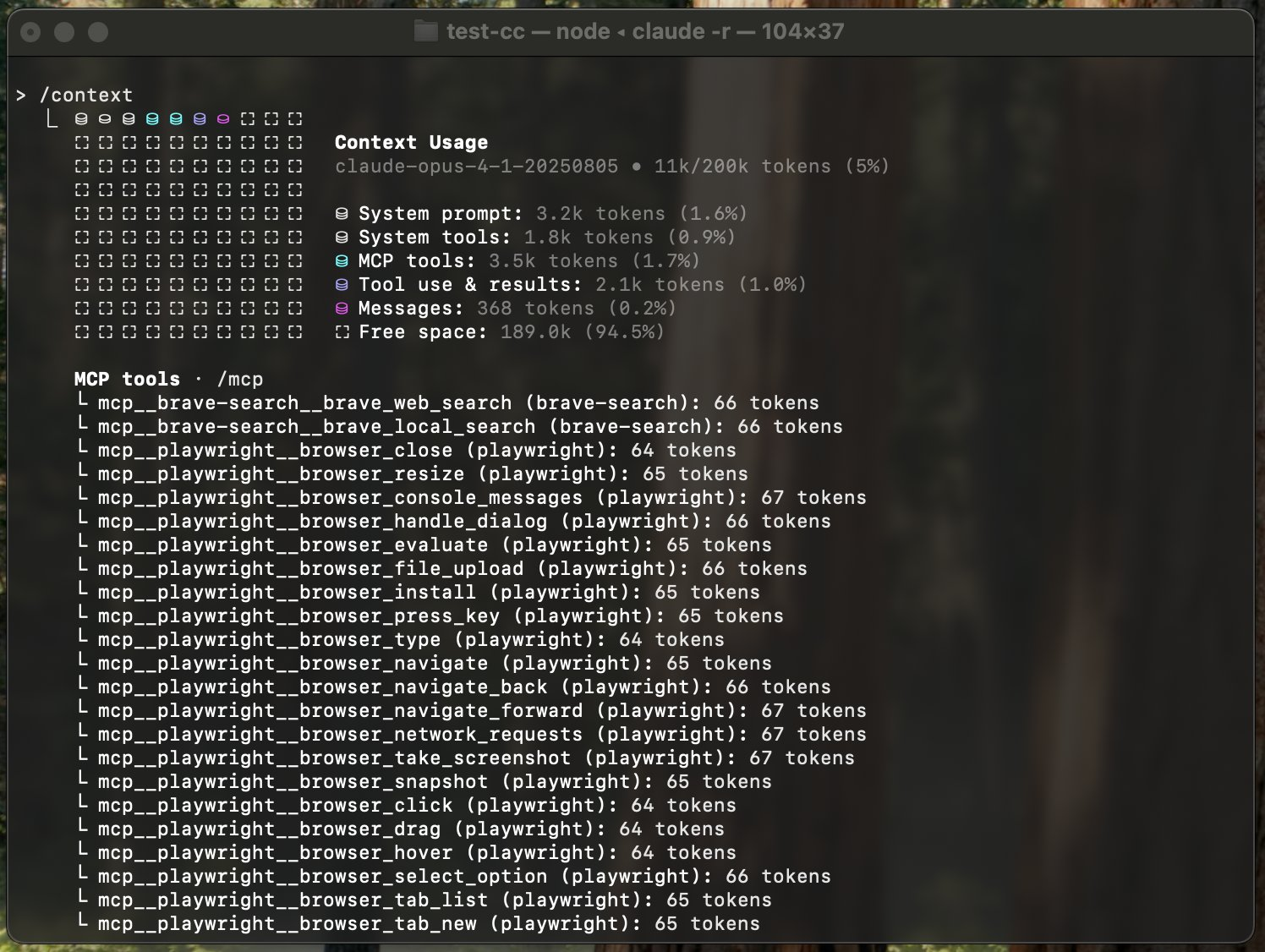
While the concept of context engineering had spread, many people understood it existed as a concept but didn’t fully grasp it.
/context displays the following:
- System prompt
- System tools
- MCP tools
- Custom agents
- Memory files
- Messages
From this information, you can now see at a glance how much of the context window is occupied and how much remains.
The /context command helped many users become aware of the context window and understand the importance of context engineering. A commonly mentioned example now is that MCP tools occupy a large portion, so it’s better to remove unnecessary ones—this wasn’t possible to discuss before the /context command.
The /context command deserves credit for shining a light on context engineering, a concept that was vague for many people, and making its contours more visible.
Claude Code v2.0.x Series
Opus 4.5
For the Claude Code 2.0.x series, the release of Claude Opus 4.5 (11/24) was the important event.
At the time, many people were migrating from Claude Code to Codex CLI. The reasons I often heard were rumors about Claude Code’s degradation and the excellence of GPT-5.1 Codex. Incidentally, I was still primarily using Claude Code with Codex CLI as secondary, though I did delegate a reasonable portion of tasks to Codex.
From v2.0.51, Opus 4.5 became available in Claude Code, and gradually more people seemed to return to Claude Code. I say “gradually” because AI models at this point had become difficult to differentiate through simple implementation tasks with coding tools—many felt you needed to use them for hours or days to understand the differences. It’s also significant that Codex CLI had evolved into an excellent AI tool, and Cursor had established its own position with Composer-1 and similar features.
When actually using it, Claude Opus 4.5 excels at using Claude Code’s tools, with sufficient implementation speed. I particularly felt its affinity with Claude Code as a harness was higher than the previous Claude Opus 4.1 or Sonnet 4.5. Claude Opus 4.5 is undoubtedly a major factor in elevating Claude Code’s position and has once again significantly advanced the history of AI coding.
As a side note, I personally find it increasingly difficult to measure AI model performance. For simple tasks, any AI tool can produce high-quality output.
The SWE-Bench benchmark is often cited, but recently it feels more like marketing and performance theater. You can’t be confident about real-world usability without hands-on experience. A similar point was made in a recent YouTube video featuring someone from PromptLayer.
Claude Skills (Agent Skills)
Claude Skills was added in v2.0.22 (October 17th). On December 18th, it became an open standard as Agent Skills.
Skills have been a hot topic lately, with many people explaining them, so I’ll skip the details. For a general overview of Skills, the following video is easy to understand (another Code Summit video).
For Agent Skills, understanding the basic concept of progressive context disclosure is sufficient. Conversely, this also shows how context engineering becomes important here. The key to Skills is tool orchestration, and the combination with agent orchestration will receive even more attention going forward.
Anthropic emphasizes these Skills characteristics while designing for portability that can be used not only in Claude Code but also in Claude Desktop and elsewhere. As with MCP (Model Context Protocol), Anthropic is really good at developing concepts and features that are important for AI agents.
Interactive Question Tool
The name “Interactive Question Tool” in Claude Code probably isn’t familiar to you. It’s the feature where “Claude asks the user about details” that often appears in Plan mode. I’m using the name “Interactive Question Tool” because it’s mentioned in the CHANGELOG.
I personally think this feature is groundbreaking—it enables clarifying specification boundaries during Plan mode.
A problem causing rework in AI coding has been the gap between the specifications the user envisions and what the AI implements. If users could clearly define specification boundaries through prompts or specification documents, there would be no issue, but in many cases those boundaries are ambiguous, resulting in the AI agent deviating from the user’s intended specifications.
With the Interactive Question Tool, the AI agent can now confirm specification details (just like a human would), which I feel is a major advancement in AI tools. Moving from one-directional communication from the user to mutual interaction has had a significant impact on the future of AI coding.
Plugin Marketplace
Claude Code’s Plugin system is another feature I’m personally watching. AI tools are very powerful, but many organizations still haven’t achieved sufficient utilization in team development. A major reason why AI tool adoption is slow in teams is the existence of varying “AI tool proficiency levels”.
Those who master AI tools like Claude Code can prepare their own Skills, Hooks, and custom slash commands, but there’s a big gap with how people who are resistant to or unfamiliar with AI tools use them. As a result, personalized CLAUDE.md files and similar individualized approaches tend to emerge.
The Plugin system will help make AI tools more accessible in team development by distributing functionality. The fact that they’ve already built an ecosystem where you can easily install and share features like VSCode Marketplace plugins is a strength of Claude Code.
Creating a Plugin is also easy—just create marketplace.json and plugin.json inside .claude-plugin. Please try making one. For reference, here’s my demo GitHub Project:
Claude Code’s Strong Points
Having looked at personally notable features from Claude Code’s CHANGELOG, I want to touch on Claude Code’s strengths from a tool design perspective. While there are many points where I think Claude Code excels, I’ll highlight two.
CLI Tool
One of Claude Code’s strengths is that it’s a CLI tool. Any developer can use a CLI tool anywhere.
Historically, development tools have transitioned from CLI to GUI (like IDEs) in the development and web context, but I understand that in the AI era, rather than going back to CLI, we’ve transitioned to an Agent UI user interface. In other words:
CLI -> GUI -> Agent UI
This is my image. While Claude Code seems like a CLI tool, I personally feel it’s also a pioneer of Agent UI.
Claude Code was born as a CLI tool because it was developer Boris’s side project, but there are several reasons why the CLI tool design has remained. Anthropic mentioned the following in their video:
- Chose the terminal that developers always use
- With the advent of LLMs, there was a return from rich UI to chat
- A simple CLI allows users to focus on tasks
- CLI is the thinnest possible wrapper around the model and can be kept as clean as possible
Claude Code as a Harness
Claude Code is establishing a solid position in AI coding because of the completeness of Claude Code as a harness.
I’ve repeatedly used the terms “AI model” and “harness” throughout this article, and these are also mentioned in Anthropic’s video The future of agentic coding with Claude Code.
It explains that AI tools are divided into AI models and harnesses, and their combination determines their capabilities. In the video, they compared the AI model to a horse and Claude Code to a harness (horse equipment), explaining it as something that properly controls the AI tool. I personally love this expression and often quote it when giving presentations.
Claude Code as a harness is designed very well in terms of appropriately providing tools, prompts, and context to Claude as an AI model, guiding the model to complete tasks. I recognize this as a major differentiator from other AI tools.
Challenges I Feel with Claude Code
I’ve talked about Claude Code’s good points up to now, but of course there are challenges. In fact, there are still many challenges piled up. Let me highlight some of the bigger ones.
Context Window Size
The first challenge is context window size. While GPT-5.2 has 400k and Gemini 3 Pro has 1m context windows, Claude Opus 4.5 is still at 200k. This imposes significant constraints on users.
Claude Code can alleviate the context window problem with Subagents and recently implemented rules, but this issue is noticeable even with the harness’s power.
I fortunately have access to Claude Sonnet 4.5 [1M], which I used as my main model before Claude Opus 4.5 came out. I remember feeling amazed at how much more usable it became just by having a larger context window. Conversely, I wonder what will happen when Claude natively has a 1M context window.
Compaction Quality
Even if Claude’s 200k context window is currently an unsolvable problem, Claude Code’s context compaction (/compact, auto-compact) still has room for improvement.
I’ve had several occasions where Codex CLI’s compaction felt better. Claude Code seems to simply summarize the session unless you explicitly set compaction instructions.
If model context windows become larger, compaction will become less of a concern in the future, but currently, you need to either provide compaction instructions or regularly clean up the context window with /clear.
Knowledge Cutoff
This is a universal model problem not limited to Claude, but I often feel the impact of knowledge cutoff. Specifically, I frequently encounter bugs caused by the model not knowing the latest libraries or versions.
As workarounds, there are methods to retrieve the latest information using WebSearch or Context7 MCP, but I wish Claude Code as a harness would handle this automatically. As I mentioned in a recent article by Simon Willison, I personally think centralizing version information and loading it with Skills when needed is a good approach.
Claude Code is still a product that’s only about 10 months old, like an infant. I want to watch its future growth.
Should You Use Claude Code Third-Party Tools?
Claude Code’s user base grew dramatically this year, and third-party tools have also increased. Famous examples include the awesome-claude series (created by various people) that collects custom slash commands and subagents. There are also many tools that use Claude Hooks to achieve more complex harness mechanisms.
My personal opinion is that these third-party tools should be used cautiously.
Claude Code as a product consists of both the Claude model and the Claude Code harness. Many third-party tools are like building additional harnesses on the outside of that harness.
The evolution of Claude models and tools is dramatic, and Claude Code’s behavior changes significantly on a weekly basis. If third-party tools are maintained well enough to keep up with these changes, there might not be a problem, but many tools may become unnecessary harnesses.
Since there’s a high possibility that features will be incorporated and improved in Claude Code itself in the future, I personally don’t recommend over-relying on third-party tools.
The Future of Claude Code
In just 10 months of 2025, Claude Code has made dramatic progress. Having shared my personal opinions about Claude Code’s present, I’d also like to speculate about Claude Code in 2026.
The Direction of Claude Code’s Evolution
I believe Claude Code has established a solid position as an AI coding tool, but there’s still plenty of room for evolution. Based on hints I got from directly asking Boris, one of Claude Code’s developers, at the recent Claude Code Meetup Tokyo, I’ll consider the direction of its evolution.
Long Running (Extended Execution)
Claude Code already has considerable autonomous capability, but it’s not complete.
For example, with tasks that require checking the entire codebase and performing certain operations, Claude Code often stops midway even when not finished. When this happens, users need to tell it “Continue, you’re not done yet” to resume.
In the future, I expect improvements that will allow Claude Code to run for longer durations and complete tasks.
Incidentally, there’s already an official Anthropic plugin called ralph-wiggum for long-running execution. This is likely to be built in as a standard feature or improved.
Swarming (Organizational Execution)
Organizational execution of Claude Code was also mentioned. The organizational execution discussed here is different from parallel Subagent execution.
Speaking of organizational execution, around June 2025, using tmux to launch multiple Claude Code instances and orchestrate them with Manager and Worker roles became a hot topic.
There’s a possibility that Claude Code will be able to do such Swarming (organizational execution) as a standard feature. I personally speculate that the delegate mode that was added without any announcement is part of the swarming functionality.
External Tool Integration
External tool integration is my personal prediction, not from Boris’s comments.
Currently, Claude Code has standard tools plus Skills and MCP tools that Claude Code can use autonomously. However, there’s still room for improvement in choosing the right tool at the right time.
Particularly for MCP tools, it’s been pointed out that they consume the context window, so there’s a need to improve the tool calling mechanism. This topic also came up a bit at Anthropic Builder Summit Tokyo, where I heard ideas about using MCP tools through programs. Regarding MCP, there’s a beta feature for dynamically loading MCP tools that you can try.
Expanding a bit more on external tools, I think Physical AI will receive even more attention in 2026. While robots and autonomous driving are already heating up, I expect developments where Claude Code can perceive and interact with the real world through external sensors.
The Value of Following Claude Code
I think Claude Code is an excellent tool. Especially since Claude Opus 4.5 came out, I feel it’s a step ahead of the rest. However, other AI tools have also improved significantly, and honestly, you should choose the one that fits your use case and preferences.
Even in this era of competing AI tools, Claude Code (and Anthropic) continues to place milestones at the forefront of AI tools, so I personally think there’s definitely value in using and following it. At least in 2025, Claude Code has led AI tools. The numerous features and mechanisms that Claude Code has released will undoubtedly be recorded in engineering history when we look back years from now.
For those who will be involved in engineering for the next decade or more, I think it’s a tool worth following.
Summary
I wrote this article wanting to organize the personal thoughts that emerged from watching Claude Code throughout this year. I’m once again realizing how impactful this year has been for me. I’m truly grateful to be an active engineer during such an interesting era.
I already have a feeling that next year will accelerate even further, but I want to keep running without forgetting to enjoy it, occasionally gritting my teeth to avoid being left behind.
Side note:
By the way, I was inspired to write this summary after reading the following article. It’s long but excellent, so please read it without summarizing it with NotebookLM.

Please Follow Me on X
I’m sharing information on X, so I’d appreciate your follow!

References
Claude Code CHANGELOG:
Claude Max Plan:
GitHub Issue about AGENTS.md Support:
Claude Opus 4.5 Announcement:
Agent Skills:
ralph-wiggum Plugin:
Simon Willison - actions-latest:
Sankalp - My experience with Claude Code 2.0:
Anthropic YouTube - The future of agentic coding with Claude Code:
Anthropic YouTube - Claude Code design philosophy:
Skills explanation video:
Video about SWE-Bench: