How I Use Claude Agent Teams
The Agent Teams feature was released in Claude Code 2.1.32 (CHANGELOG).
The idea of AI agent orchestration itself isn’t entirely new. Around June 2025, engineers were experimenting with launching multiple Claude Code instances and sending instructions across Tmux panes, and it was quite a hot topic for a while.

Claude MAXプランによるClaude Codeと戯れる方法を書きました。 部下自身がタスク完了時に報連相すできるように、タスク依頼時に報連相用のtmuxのコマンドを教えておくのが味噌です。 >> Claude Codeを並列組織化してClaude Code "Company"にするtmuxコマンド集 htn.to/3ekfB1pieD
At the time, agent orchestration was gaining attention in certain circles, but it never really took off due to the difficulty of environment setup and the limitations of AI models.
Now that Claude Code has officially released Agent Teams, and AI model capabilities have improved dramatically over the past six months, agent orchestration is once again in the spotlight.
I’ve been experimenting with Agent Teams for about two weeks, and I’ve settled on a personal workflow that works well for me. What I share here is what’s been working in my experience, so take it as a reference rather than a definitive guide.
Claude Agent Teams Overview
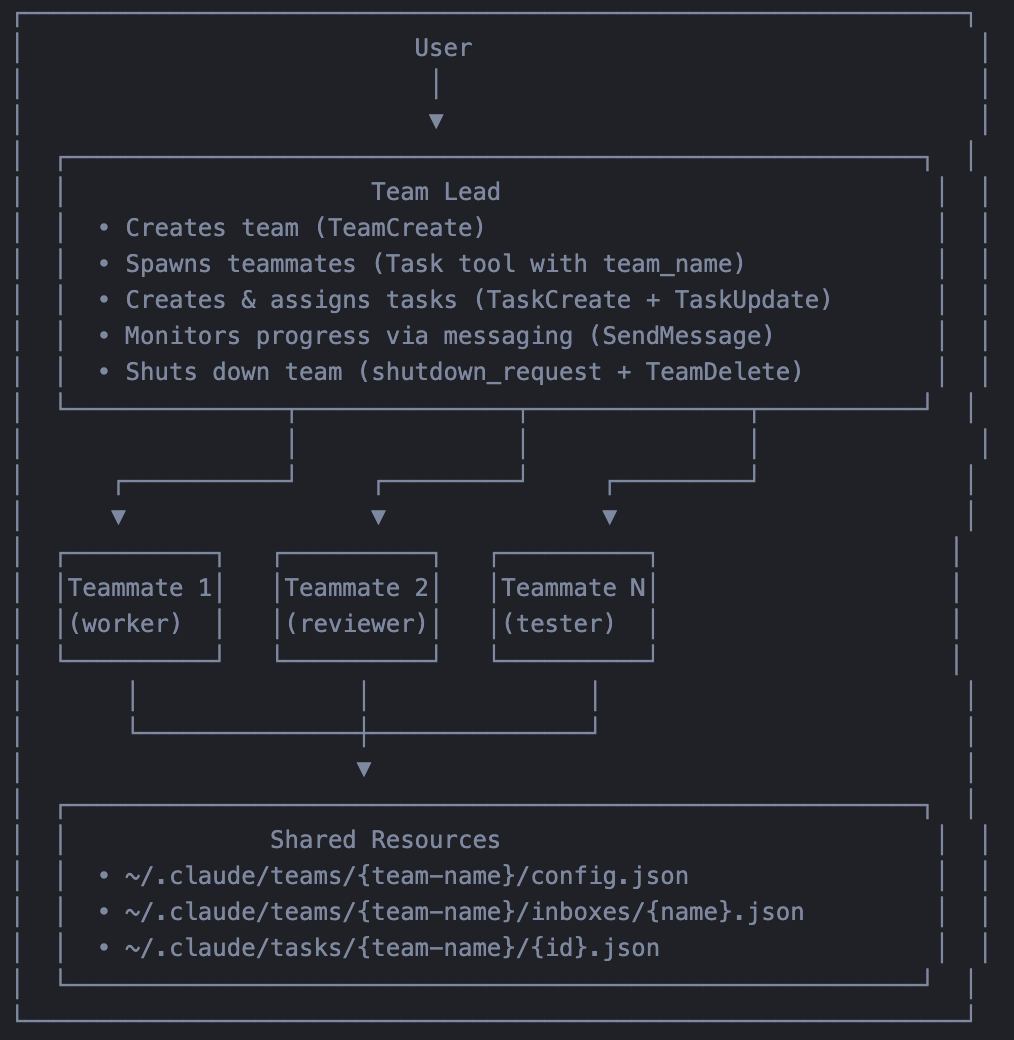
Claude Agent Teams is a feature where a team leader assigns tasks, teammates work in independent context windows, and agents can send and receive messages to each other.
You can enable it by setting the following environment variable.
At launch:
CLAUDE_CODE_EXPERIMENTAL_AGENT_TEAMS=1 claude~/.claude/settings.json:
{
  "env": {
    "CLAUDE_CODE_EXPERIMENTAL_AGENT_TEAMS": "1"
  }
}
For detailed setup instructions, refer to the official documentation.

Here are the options I typically use when launching. Some are optional. Just for reference.
  cd <working-directory> && \
    env \
    CLAUDECODE=1 \
    CLAUDE_CODE_EXPERIMENTAL_AGENT_TEAMS=1 \
    <claude-binary> \
    --agent-id <name>@<team> \
    --agent-name <name> \
    --team-name <team> \
    --agent-color <color> \
    --parent-session-id <uuid> \
    --agent-type <type> \
    --permission-mode <mode> \
    --max-turns <number> \
    --model <model>
Agent Teams vs Subagents
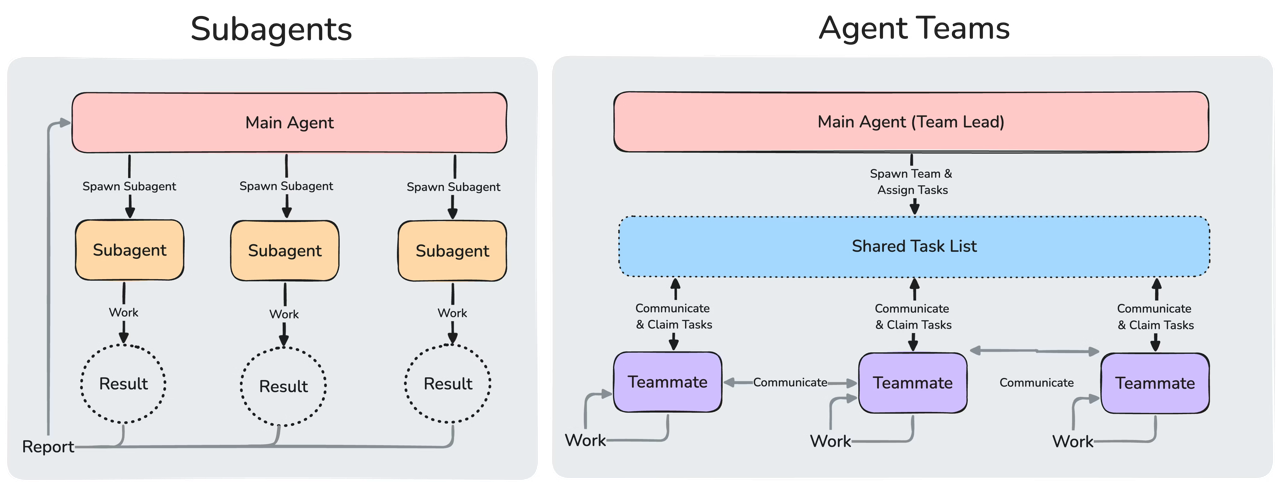
Claude Code already has a feature called Subagents. Since Subagents also allow multiple AI agents to run in parallel with independent contexts, they’re often compared to Agent Teams.
The key differences that set Agent Teams apart from Subagents are:
- Shared task list
- Inter-agent communication
- Information flow from teammates to the main agent
Let’s look at each one.
Shared Task List
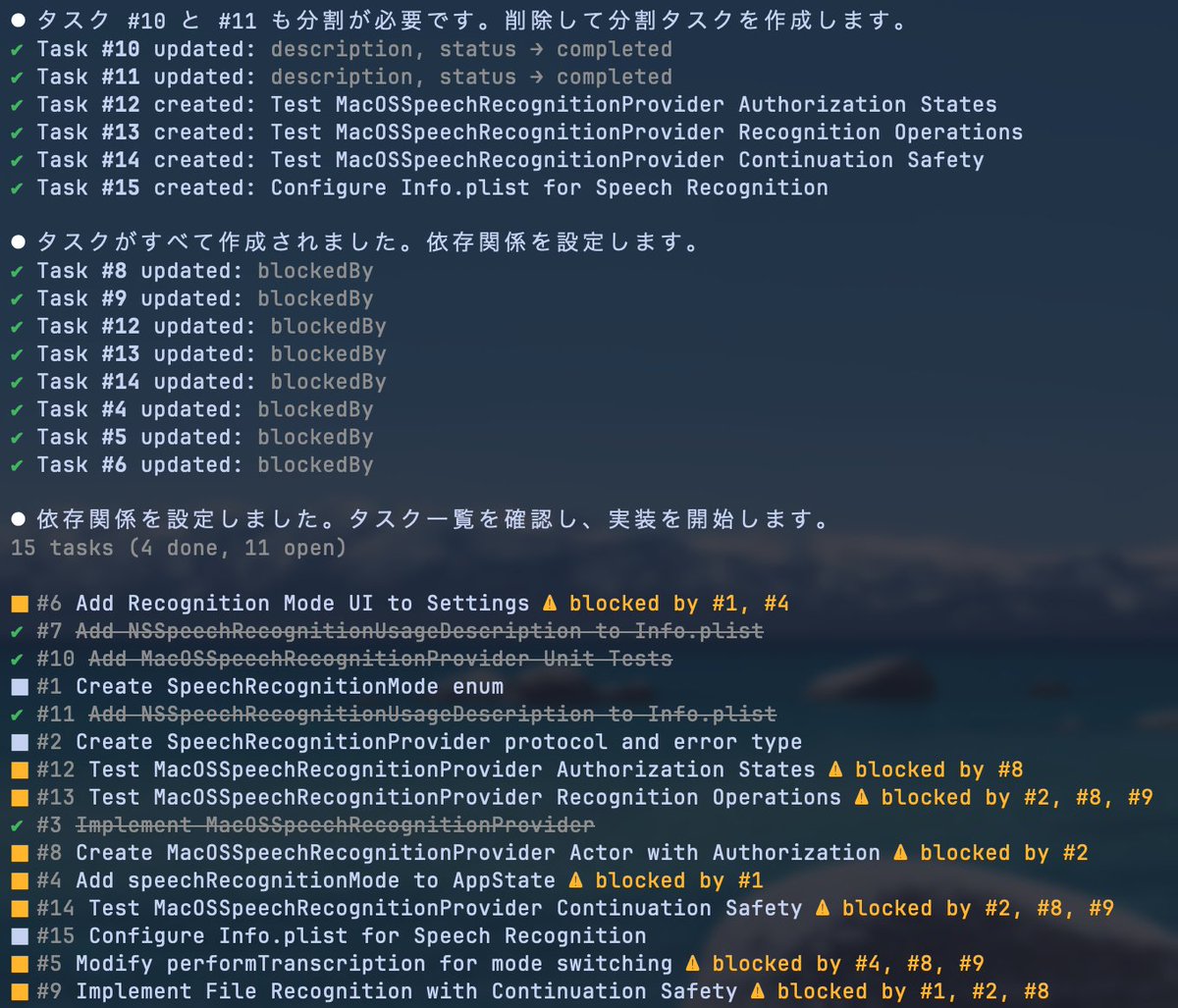
In Claude Agent Teams, teammates share a task list.
Claude Code’s Tasks System was revamped in January 2026, making task progress and dependencies much clearer. By using CLAUDE_CODE_TASK_LIST_ID, you can share the same task list across multiple Claude Code instances. This laid the groundwork for what became Agent Teams.
While Subagents can technically share tasks, Agent Teams leverages the Tasks System much more effectively within Claude Code’s harness.
The actual task list is stored at ~/.claude/tasks/{team-name}/. Here’s what the format looks like (just an example):
{
    "id": "1",
    "subject": "Create login handler with JWT token generation",
    "description": "**What**: ...\n**Where**: ...\n**How**: ...\n**Why**: ...\n**Verify**: ...",
    "activeForm": "Creating login handler",
    "status": "pending",
    "blocks": ["3"],
    "blockedBy": []
}
The Tasks System exposes four tools, which means you can add further control through PreToolUse Hooks:
- TaskCreate: Creates a new task in the task list
- TaskGet: Retrieves full details for a specific task
- TaskList: Lists all tasks with their current status
- TaskUpdate: Updates task status, dependencies, details, or deletes tasks

Inter-Agent Communication
A major difference from Subagents is that Agent Teams supports bidirectional communication between agents.
Under the hood, when an agent calls sendMessage, the message is recorded in ~/.claude/teams/{team-name}/inboxes/{name}.json. Other agents monitor these inboxes, so when a new message arrives, they pick it up, establishing inter-agent communication.
Here’s the schema used for message exchange:
[
  {
    "from": "team-lead",
    "text": "Task 1.4 (Auth integration) is complete. Here's a summary:...",
    "summary": "Task 1.4 auth integration complete, committed",
    "timestamp": "2026-02-14T06:37:35.599Z",
    "read": true
  }
]
This inter-agent communication allows the main agent and teammates to exchange messages even during task execution. This is largely why Agent Teams are considered effective for discussion-oriented tasks.
Information Flow from Teammates
Thanks to the shared Tasks System and inbox-based messaging, Agent Teams no longer require the main agent to receive all information from teammates. The main agent and teammates communicate as needed through the task list and message inboxes.
With Subagents, once the main agent delegated a task, it could only see the final result returned upon completion. The details of what the Subagent did were mostly hidden. On the flip side, this means Subagents are well-suited for tasks with clear completion criteria.
Claude Agent Teams
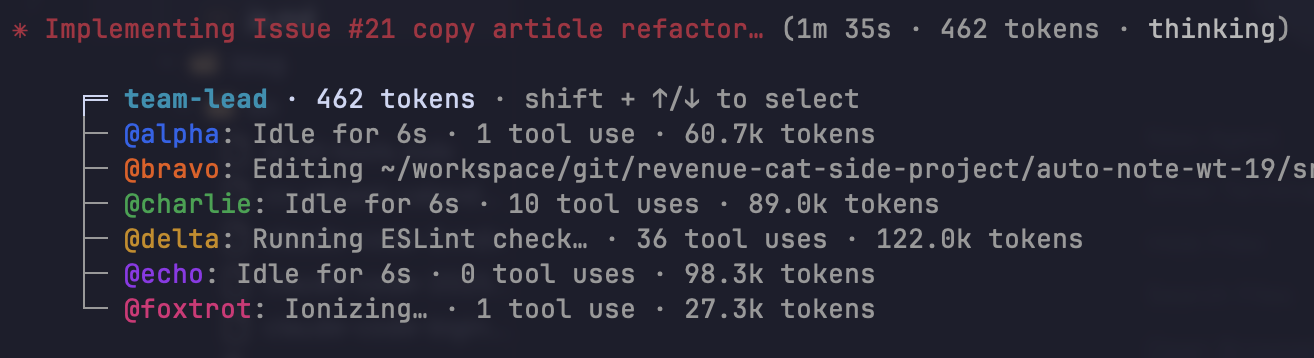
Claude Agent Teams has made agent orchestration significantly more accessible.
I currently use it in two main ways. I hope you find them useful.
1. Plan & Discussion
The strength of Agent Teams lies in “shared tasks” and “inter-agent communication.” Unlike Subagents, teammates remain in an idle state once launched until the main agent explicitly shuts them down.
This makes Agent Teams particularly effective for having AI agents discuss open-ended questions.
Here’s a prompt pattern I use frequently (just an example):
“Use Agent Teams with N teammates to discuss [topic] over 3 rounds. Have teammates communicate with each other within each round. Include a teammate dedicated to providing critical feedback from a Red Teaming perspective.”
I personally find these three aspects work well:
- Multi-round discussions
- Intra-round teammates discussions
- Red Teaming
Multi-round discussions in particular were difficult to achieve with Subagents.
I use Agent Teams for this kind of planning and open-ended discussion.
2. Task Execution
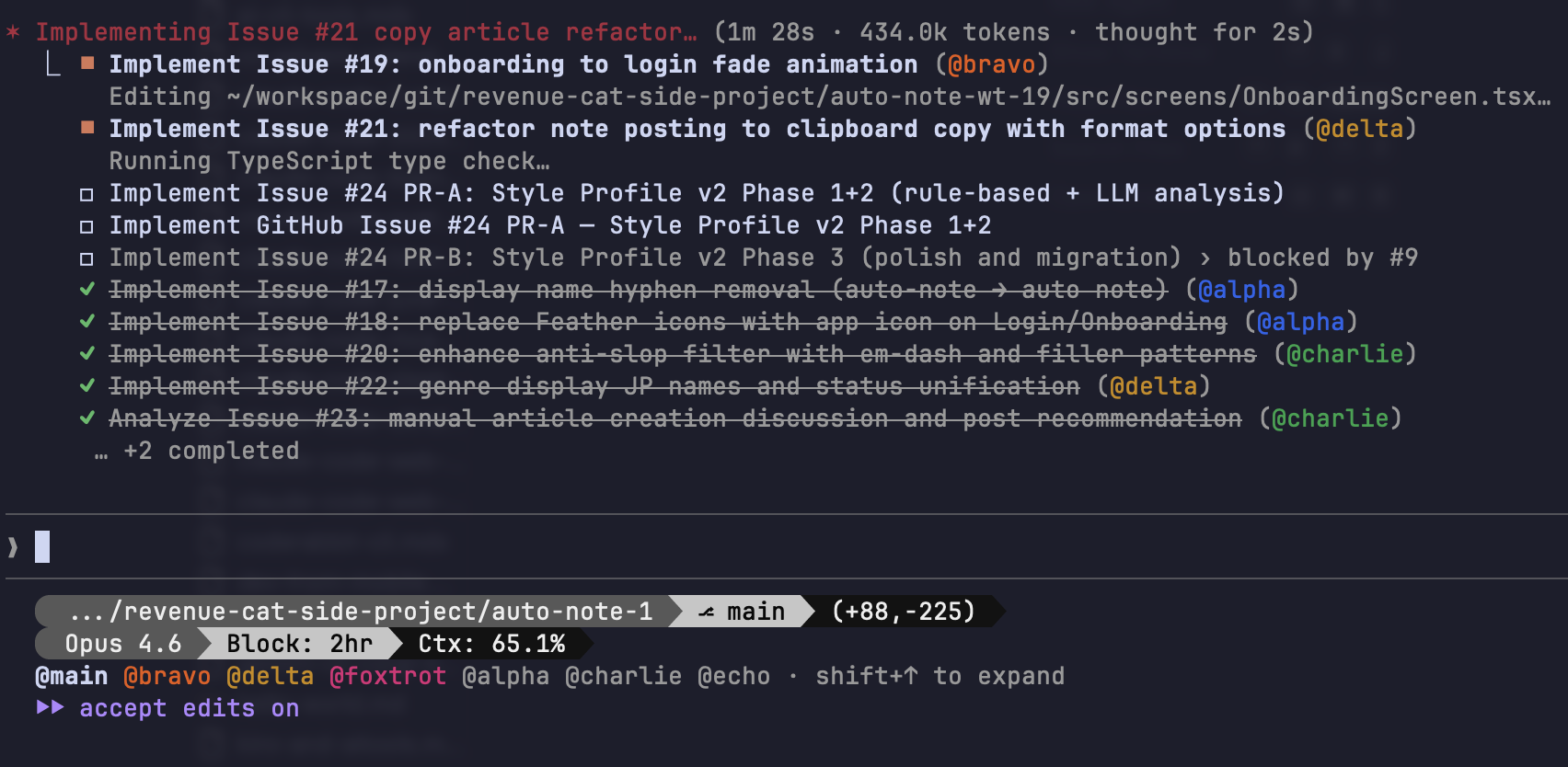
Agent Teams can also be used effectively for task execution.
With the Tasks System now supporting task breakdown and dependency management, Agent Teams with shared tasks can handle both sequential and parallel execution better than Subagents.
My personal tip is to carefully define task granularity and dependencies during the planning phase. Once you have a clear task list, you can simply instruct Claude Code to assign tasks appropriately to Agent Teams teammates and coordinate as needed. It usually executes faithfully.
There are several ways to create effective task lists:
- Set up Hooks for task-related events
- Pre-define tasks using Spec Driven Development tools
- Pre-define specs similar to what Ralph-loop requires
This comes down to preference, but ultimately you can dynamically spin up teammates for specific tasks, or even have teammates review each other’s work. Like Subagents, Agent Teams don’t consume the main agent’s context window, so delegating to teammates is worthwhile when tasks are clearly defined.
Though if you use it too much, you’ll hit the usage limit in no time.
Conclusion
I personally find Agent Teams to be a fascinating feature.
This year, not just Claude Code but other tools will likely roll out multi-agent orchestration features as well. I’d recommend giving it a try at least once.