Claude Code Advent Calendar: 24 Tips Summary
TL;DR
- Ran a solo Claude Code advent calendar from 12/1-12/24
- Shared 24 Claude Code tips on X (Twitter)
- Posts can be found at #claude_code_advent_calendar
| Day | Topic | Day | Topic |
|---|---|---|---|
| Day1 | Opus 4.5 Migration Guide | Day13 | Prevent with Sandbox |
| Day2 | Claude Code statusline | Day14 | Filtering with Hooks |
| Day3 | & to send to on the Web | Day15 | Formatting with Hooks |
| Day4 | Thinking Keywords | Day16 | Editor editing with Ctrl + G |
| Day5 | AGENTS.md Support | Day17 | Plan Mode |
| Day6 | on the Web Setup | Day18 | GIF creation with Claude in Chrome |
| Day7 | MCP Tool Context | Day19 | Agent Skills Best Practices |
| Day8 | Skill Creator | Day20 | Auto-compact Buffer Size |
| Day9 | Skills + Subagents | Day21 | Async Subagents |
| Day10 | Project Rules | Day22 | Code Action + Agent Skills |
| Day11 | CLAUDE.md Loading | Day23 | Parallel Execution of Claude Code |
| Day12 | Preventing rm -rf Tragedy | Day24 | Claude Code Ecosystem |
Background
In December, you start seeing tech article advent calendars. Engineers take turns writing technical articles on various tech topics from December 1st to 24th (sometimes 25th).
Meanwhile, I saw someone from Anthropic starting an advent calendar on X.

Advent of Claude Day 1 - The ! Prefix Don't waste tokens asking "can you run git status or tests?" Just type: ! followed by your bash command The ! prefix executes bash instantly and injects the output into context. No model processing. No delay. No wasted tokens.
Seeing this post, I thought I’d try it since I regularly share information about Claude Code.
I also thought it would be a good opportunity to investigate features I felt I hadn’t verified enough.
Claude Code Advent Calendar
I’ll repost and add commentary for each day from Day 1 to Day 24.
There’s probably at least one useful topic, so please take a look.
Topic List (repost)
| Day | Topic | Day | Topic |
|---|---|---|---|
| Day1 | Opus 4.5 Migration Guide | Day13 | Prevent with Sandbox |
| Day2 | Claude Code statusline | Day14 | Filtering with Hooks |
| Day3 | & to send to on the Web | Day15 | Formatting with Hooks |
| Day4 | Thinking Keywords | Day16 | Editor editing with Ctrl + G |
| Day5 | AGENTS.md Support | Day17 | Plan Mode |
| Day6 | on the Web Setup | Day18 | GIF creation with Claude in Chrome |
| Day7 | MCP Tool Context | Day19 | Agent Skills Best Practices |
| Day8 | Skill Creator | Day20 | Auto-compact Buffer Size |
| Day9 | Skills + Subagents | Day21 | Async Subagents |
| Day10 | Project Rules | Day22 | Code Action + Agent Skills |
| Day11 | CLAUDE.md Loading | Day23 | Parallel Execution of Claude Code |
| Day12 | Preventing rm -rf Tragedy | Day24 | Claude Code Ecosystem |
You can also check out actual posts with the hashtag #claude_code_advent_calendar.
【Day1】 Opus 4.5 Migration Guide
Original post
Claude CodeのAdvent CalendarでTipsをポストしようかな。もう2日だけどw 【Day1】 Opus 4.5はツールの利用に積極的になった分、ツールを呼ばなくても良いケースも呼んでコンテキストが埋まったりするので、動きをしっかり見ると良い。 #claude_code_advent_calendar

古いClaude モデルを Opus 4.5 へ移行する公式Skillsが面白い。Opus 4.5 の振る舞いが以前のモデルと変わっているので、以下の観点での修正指示をしている。 ・ツールの過剰な呼び出し ・オーバーエンジニアリング防止 ・コード探索不足 ・フロントエンドデザインの質 ・"think"

【Day1】 Opus 4.5 Migration Guide
The official Skills for migrating old Claude models to Opus 4.5 is interesting. Since Opus 4.5’s behavior differs from previous models, it provides modification instructions for:
- Excessive tool calling
- Preventing over-engineering
- Insufficient code exploration
- Frontend design quality
- Overreaction to “think” keyword
You can see Opus 4.5 model tendencies, which helps when crafting prompts.

Opus 4.5 has become more aggressive with tool usage, sometimes calling tools even when unnecessary and filling up context, so it’s good to watch its behavior carefully.
I shared that Anthropic’s official repository contains Skills for migrating Claude models. It’s a Skill for updating prompts used with Sonnet 4.0, Sonnet 4.5, and Opus 4.1 for Opus 4.5.
What’s interesting is the description of Opus 4.5 tendencies, like how it actively executes tool calls. Since model changes can alter behavior like API calls, it’s worth reading.
【Day2】 Claude Code statusline
Original post
【Day2】Claude Code statusline 先日の登壇で、「チャット欄下の使用量表示はどうやるの?」という質問が来ていました。 `/statusline <表示したい内容>` で作成できます。 簡単なおすすめ設定は、画像のccusage のstatuslineです! Thanks to @ryoppippi ! #claude_code_advent_calendar
![ccsuage statusline の設定画面と設定方法
~/.claude/settings.jsonに以下の設定をします
"statusLine": {
"type": "command",
"command": "bun x ccusage statusline",
"padding": 0
},
参考: https://github.com/ryoppippi/ccusage#usage
ちなみにgit branchを表示するために、個人的には以下のscriptを作ってcommandに設定しています
```bash
#!/bin/bash
# Read JSON input from stdin
input=$(cat)
# Extract current directory from JSON
cwd=$(echo "$input" | jq -r '.workspace.current_dir')
# Get git branch
git_branch=$(cd "$cwd" 2>/dev/null && git --no-optional-locks rev-parse --abbrev-ref HEAD 2>/dev/null)
# Get ccusage output by passing the same JSON input
ccusage_output=$(echo "$input" | bun x ccusage statusline 2>/dev/null)
# Format output with branch at the front
if [ -n "$git_branch" ]; then
printf "\033[1;36m[%s]\033[0m %s" "$git_branch" "$ccusage_output"
else
printf "%s" "$ccusage_output"
fi
```](https://pbs.twimg.com/media/G7KOLD7a8AARe0N?format=jpg&name=small)
【Day2】 Claude Code statusline
At a recent presentation, someone asked “How do you show usage below the chat?”
You can create it with /statusline <what you want to display>.
An easy recommended setup is the ccusage statusline in the image! Thanks to @ryoppippi!

Claude Code’s statusline is a hidden gem that many don’t know about.
You can display the model being used, Git branch, etc. below the chat area.
If you haven’t used statusline before, you could use settings from GitHub, but I recommend trying ryoppippi’s ccusage settings.
{
  "statusLine": {
    "type": "command",
    "command": "bun x ccusage statusline"
  }
}
【Day3】 Send to on the Web with &
Original post
【Day3】`&` でon the Webに送る Claude Code CLIでプロンプトに `&`を先頭に付けると、タスクをClaude Code on the Webに送ることができる。 on the Webは「CLIから開く」ボタンで、ローカルに転送可能。 ちなみにローカルのモデルがon the Webでも使われる。 #claude_code_advent_calendar
【Day3】 Send to on the Web with &
In Claude Code CLI, prefixing your prompt with & sends the task to Claude Code on the Web.
on the Web can be transferred to local with the “Open from CLI” button.
By the way, the local model is also used on the Web.
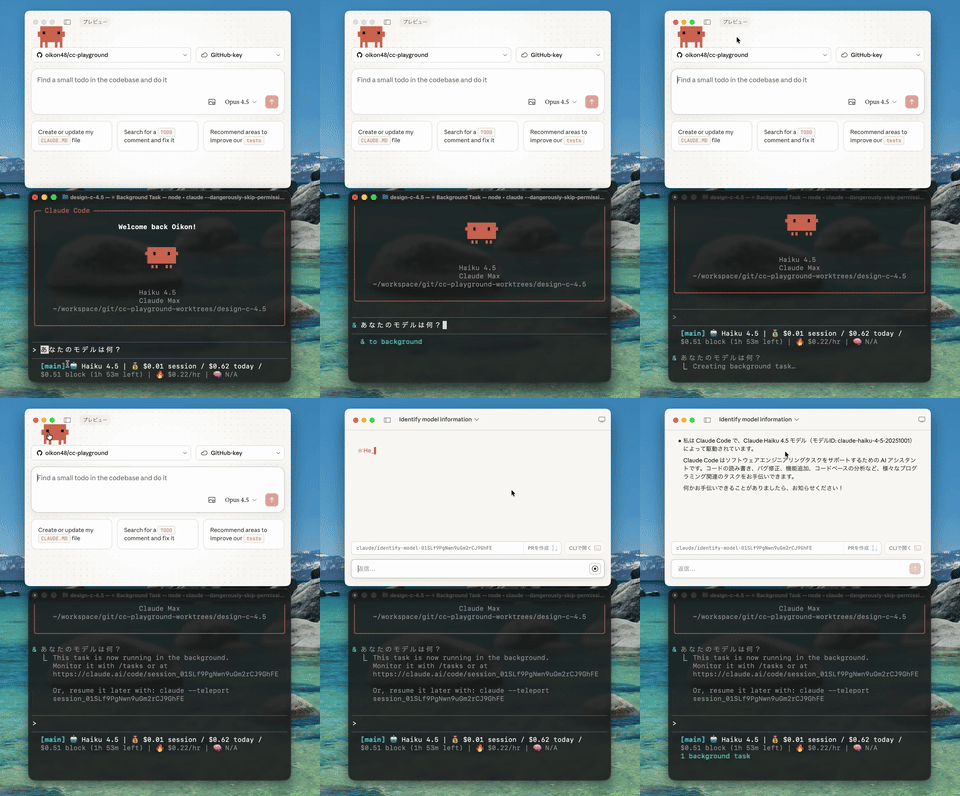
This feature was added in Claude Code 2.0.45. With Claude Code on the Web’s appearance, local and remote tasks can now be connected.
Especially from the local CLI, you can easily throw small tasks as background tasks, so there are many use cases.
【Day4】 Thinking Keywords
Original post
【Day4】Thinking キーワード Claude CodeのThinking(拡張思考)は、内部推論を挟み複雑なタスクが可能に。Tabで有効化できる。 ⭕️ ultrathink ❌ think, think hard, 考えて, よく考えて 以前のThinkingキーワードの多くは無効になり、現在は ultrathink のみ有効 #claude_code_advent_calendar
【Day4】 Thinking Keywords
Claude Code’s Thinking (extended thinking) enables complex tasks by inserting internal reasoning. Can be enabled with Tab.
[valid] ultrathink [invalid] think, think hard, etc.
Many previous Thinking keywords have been disabled, and currently only ultrathink is valid
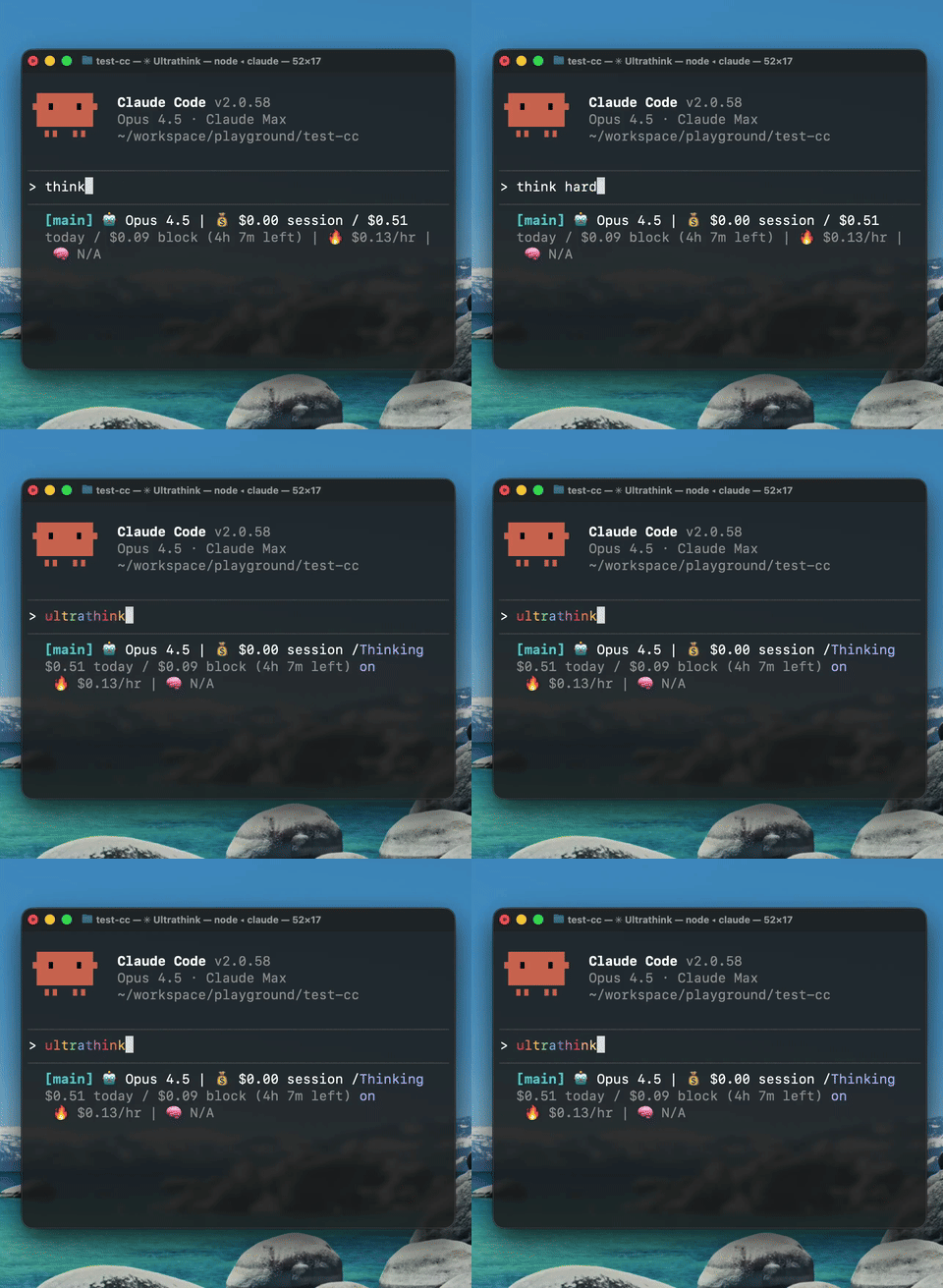
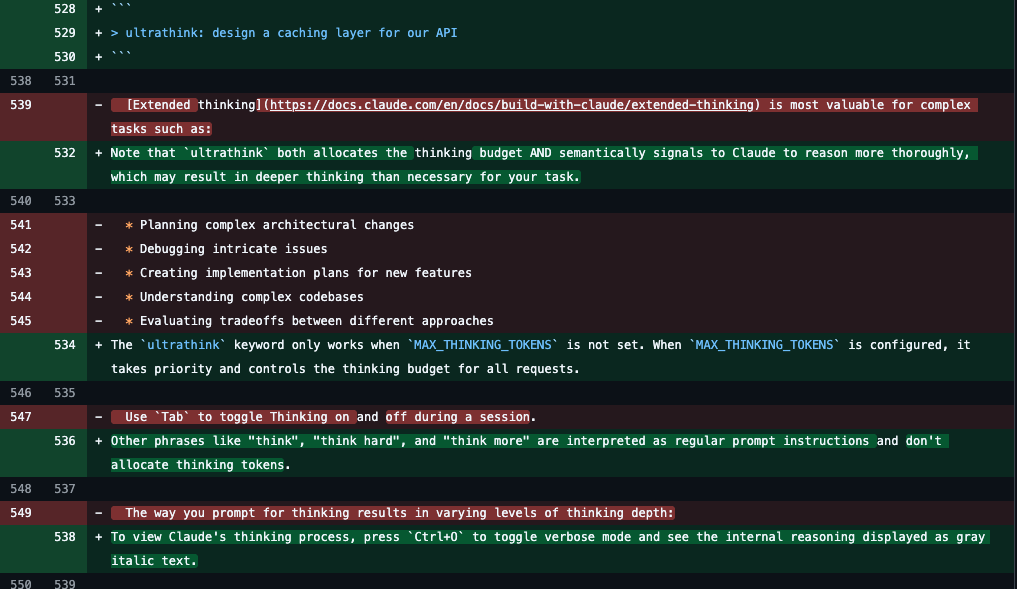
This has been misunderstood for a long time, but current Claude Code doesn’t trigger Thinking (extended thinking) with keywords other than ultrathink.
When Claude Code 2.0.0 allowed toggling Thinking mode, think and think hard stopped working.
Even someone from Anthropic didn’t seem to know, so it’s understandable if you didn’t know.
By the way, the official documentation was updated on December 13th. It took 2 months to update…
【Day5】 Claude Code AGENTS.md Support
Original post
【Day5】Claude Codeの AGENTS .md 対応 Claude CodeはAGENTS .mdを公式サポートしていないが回避策は存在する。 CLAUDE .mdの中で、`@ AGENTS .md`をImportすることでメモリファイル参照してくれるようになる。 Importされたかは`/memory`コマンドで確認可能。 #claude_code_advent_calendar

【Day5】 Claude Code AGENTS.md Support
Claude Code doesn’t officially support AGENTS.md but workarounds exist.
By importing @AGENTS.md in CLAUDE.md, it will reference the memory file.
You can verify it was imported with the /memory command.

Claude Code doesn’t support AGENTS.md. This has been discussed on GitHub issues since August.
Anthropic’s official documentation does mention a solution: import AGENTS.md within CLAUDE.md.
Another workaround is setting up a symbolic link with ln -s AGENTS.md CLAUDE.md.
【Day6】 Claude Code on the Web Setup
Original post
【Day6】Claude Code on the Web のSetup #claude_code_advent_calendar CC on the Webには`CLAUDE_CODE_REMOTE`という環境変数が用意されており、リモート環境か判定できる。これとSessionStart Hooks利用することで、リモート環境限定のSetupが可能。 実は session-start-hook がリモートのon

【Day6】 Claude Code on the Web Setup
CC on the Web has an environment variable called CLAUDE_CODE_REMOTE that determines if you’re in a remote environment. Using this with SessionStart Hooks enables remote-only setup.
Actually, session-start-hooks are prepared in global settings for remote on the Web environments, so you can easily ask to create Hooks that only launch in remote environments.

Since Claude Code on the Web uses a remote sandbox environment, you can’t bring in local setup.
By detecting with CLAUDE_CODE_REMOTE and running setup scripts with SessionStart Hooks only for remote, you can reproduce local setup in remote.
By the way, Claude Code on the Web has built-in session-start-hooks, and the official team also recommends using SessionStart Hooks in remote.
【Day7】 MCP Tool Context
Original post
【Day7】MCPツールのコンテキスト #claude_code_advent_calendar Claude Codeでは `/context` コマンドで、コンテキストウィンドウ内のプロンプトやツールの占有量が確認可能。 特に注意するべきはMCPツールであり、ものによっては8% ~

【Day7】 MCP Tool Context
In Claude Code, you can check prompt and tool occupancy in the context window with the /context command.
Pay special attention to MCP tools, as some occupy 8% ~ 30% (assuming 200k). Using minimal MCP tools is desirable.

MCP tools occupy context just by existing because they load tool descriptions into AI agents.
Browser operation MCP tools in particular tend to consume large amounts of context.
Some say using MCP tools with Skills solves the context problem, but as long as MCP tools are in the AI agent’s context, it doesn’t solve it. There are cases where using Skills with scripts or API calls equivalent to MCP tools (without using MCP servers) can reduce context pressure.
【Day8】 Create Claude Skills with Skill Creator
Original post

【Day8】 Create Claude Skills with Skill Creator
Claude Skills is a feature that dynamically loads abilities to execute specialized tasks. Skills were recently added to Codex CLI too and are gaining attention.
Easy to try with the official “Skills that create Skills (skill-creator)”
/plugin marketplace add anthropics/skills
/plugin install example-skills@anthropic-agent-skills
Restart Claude Code, then you can trigger skill-creator skills by requesting “Create a skill for XX”.

This is skill-creator for creating Agent Skills. I’ve seen it become a topic recently, but skill-creator has existed since October.
If you ask “Create a skill for XX”, the Skills-creating-Skills will activate, making it suitable for creating Skill drafts.
However, it doesn’t necessarily follow best practices, so refinement is needed. I cover best practices in 【Day19】.
【Day9】 Claude Skills + Subagents
Original post
【Day9】Claude Skills + Subagents #claude_code_advent_calendar SkillsとSubagentsの使い分けは、「知識やワークフローの提供」と「専門タスクの実行」の観点で考えると良い。相互に補完し合う関係にあり、連携することも可能。 SubagentsにはYAMLフロントマターで`skills`

【Day9】 Claude Skills + Subagents
Think of Skills vs Subagents differentiation as “providing knowledge and workflows” vs “executing specialized tasks”. They complement each other and can be linked.
Subagents can define skills in YAML frontmatter. For example, as in the image, you can define two specific Skills for fullstack Subagents. Skills defined here are automatically loaded into context when Subagent launches.

Around this time Codex CLI supported Skills, so I was introducing Skills tips.
This is a method to explicitly specify Skills with frontmatter for Subagents that execute specialized tasks.
You can surprisingly specify a lot with frontmatter, so it’s good to read the official documentation.
【Day10】 Project Rules .claude/rules/
Original post
【Day10】Project ルール `.claude/rules/` #claude_code_advent_calendar Claude CodeはCLAUDE .md の他に、rulesを設定可能。`.claude/rules/` にMarkdownでプロジェクトルールを記載する。トピック別のプロジェクト指示が管理しやすい。 (例) ・コードスタイル ・テスト規約 ・セキュリティ

【 .claude/rules の実験 】 公式ドキュメントには「全てのメモリファイルはロードされる」と書いてある。.claude/rulesで特定のファイルを指定しても、コンテキストの削減に繋がらない感じかと思って検証してみた。 結論: 動的に rules がロードされるっぽい


【Day10】 Project Rules .claude/rules/
Claude Code can set rules besides CLAUDE.md. Write project rules in Markdown in .claude/rules/.
Topic-based project instructions are easy to manage.
(Examples)
- Code style
- Test conventions
- Security
Rules that apply only to specific files can be defined with YAML frontmatter:
(Example)
paths: src/api/**/*.ts
Based on verification, rules appear to be dynamically loaded into context via Glob pattern matching.
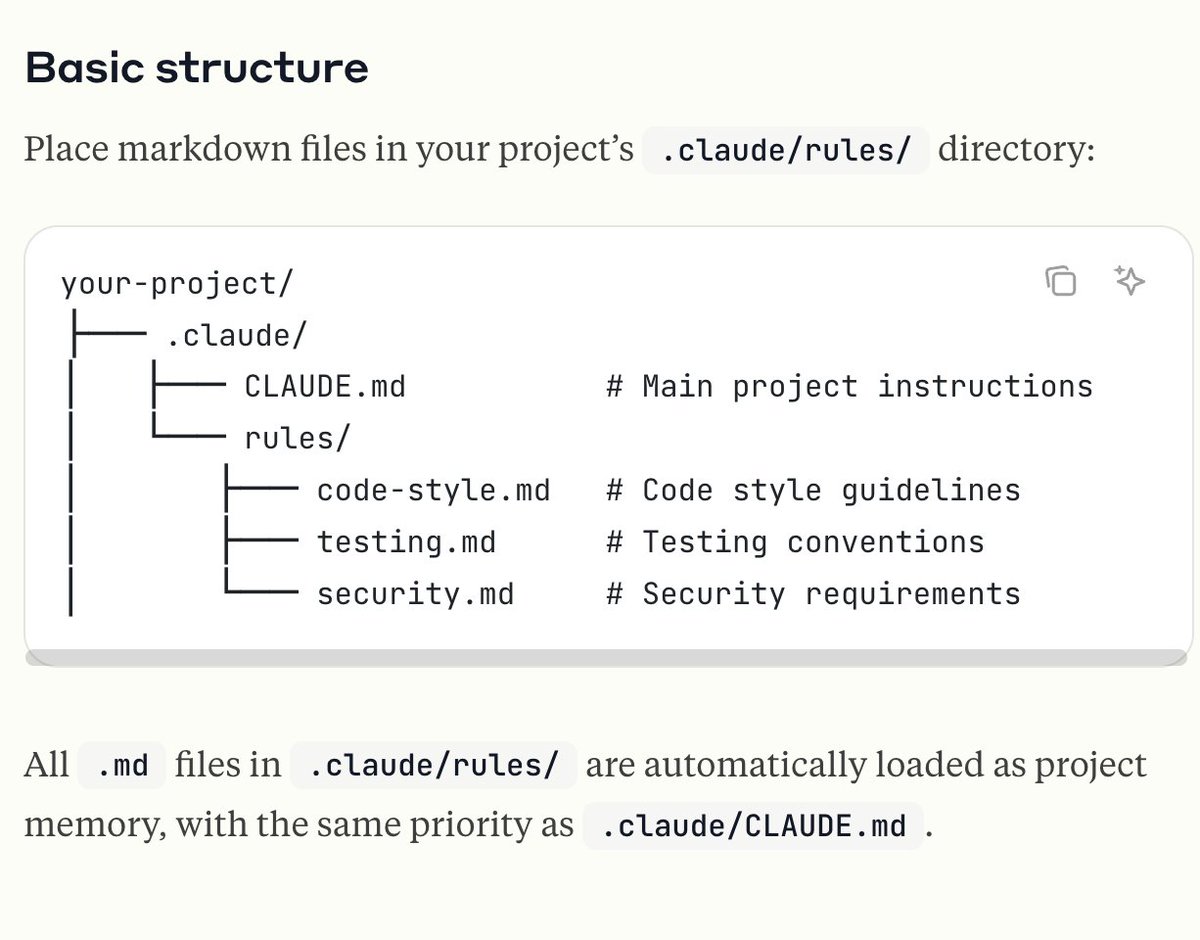
I introduced this because Project rules were supported in v2.0.64.
I also verified that rules can be dynamically loaded with paths frontmatter settings.
【 .claude/rules の実験 】 公式ドキュメントには「全てのメモリファイルはロードされる」と書いてある。.claude/rulesで特定のファイルを指定しても、コンテキストの削減に繋がらない感じかと思って検証してみた。 結論: 動的に rules がロードされるっぽい
【`.claude/rules/` のサポートを追加】 `.claude/rules/` 以下にプロジェクトルールを追加可能。CLAUDE .mdの肥大化を防げる。大規模プロジェクトなどでは有効。 特筆すべきは、パスやファイル拡張子でルール適用を限定できるため、より柔軟なプロジェクトルールの適応が可能に。


【Day11】 CLAUDE.md Loading
Original post
【Day11】 CLAUDE.md のロード #claude_code_advent_calendar Claude Codeのプロジェクト CLAUDE.md は以下の2箇所に定義でき、起動時にロードされる ./CLAUDE.md ./.claude/CLAUDE.md ネストされたディレクトリにも定義でき、

【Day11】 CLAUDE.md Loading
Claude Code’s project CLAUDE.md can be defined in these 2 locations and is loaded at startup:
./CLAUDE.md ./.claude/CLAUDE.md
It can also be defined in nested directories, which are not loaded at startup but read when operating within that directory, as shown in the image.
From v2.0.64, ./.claude/rules project rules are supported. Rules are recommended for large projects, and since rules can more flexibly limit application conditions than CLAUDE.md, you can now choose between nested CLAUDE.md and rules based on your project.

When Claude Code’s Project rules were implemented, the difference from CLAUDE.md became a topic, so I introduced it.
The conventional method of placing separate CLAUDE.md in directories like frontend or backend to progressively read CLAUDE.md also exists. It’s about differentiating from Project rules.
【Day12】 Preventing the rm -rf Tragedy
Original post
【Day12】`rm -rf` の悲劇を防ぐ #claude_code_advent_calendar Claude Codeユーザーが最近も増えているので注意喚起。定期的に話題に上がるのが、AIエージェントが `rm -rf` を実行してディレクトリを消したなどの悲劇。先日もRedditで話題になっていた。 回避する方法は色々あるが、まずは

【Day12】 Preventing the rm -rf Tragedy
A heads up since Claude Code users are increasing lately.
A periodically trending topic is tragedies like AI agents executing rm -rf and deleting directories. It was recently a topic on Reddit too.
There are various ways to avoid this, but first configure permissions.deny in settings.json. By denying rm or DB operation command permissions here, you can somewhat avoid tragedies where Claude Code mistakenly deletes files or directories that shouldn’t be deleted.
You can also flexibly set permissions.ask to have Claude confirm before executing rm. Even with the --dangerously-skip-permissions option, permissions settings take priority.

This is about AI agents executing rm -rf. Honestly, I’ve seen it so many times I’m tired of it lol. But I don’t want new users to be disappointed with Claude Code, so I covered it.
It got quite a reaction since it was also trending on Reddit.
【Day13】 Prevent rm -rf with Sandbox
Original post
【Day13】Sandbox で`rm -rf`を予防 #claude_code_advent_calendar Claude Codeは /sandbox コマンドで、ファイルシステムとネットワークのアクセスを制限できる。アクセスできるディレクトリやネットワークは permissions でコントロール可能。 Sandbox外ではEditやReadだけでなく、Bashの`rm`
【Day13】 Prevent rm -rf with Sandbox
Claude Code can restrict file system and network access with the /sandbox command. Accessible directories and networks can be controlled with permissions.
Outside the Sandbox, not only Edit and Read but also Bash rm commands can’t be executed, limiting changes to the working directory and permitted directories.
Combining Sandbox settings with 【Day12】 permissions settings can create a development environment where AI agent file operation accidents are less likely.
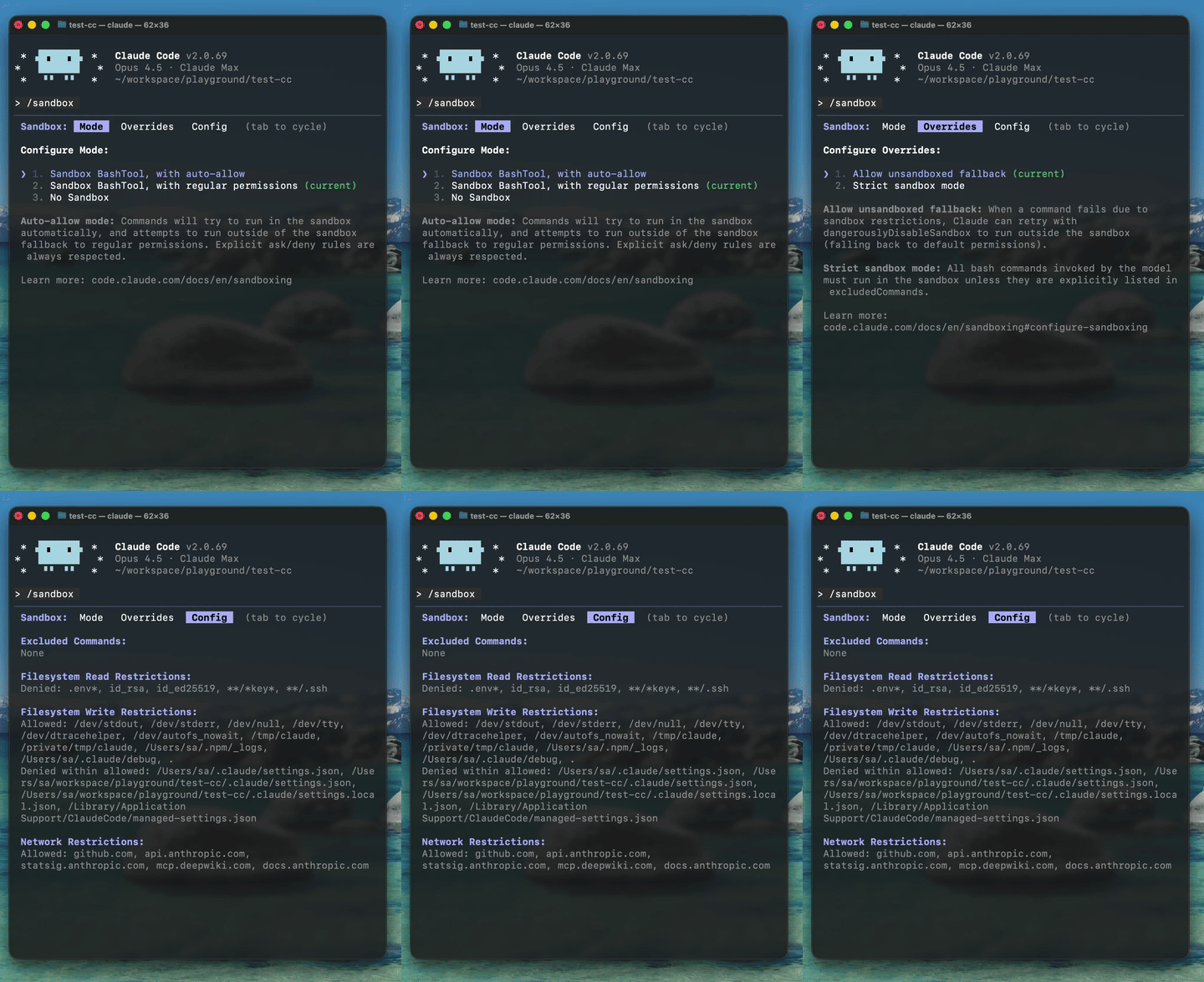
Following 【Day12】‘s rm -rf command. I now recommend using Sandbox to prevent changes outside the working directory.
You can also stop commands before execution with Hooks, etc. Multiple defensive measures can strengthen your guardrails.
【Day14】 Filtering with Claude Hooks
Original post
【Day14】Claude Hooks でフィルタリング #claude_code_advent_calendar Claude CodeのHooksを活用すれば、AIエージェントに渡す情報のフィルタリングが可能。UserPromptSubmit や PreToolUse を使うのが効果的。 例えば、API
【Day14】 Filtering with Claude Hooks
Using Claude Code’s Hooks enables filtering information passed to AI agents. UserPromptSubmit or PreToolUse are effective.
For example, in cases where API keys are in prompts or files, you can block them with Hooks before they’re read by the AI agent. Can be used for filtering sensitive information.
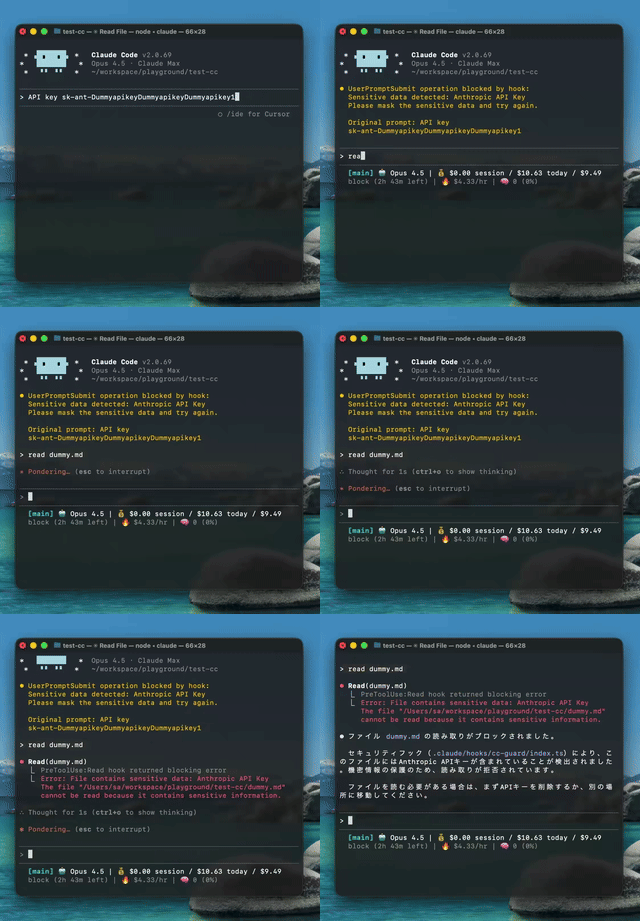
I covered Hooks because I saw opinions that Claude Hooks are difficult to use.
I personally hadn’t used UserPromptSubmit and PreToolUse Hooks, so I created filtering Hooks while researching.
This example pre-checks and stops execution, but UserPromptSubmit can also be used for prompt appending, so Hooks are actually quite deep.
【Day15】 Formatting with Claude Hooks
Original post
【Day15】Claude Hooks でフォーマット #claude_code_advent_calendar Claude CodeのHooksは、イベントにフックしてスクリプトを実行することができ、Claude Codeに決定的な動作を可能にする。代表的な使い方だと、Linter やFormatter をHooksで起動する。 例として、Claude Codeの PostToolUse
![Example of Claude Code PostToolUse Hooks. Showing Claude Code execution, settings.json and sample hooks script:
settings.json sample:
```json
{
"hooks": {
"PostToolUse": [
{
"matcher": "Write|Edit",
"hooks": [
{
"type": "command",
"command": "~/.claude/hooks/format-code.sh"
}
]
}
]
}
}
```
sample hooks script:
```
#!/bin/bash
# PostToolUse hook: Format code files with Prettier
set -e
# Read file path from stdin JSON
file_path=$(jq -r '.tool_input.file_path // empty')
# Exit if no file path
[ -z "$file_path" ] && exit 0
# Skip node_modules
[[ "$file_path" == *"node_modules"* ]] && exit 0
# Format with Prettier (use local installation only)
npx --no-install prettier --write "$file_path" 2>/dev/null || true
```](https://pbs.twimg.com/media/G8NAMQ1b0AARnWR?format=jpg&name=small)
【Day15】 Formatting with Claude Hooks
Claude Code’s Hooks can hook into events and execute scripts, enabling deterministic behavior for Claude Code. A typical use is launching Linters or Formatters with Hooks.
As an example, here’s a sample that auto-runs prettier after file editing with Claude Code’s PostToolUse Hooks. Setting up a Hooks sample script in settings.json as shown in the image shows PostToolUse Hooks firing after Claude Code edits.

Continuing from 【Day14】, this is Claude Hooks.
Many people probably use PostToolsUse Hooks for formatting. I covered it because I wanted people to try Hooks since the benefit is being able to deterministically process outside Claude’s context.
【Day16】 Editor Editing with Ctrl + G
Original post
【Day16】Ctrl + G でエディタ編集 #claude_code_advent_calendar Claude Codeでは`Ctrl + G`で、外部エディタを開いて編集ができる。プロンプトだけでなくPlanモードの編集も可能。 外部エディタは環境変数`VISUAL`で決まる e.g.) export VISUAL="vim" export VISUAL="emacs" export
【Day16】 Editor Editing with Ctrl + G
In Claude Code, Ctrl + G opens an external editor for editing. Not just prompts but Plan mode editing too.
External editor is determined by environment variable VISUAL
e.g.) export VISUAL=“vim” export VISUAL=“emacs” export VISUAL=“code —wait” export VISUAL=“cursor —wait”
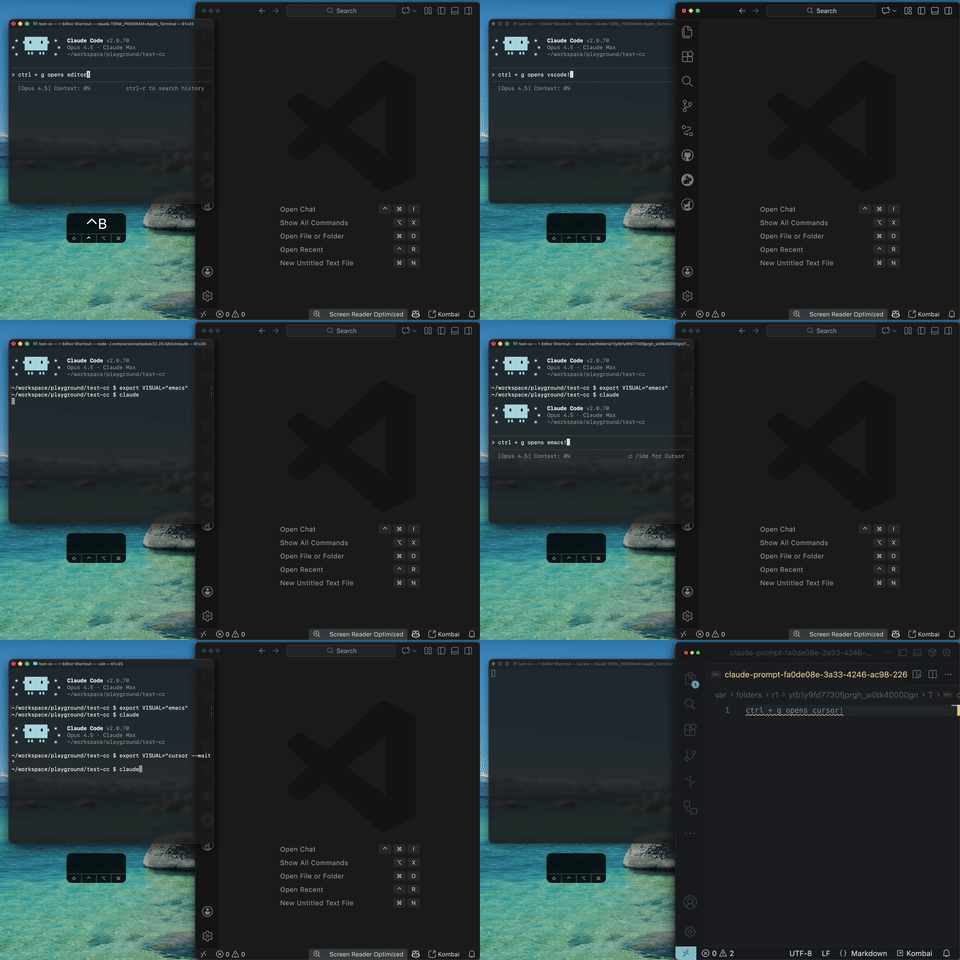
Claude Code allows editing with your familiar editor using Ctrl + G.
I forgot to mention in the post, but it checks EDITOR as well as VISUAL. If both exist, VISUAL takes priority.
【Day17】 Plan Mode
Original post
【Day17】Planモード #claude_code_advent_calendar Claude Code はShift + TabでPlan モードに切り替えることが可能。Claudeの作成した計画書は【Day16】で紹介した Ctrl + G で編集可能。 Planモードのドキュメントは、`~/.claude/plans/`

【Day17】 Plan Mode
Claude Code can switch to Plan mode with Shift + Tab. Claude’s created plan document can be edited with Ctrl + G from 【Day16】.
Plan mode documents are now saved to ~/.claude/plans/ where you can check details. However, you currently can’t generate Plan documents to arbitrary paths.
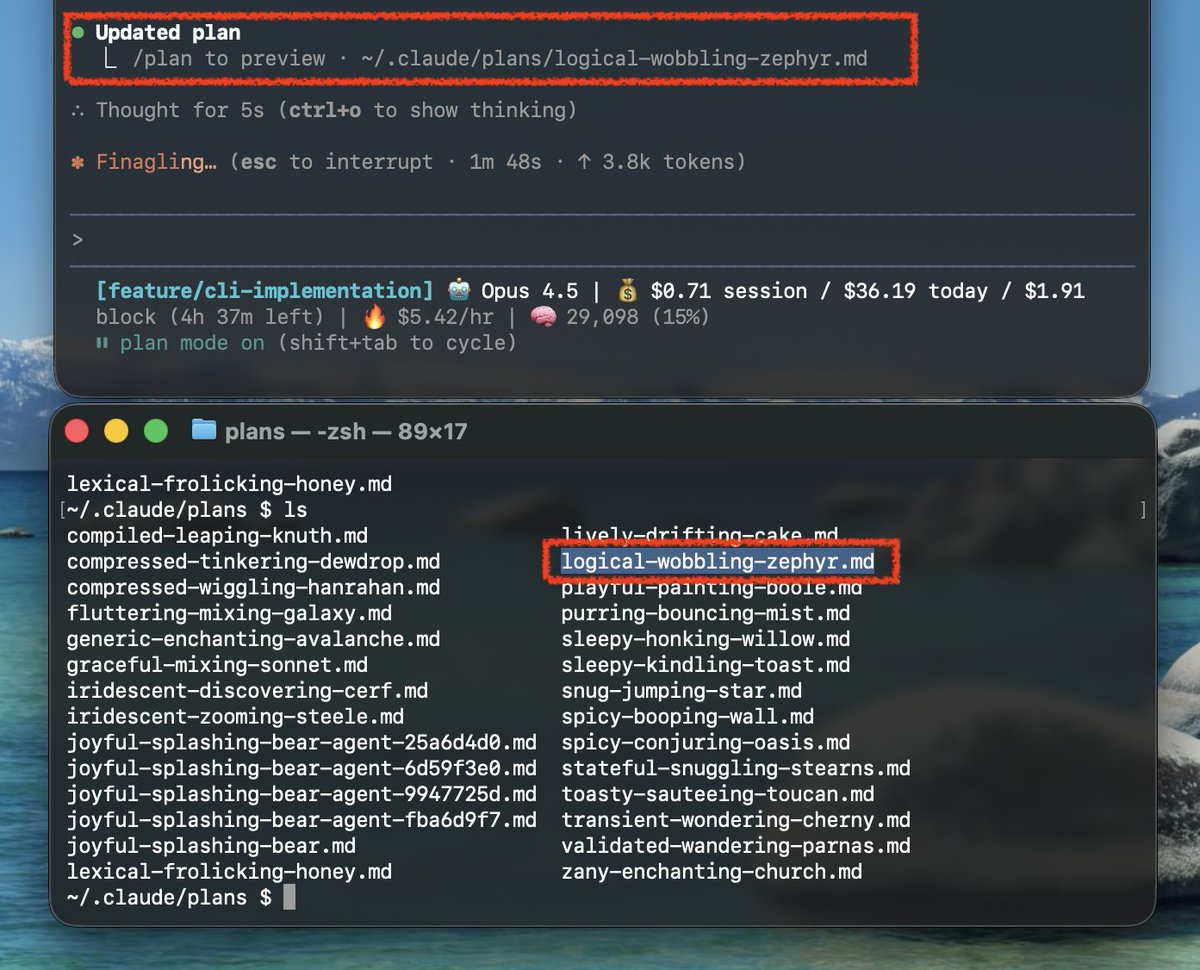
I introduced Plan mode since it’s had frequent changes. The recent ability to save as documents around v2.0.34 was a big change.
There’s also an Issue about wanting to specify Plan document locations, so Plan mode document generation location may become specifiable in the future.
【Day18】 GIF Creation with Claude in Chrome
Original post
【Day18】Claude in Chrome でGIF作成 #claude_code_advent_calendar Claude Code と Chrome デスクトップを連携する機能がv2.0.72から追加された。/chrome コマンドで設定可能。 Claude in Chrome にはGIF作成機能がある。これはWeb
【Day18】 GIF Creation with Claude in Chrome
A feature linking Claude Code and Chrome desktop was added from v2.0.72. Configurable with /chrome command.
Claude in Chrome has a GIF creation feature. This records browser operations and outputs the whole process as a GIF. You can create simple operation guides for web apps with this feature.
For example, the video shows creating GIFs for two cases, success and failure, for flight search. Download GIFs via browser. Actually created GIFs attached in thread (link below)
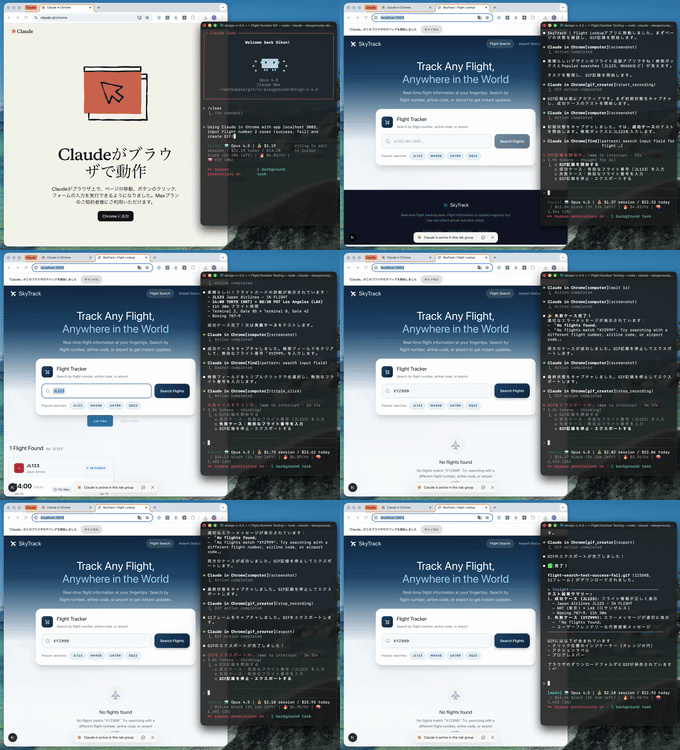
I introduced this because the Claude in Chrome feature was released.
While there’s some overlap with Chrome DevTools MCP, the big point is that it’s now easier to operate Chrome using user profiles.
I introduced detailed features in a separate post:
Claude Code 2.0.72 から Chromeが操作できるようになりました。 /chrome コマンドでStatusとExtensionが有効になっていることを確認した上で、ブラウザ操作をお願いすると、MCPツール(mcp__claude-in-chrome__) を使用してブラウザを操作してくれます。 claude --chrome でも有効にできます。
【Day19】 Agent Skills Best Practices
Original post
【Day19】Agent Skillsベストプラクティス #claude_code_advent_calendar Agent Skillsがオープンスタンダードになった。Claude以外のCursorやGitHub CopilotでSkillsを利用できる。 Agent Skillsを作る際には、Claude Skillsベストプラクティスが参考になる↓ ・SKILL .mdは500行以下

【Day19】 Agent Skills Best Practices
Agent Skills became an open standard. Skills can be used in Cursor and GitHub Copilot besides Claude.
When creating Agent Skills, Claude Skills best practices are helpful↓
- SKILL.md should be under 500 lines
- Examples should be specific
- File references up to 1 level deep
- Set progressive disclosure appropriately
- Clear step workflows
- Utilize scripts
- Don’t use Windows-style paths
- Verification and feedback loops for important operations
- At least 3 evaluations
- Tested on multiple models
etc.
Beyond these, naming conventions and anti-patterns are published, with many useful reference points. First create Agent Skills using “【Day8】Create Claude Skills with Skill Creator”, then refine from there.

Claude Skills became an open standard and was renamed to Agent Skills. I expect it will get attention for a while like MCP did last year.
The Skill authoring best practices published in October was also getting renewed attention, so I covered it here.
【Day20】 Auto-compact Buffer Size
Original post
【Day20】Auto-compact Bufferサイズ #claude_code_advent_calendar Claude CodeはAuto-comapactを有効にした時、会話を自動圧縮をするためのバッファ(Auto-compact Buffer)が存在する。 このAuto-compact Bufferは、環境変数CLAUDE_CODE_MAX_OUTPUT_TOKENS で変動する。デフォルトは32k

【Day20】 Auto-compact Buffer Size
When Claude Code has Auto-compact enabled, there’s an Auto-compact Buffer for auto-compressing conversations.
This Auto-compact Buffer varies with environment variable CLAUDE_CODE_MAX_OUTPUT_TOKENS. Default is 32k, occupying 22.5% of 200k context window. Model overview shows 64k is max, but in that case understand nearly 40% of context window is occupied by buffer.
No buffer difference was seen between Haiku, Sonnet, and Opus models.
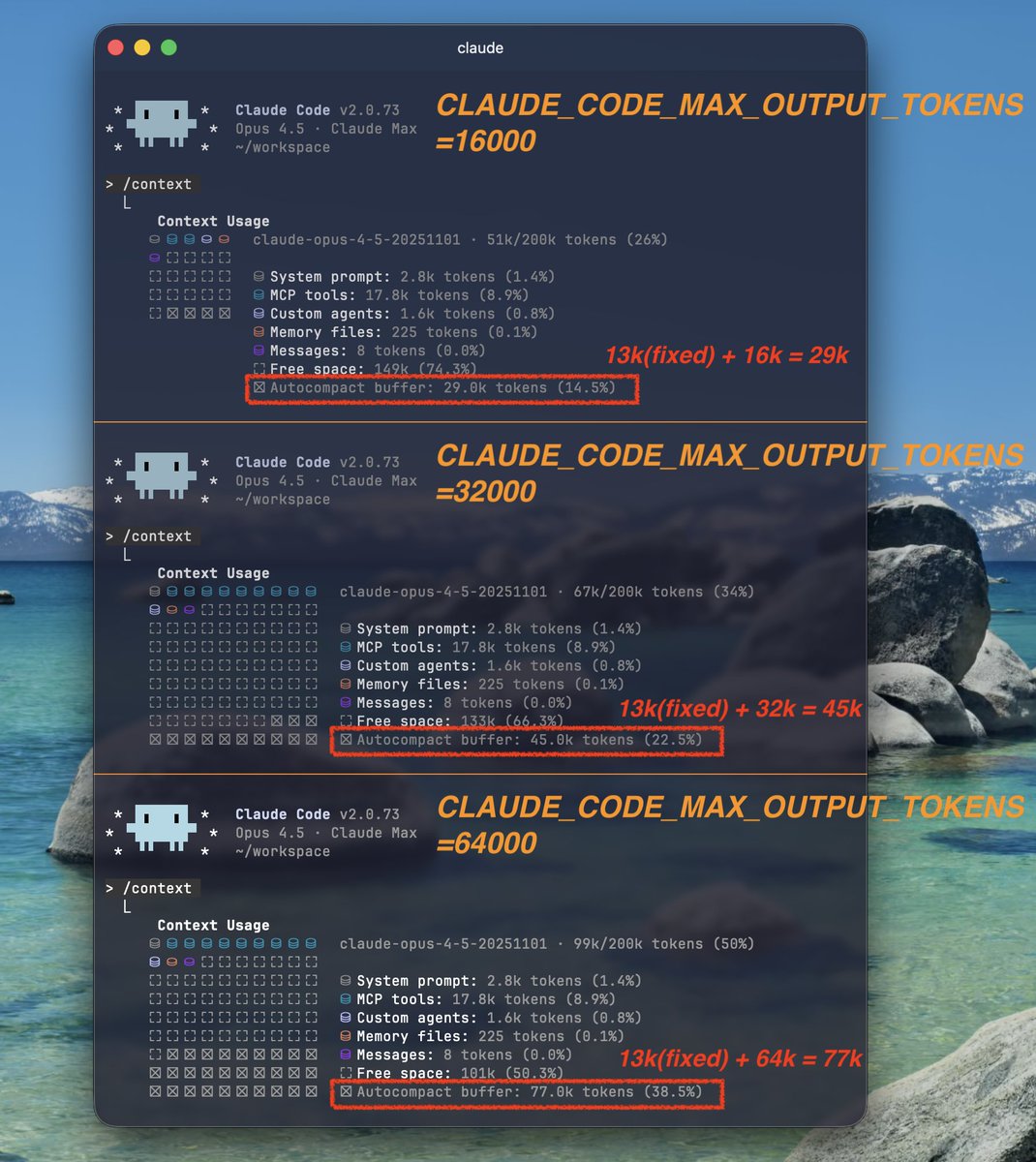
I noticed the Auto-compact Buffer was different from before, so I investigated and discovered the specification in this post.
With growing interest in context, this is a setting worth considering for those trying to maximize context window availability.
Also, people who set CLAUDE_CODE_MAX_OUTPUT_TOKENS without thinking should reconsider.
【Day21】 Async Subagents
Original post
【Day21】非同期 Subagents #claude_code_advent_calendar Claude Code のSubagents は、非同期(バックグラウンド)でタスクを実行できる。非同期タスクが終了した際には、メインエージェントに通知される。非同期で並列作業を実施できるため、以下のような使い方が可能↓ ・並列コードベース探索

【Day21】 Async Subagents
Claude Code Subagents can execute tasks asynchronously (in background). When async tasks finish, the main agent is notified. Since parallel work can be done asynchronously, uses like these are possible↓
- Parallel codebase exploration
- Code review execution
- Parallel search task execution
The image shows parallel code review execution, calling multiple Subagents that invoke Codex CLI and CodeRabbit CLI headlessly for reviews.

The ability to execute Subagents asynchronously was added in v2.0.60.
There are still cases where running multiple Subagents simultaneously on related tasks waits for Subagent task completion, but it feels more usable than before.
I’ve also heard from Anthropic engineers that they’ll work on Swarming in 2026, so it’s worth trying parallel execution.
【Day22】 Claude Code Action + Agent Skills
Original post
【Day22】Claude Code Action + Agent Skills #claude_code_advent_calendar Claude Code Actionは、GitHubでUbuntuマシンにリポジトリをCloneして、そこでClaude Codeを動かす。この際リポジトリ内にSkillsがあれば、もちろんGitHub Actions上でSkillsを使用することできる。 必要な設定は、

【Day22】 Claude Code Action + Agent Skills
Claude Code Action clones a repository to a GitHub Ubuntu machine and runs Claude Code there. If there are Skills in the repository, you can of course use Skills on GitHub Actions.
Required settings:
- Prepare Skills to use in GitHub Actions in
.claude/skills/ - Add “Skill” to claude_args:
--allowed-tools
Using /install-github-app command auto-registers CLAUDE_CODE_OAUTH_TOKEN secret, so use that to incorporate Claude Code Action into GitHub Actions workflows.

Running Agent Skills in Claude Code Action is a feature I’m personally focusing on lately.
Claude Code Action has been available for a while, but Skills now allow more flexible specialized task execution. Additionally, GitHub Actions pricing changes are planned with price reductions for GitHub-hosted runners, making it even more accessible.

【Day23】 Parallel Execution of Claude Code
Original post
【Day23】Claude Codeの並列実行 #claude_code_advent_calendar Claude Codeは自律的にタスクをこなせるため、並列実行を積極的に使っていきたい。並列実行には主に2つのアプローチがある: ・同じブランチで並列実行(Subagents) ・別のブランチで並列実行(git worktree) 前者は、Claude Code

【Day23】 Parallel Execution of Claude Code
Since Claude Code can autonomously handle tasks, we want to actively use parallel execution. There are mainly 2 approaches for parallel execution:
- Parallel execution on same branch (Subagents)
- Parallel execution on different branches (git worktree)
The former is running multiple Claude Code Subagents in parallel, examples include assigning read-only code reviews or tasks with clear component boundaries. Recently, methods to explicitly call Subagents with Skills are gaining attention, easy to try with wide applicability.
The latter uses git worktree to run multiple agents in parallel, applicable not just for task splitting but also implementation competitions. With tmux, Claude Code can give instructions to other Worker pane Claude Codes.
Anthropic has said they’re considering expanding Claude’s organizational execution (Swarming), so getting familiar with parallel execution is good.

Recently, there was a Claude Code Meetup Tokyo where I had the opportunity to directly ask questions to Anthropic engineers.
I asked the first question, and got an answer about Swarming enhancement, so I covered parallel execution.
Someone took meeting notes, which are also worth reading.
Claude Code Meetup Tokyo に参加した際の Q&A セッションで自分用に取っていた書き起こしメモを放流しておきます!参考までに〜 #aimeetup 不完全な自動文字起こしをもとに Claude Opus 4.5 自身に誤認識の修正・翻訳をやってもらいました mango-garlic-eff.notion.site/Claude-Code-Me…


Claude Code Meetup Tokyo 参加してきました!めっちゃ知見共有できたり貴重なお話聞けてよかった……


【Day24】 Claude Code Ecosystem
Original post
【Day24(Last)】Claude Code Ecosystem #claude_code_advent_calendar Claude Codeのエコシステムを再確認する。2025年2月24日から、たった10ヶ月でこのエコシステムが出来ているのは尋常ではない。 Claude Code CLIから始まりSDKが登場。IDE拡張機能にVSCode

【Day24(Last)】Claude Code Ecosystem
Reconsidering Claude Code’s ecosystem. It’s extraordinary that this ecosystem was built in just 10 months since February 24, 2025.
Starting with Claude Code CLI, SDK appeared. IDE extensions supported VSCode Forks and JetBrains, expanding the user base. GitHub Actions has been active from early on too.
With Sandbox features ready, Claude Code on the Web was released, creating an environment where mobile apps, desktop, and Slack can send tasks to Claude Code on the Web.
Chrome extension was being used standalone like an AI browser, but recent updates released a feature allowing Claude Code to directly operate Chrome via MCP tools.
It will accelerate further, and Claude Code’s ecosystem will expand. I’m excited to see how it looks this time next year.

For the advent calendar finale, I introduced Claude Code’s ecosystem.
From originally being a terminal-only product to now being executable from mobile apps using on the Web is remarkable.
Summary
I ran a Claude Code advent calendar and shared tips on X for 24 days.
Having followed Claude Code since around March, I wasn’t short on topics, but maintaining some quality of information took some effort.
Through this project, I was able to verify my Claude Code knowledge and do new investigations, which was great.
Claude Codeアドベントカレンダー完走! 軽い気持ちで始めましたが、なんとか24日間続けられてよかったです!自分の知識の整理と追加検証をする良い機会になりました。 タグ #claude_code_advent_calendar で全ポスト追えるので、良かったら見てみてください。多分まとめ+補足の記事を書きます。

Follow Me on X
I share content like this on X, so I’d appreciate it if you followed me!

References