What can be learned from Everything Claude Code
Everything Claude Code drew attention in January 2026 as a repository published by the winner of an Anthropic hackathon.
The author, cogsec (@affaanmustafa on X), had also been posting Claude Code tips on X, so I imagine quite a few people read it. I was one of them, and I found it practical and easy to follow.
About two months later, Everything Claude Code reportedly surpassed the official Claude Code GitHub repo in stars. That alone suggests how much interest it has attracted.

May I have your attention, please? Will the real Claude Code (repo) please stand up? I repeat Will the real Claude Code (repo) please stand up?

Around the same time, I spoke at a Japanese meetup titled “How the hackathon winner uses it! Basics and practice from Everything Claude Code” (Japanese event page). Looking back at the title now, it almost sounds like Oikon won the hackathon, which is far more credit than I deserve.
Because I was presenting, I decided to study the latest Everything Claude Code and went through the repo again. What struck me was how different it was from what I had seen in January. I have also linked my slide deck (Japanese).
In that spirit, this post summarizes what I found interesting in the latest Everything Claude Code (often called ECC). I will not cover how to install ECC or how you “should” use it. There are plenty of tip-style articles for that, and I recommend reading those instead.
What is in Everything Claude Code
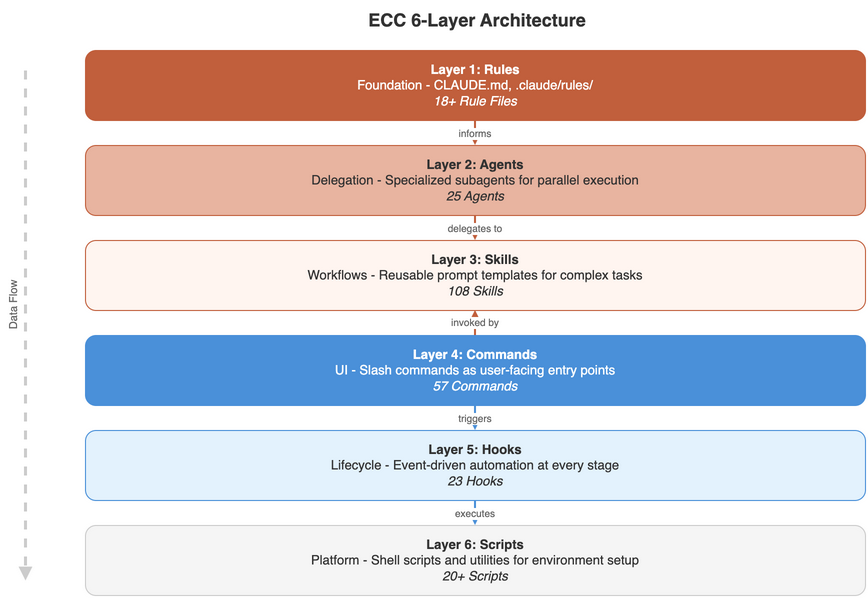
Here is a quick look at what ECC includes.
| Category | Count | Summary |
|---|---|---|
| Rules | common 9 + 9 language-specific | Shared across languages for coding-style / security / testing / git-workflow, plus TypeScript, Python, Go, Swift, Kotlin, Perl, PHP, C++, Rust |
| Agents | 25 | Design & planning / quality & review / implementation support / language-specific (Go, Kotlin, Python, C++, Rust, Java) / ops & docs |
| Skills | 108 | Workflow definitions (core, multilingual, frameworks, testing, DB, infra, security, AI, etc.) |
| Commands | 57 | Slash commands such as /plan, /tdd, /orchestrate |
| Hooks | 23 | Session management / code quality / safety guards / context / build / external integration |
| Scripts | 997 tests | Node.js–based, cross-platform on Windows, macOS, and Linux |
That is a lot. If you are new to Claude Code, it is easy to feel overwhelmed.
Many people install the whole plugin bundle, but the README essentially says: pick what you need and customize. You do not need everything.
Customization
These configs work for my workflow. You should:
- Start with what resonates
- Modify for your stack
- Remove what you don’t use
- Add your own patterns
Installing every feature can bloat context and turn the setup into an overgrown harness, so it is worth being careful.
At the same time, the ECC repo includes components that are meant to work together.
Agents + Skills combination
The doc-updater subagent has front matter like this:
---
name: doc-updater
description: Documentation and codemap specialist. Use PROACTIVELY for updating codemaps and documentation. Runs /update-codemaps and /update-docs, generates docs/CODEMAPS/*, updates READMEs and guides.
tools: ["Read", "Write", "Edit", "Bash", "Grep", "Glob"]
model: haiku
---
That description references two Skills:
- /update-codemaps
- /update-docs
So when you use this subagent, those Skills are invoked as well.
Short descriptions
I also find it characteristic that many Commands, Skills, and Agents in ECC keep their descriptions short.
---
name: code-reviewer
description: Expert code review specialist. Proactively reviews code for quality, security, and maintainability. Use immediatel after writing or modifying code. MUST BE USED for all code changes.
tools: ["Read", "Grep", "Glob", "Bash"]
model: sonnet
---
Even with code-reviewer, like doc-updater, the description stays compact. If you actually use ECC, you will notice this agent gets called often whenever code changes. Besides the explicit “MUST BE USED” wording, I suspect another reason it triggers so reliably is that concise descriptions route better. In my experience, overly long descriptions are rarely as effective.
Model choice
Browsing ECC, you also run into interesting Commands.
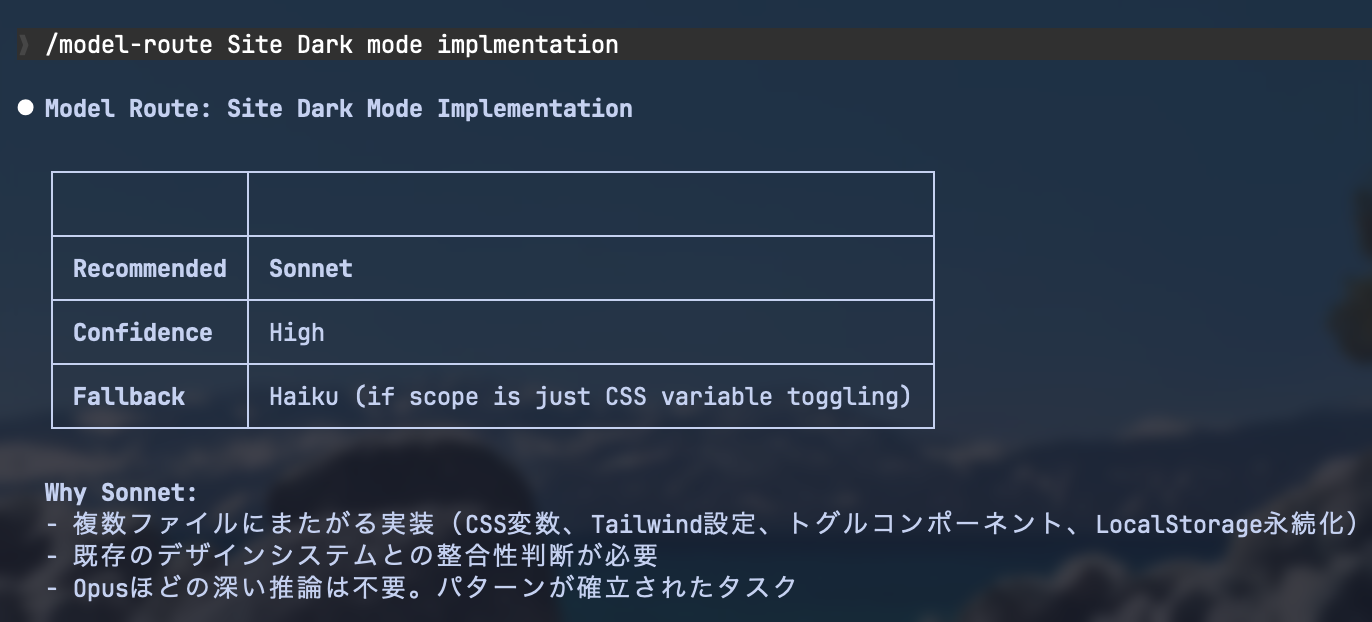
The /model-route command takes a task as an argument and suggests which Claude model to use among Haiku, Sonnet, and Opus, and why.
What stood out to me was that models are specified in detail rather than inherited, and the overall stance seems to be that Sonnet is enough for most tasks.
My own take on why Sonnet suffices is that ECC splits work into narrow domains, so each Agent or Command often has a clear job. When workflows are broken down to the right granularity, you do not always need the top-tier Opus model for execution.
Orchestrate (/orchestrate)
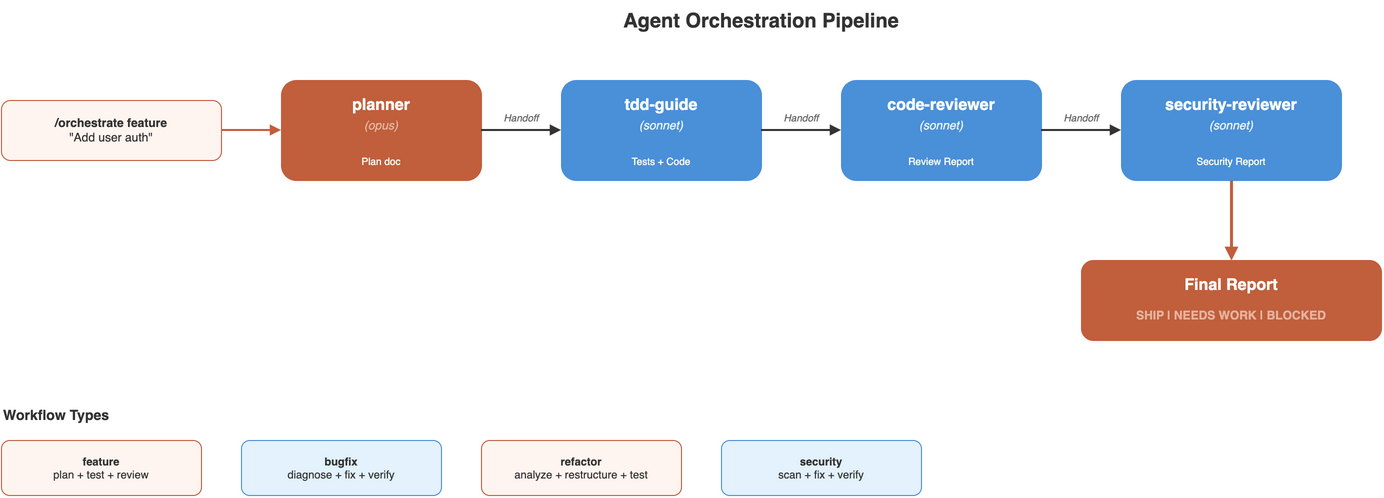
Consider /orchestrate, one of ECC’s commands. It builds workflows from multiple subagents; for example:
- feature: planner (Opus) → tdd-guide → code-reviewer → security-reviewer
And others such as:
- bugfix: planner → tdd-guide → code-reviewer
- refactor: architect → code-reviewer → tdd-guide
- security: security-reviewer → code-reviewer → architect
So several orchestration patterns are supported.
One takeaway is that agent workflows assign clear responsibilities per agent and reorder them to match the goal. ECC seems to favor predefined specialist agents over asking a general-purpose agent to pick up duties on the fly.
Instinct model (continuous-learning-v2)
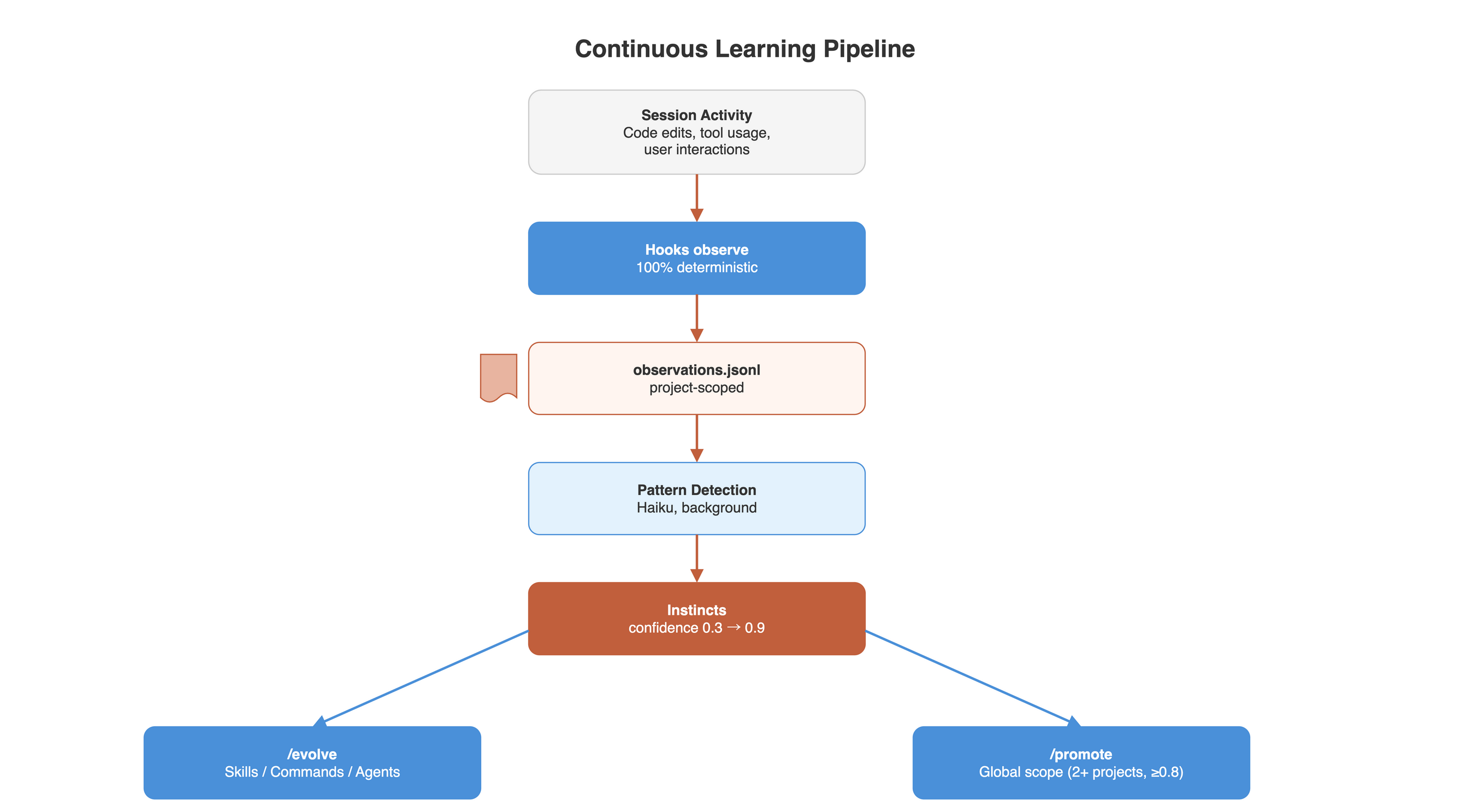
The current ECC includes an automated learning system. The flow looks like this:
Session Activity (in a git repo)
      |
      | Hooks capture prompts + tool use (100% reliable)
      | + detect project context (git remote / repo path)
      v
+---------------------------------------------+
|  projects/<project-hash>/observations.jsonl  |
|   (prompts, tool calls, outcomes, project)   |
+---------------------------------------------+
      |
      | Observer agent reads (background, Haiku)
      v
+---------------------------------------------+
|          PATTERN DETECTION                   |
|   * User corrections -> instinct             |
|   * Error resolutions -> instinct            |
|   * Repeated workflows -> instinct           |
|   * Scope decision: project or global?       |
+---------------------------------------------+
      |
      | Creates/updates
      v
+---------------------------------------------+
|  projects/<project-hash>/instincts/personal/ |
|   * prefer-functional.yaml (0.7) [project]   |
|   * use-react-hooks.yaml (0.9) [project]     |
+---------------------------------------------+
|  instincts/personal/  (GLOBAL)               |
|   * always-validate-input.yaml (0.85) [global]|
|   * grep-before-edit.yaml (0.6) [global]     |
+---------------------------------------------+
      |
      | /evolve clusters + /promote
      v
+---------------------------------------------+
|  projects/<hash>/evolved/ (project-scoped)   |
|  evolved/ (global)                           |
|   * commands/new-feature.md                  |
|   * skills/testing-workflow.md               |
|   * agents/refactor-specialist.md            |
+---------------------------------------------+
(The workflow above is described in the /continuous-learning-v2 Skill.)
Roughly speaking, on PreToolUse/PostToolUse hooks, the coding agent writes user prompts, tool usage, and project context to ~/.claude/homuncles/ automatically (with project settings, to projects/<project-hash>/observations.jsonl).
A Claude Haiku observer agent analyzes the recorded observation JSONL in the background. Detected patterns are stored as instinct files (global: instincts/personal/, project: projects/<project-hash>/instincts/personal/) with confidence scores.
After enough instinct files accumulate, running /evolve clusters instinct files and generates commands, skills, and agents. /promote can promote patterns to global settings when confidence scores repeat across projects.
This “record sessions and learn” loop is still prototype-level, but it hints at how automatic memory may mature over time and how increasingly autonomous agent systems could evolve.
OpenClaw and security
Around January 2026, OpenClaw (formerly ClawdBot) was widely discussed. In that context, the ECC author wrote a long piece called The Hidden Danger of OpenClaw.
The article warns about OpenClaw’s risks, but I also think it is essential reading for understanding ECC’s philosophy.
In short, the arguments include:
- Integrating many channels (Telegram, Discord, X, email) increases attack surface.
- Community-distributed Skills and plugins are convenient, but unvetted installs can become supply-chain entry points.
- If you give a self-directed agent broad powers, sandboxing, least privilege, and audit logs should be baseline expectations.
- The more you prioritize convenience and add external connectivity, the easier it becomes for prompt-injection damage to spread.
Looking at ECC as a whole, it is not just a bag of handy commands. It shows strong interest in how to structure an AI agent’s execution environment. Agents like security-reviewer, along with hooks, memory, and instincts, ultimately boil down to “how much freedom do we give the agent?” and “how do we constrain that freedom?”
Should engineers use OpenClaw?
What I enjoyed in the OpenClaw article was the line that people who can use it safely do not need it, and those who need it often cannot use it safely.
The piece argues that engineers can manage alternatives themselves, such as:
- Always-on sessions over SSH / tmux
- Scheduled runs with cron or other schedulers
- Direct use of harnesses like Claude Code or Codex
- Limited automation with Playwright or APIs
- Self-audited Skills, Hooks, and Commands
I agree. A few days before I wrote this article, Claude Code officially added Discord and Telegram support. Recent builds also ship Remote Control and cron, so much of what OpenClaw offered can now be approached from Claude Code as well.

Claude Code channels がリリース。Telegram と DiscordからClaude Codeを使用可能に。 OpenClawかな🤔

We just released Claude Code channels, which allows you to control your Claude Code session through select MCPs, starting with Telegram and Discord. Use this to message Claude Code directly from your phone.
Engineers who are comfortable with terminals and server operations can often decide for themselves how to split tasks, what to monitor, and how far to extend permissions: the core of orchestration.
NanoClaw inside ECC
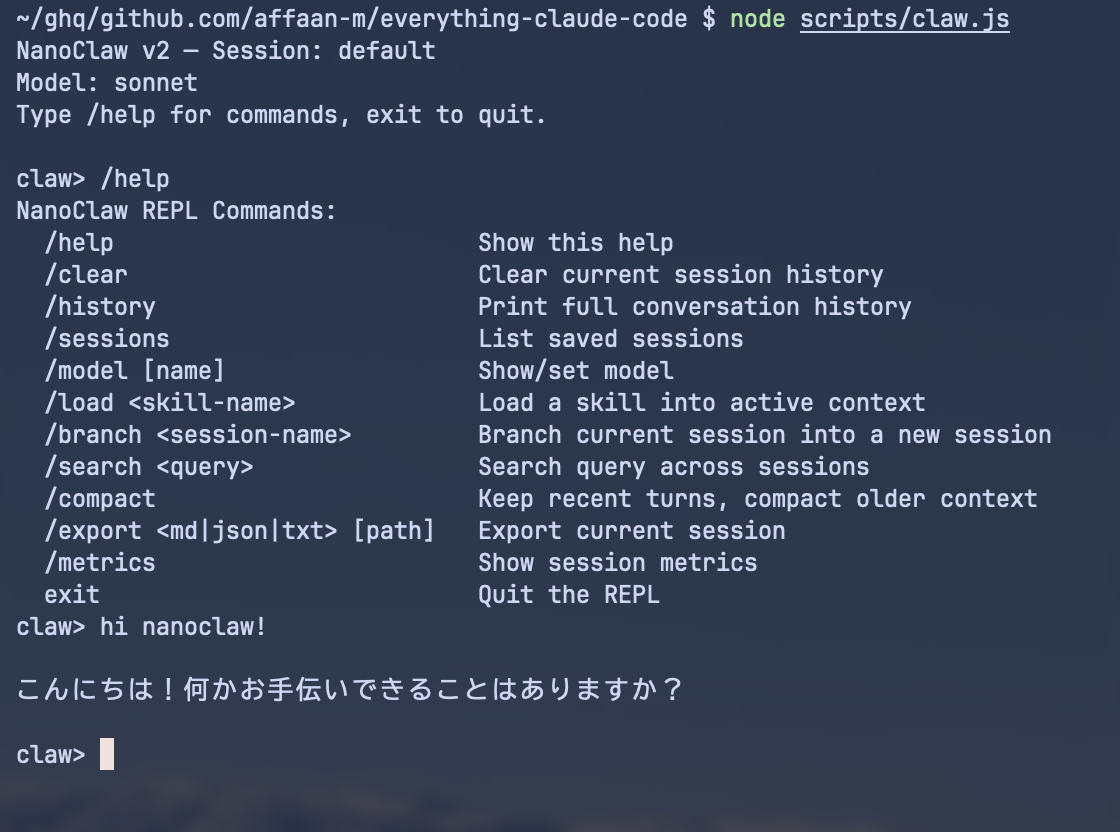
ECC also includes NanoClaw, a minimal OpenClaw-style agent. You can try it via node scripts/claw.js in the GitHub repo. The implementation uses only Node’s standard library; README and Skills stress avoiding extra runtime dependencies. Internally it passes prompts to claude -p for responses, and turns are appended as Markdown under ~/.claude/claw/<session>.md.
| Principle | OpenClaw | MiniClaw |
|---|---|---|
| Access points | Many (Telegram, X, Discord, email, browser) | One (SSH) |
| Execution | Host machine, broad access | Containerized, restricted |
| Interface | Dashboard + GUI | Headless terminal (tmux) |
| Skills | ClawdHub (unvetted community marketplace) | Manually audited, local only |
| Network exposure | Multiple ports, multiple services | SSH only (Tailscale mesh) |
| Blast radius | Everything the agent can access | Sandboxed to project directory |
| Security posture | Implicit (you don’t know what you’re exposed to) | Explicit (you chose every permission) |
(Quoted from the-openclaw-guide.md.)
As discussed, the ECC author spends real effort on interfaces and security relative to OpenClaw, and Anthropic has folded similar ideas into Claude Code itself (though I doubt Anthropic will name-check OpenClaw). Whether you use OpenClaw or something like it, it is worth trying once in a safe environment and reconsidering how you will run agents going forward.
Closing thoughts
Everything Claude Code is fun to read as a collection of Claude Code tips and handy configs, but I think it is even more valuable as a study in how to design agent operations.
ECC looks like a giant “install everything” bundle, but the intent is closer to a sample library: decompose your workflow, pick what you need, and structure it deliberately, not “use every feature.”
Personally, I learned from running through how agents are split, how descriptions are written, and how hooks and skills divide responsibility.
Agents like OpenClaw will likely stay in the spotlight through 2026, so now is a good time to organize your thinking on agent interfaces and security.